Known Participant
February 23, 2018
Answered

Bootstrap and Dreamweaver

  • February 23, 2018
  • 3 replies
  • 3782 views

I’ve about given up with DW CC2018 as it relates to boot strap.

CC2018 Navbar Menu Code does not work when you test in a browser.  The Drop down menus won’t toggle or collapse.  I found Nancy O drop down menu works until…….I save in the html page. CC2018 rewrites the header information. What good is a web site with a menu?

If I, for example, put a grid row container in the body and save the result is the same. CC2018 will rewrite the code it wants/needs.

This is not a short time problem.  This is CC2017 through CC2018that I have the same issues. especialli mthe dropdown menus.  Adobe has not fixed the problem.  Any suggestions/help would be appreciated.

Joe

This topic has been closed for replies.
Correct answer Nancy OShea

Yes that worked. However, I still have problems. See email with images.

Need Drop down menus.

Thanks.

Joe


#1 You're using email to reply to this forum and we cannot see attachments sent from email.  Please use the web forum to post screenshots or code.  Don't use email.

#2 I see multiple references to Bootstrap CSS, Bootstrap JS and jQuery in your code.  You should have only 1 reference to each of the core code libraries in this order:

  • Bootstrap CSS
  • jQuery JS
  • Bootstrap JS

The following code uses BS and JQ on CDNs.  I'm doing it this way because I don't know what your Assets files are named in your local site folder. 

<!doctype html>

<html lang="en">

<head>

<meta charset="utf-8">

<meta http-equiv="X-UA-Compatible" content="IE=edge">

<meta name="viewport" content="width=device-width, initial-scale=1.0">

<title>Untitled Document</title>

<!-- Latest compiled and minified Bootstrap CSS-->

<link rel="stylesheet" href="https://maxcdn.bootstrapcdn.com/bootstrap/3.3.7/css/bootstrap.min.css" integrity="sha384-BVYiiSIFeK1dGmJRAkycuHAHRg32OmUcww7on3RYdg4Va+PmSTsz/K68vbdEjh4u" crossorigin="anonymous">

</head>

<body style="padding-top: 70px">

<nav class="navbar navbar-default navbar-fixed-top">

<div class="container-fluid">

<!-- Brand and toggle get grouped for better mobile display -->

<div class="navbar-header">

<button type="button" class="navbar-toggle collapsed" data-toggle="collapse" data-target="#topFixedNavbar1" aria-expanded="false"><span class="sr-only">Toggle navigation</span><span class="icon-bar"></span><span class="icon-bar"></span><span class="icon-bar"></span></button>

<a class="navbar-brand" href="#">Brand</a></div>

<!-- Collect the nav links, forms, and other content for toggling -->

<div class="collapse navbar-collapse" id="topFixedNavbar1">

<ul class="nav navbar-nav">

<li class="active"><a href="#">Link<span class="sr-only">(current)</span></a></li>

<li><a href="#">Link</a></li>

<li class="dropdown"><a href="#" class="dropdown-toggle" data-toggle="dropdown" role="button" aria-haspopup="true" aria-expanded="false">Dropdown<span class="caret"></span></a>

<ul class="dropdown-menu">

<li><a href="#">Action</a></li>

<li><a href="#">Another action</a></li>

<li><a href="#">Something else here</a></li>

<li role="separator" class="divider"></li>

<li><a href="#">Separated link</a></li>

<li role="separator" class="divider"></li>

<li><a href="#">One more separated link</a></li>

</ul>

</li>

</ul>

<form class="navbar-form navbar-left" role="search">

<div class="form-group">

<input type="text" class="form-control" placeholder="Search">

</div>

<button type="submit" class="btn btn-default">Submit</button>

</form>

<ul class="nav navbar-nav navbar-right">

<li><a href="#">Link</a></li>

<li class="dropdown"><a href="#" class="dropdown-toggle" data-toggle="dropdown" role="button" aria-haspopup="true" aria-expanded="false">Dropdown<span class="caret"></span></a>

<ul class="dropdown-menu">

<li><a href="#">Action</a></li>

<li><a href="#">Another action</a></li>

<li><a href="#">Something else here</a></li>

<li role="separator" class="divider"></li>

<li><a href="#">Separated link</a></li>

</ul>

</li>

</ul>

</div>

<!-- /.navbar-collapse -->

</div>

<!-- /.container-fluid -->

</nav>

<!--latest jQuery 3-->

<script src="https://code.jquery.com/jquery-3.2.1.min.js" integrity="sha256-hwg4gsxgFZhOsEEamdOYGBf13FyQuiTwlAQgxVSNgt4=" crossorigin="anonymous"></script>

<!--Bootstrap JS-->

<script src="https://maxcdn.bootstrapcdn.com/bootstrap/3.3.7/js/bootstrap.min.js" integrity="sha384-Tc5IQib027qvyjSMfHjOMaLkfuWVxZxUPnCJA7l2mCWNIpG9mGCD8wGNIcPD7Txa" crossorigin="anonymous"></script>

</body>

</html>

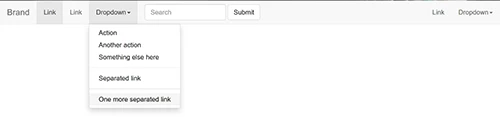
This is how it looks.
3 replies

nc_joeAuthor
Known Participant
February 25, 2018

Thanks all!  I got it to work.  Problem solved.  I used Nancy O.

Interesting.  It works using with what CC 18 code gives me.  I think it has to do with how I set up Site.  I created folder first.  Then went to new site set up and browsed to this folder.  I always used to go to new site and create the older all in one step.  Learned that here, too!

Joe

Problem solved!!!!!!

Nancy OShea
Community Expert
Community Expert
February 23, 2018

nc_joe@bellsouth.net  wrote

CC2018 rewrites the header information.

Start with a newly defined site folder.  Example, C:\MyTestSite\

Go to File > New > Starter Templates > Bootstrap Templates.  Choose a layout and hit Create button.  Save document as index.html.

DW creates appropriately linked assets folders and files for you.

Nancy O'Shea— Product User & Community Expert
nc_joeAuthor
Known Participant
February 23, 2018

I did as yoyou asked. Its telling me my site is not right! Outside the

root.

On Fri, Feb 23, 2018 at 12:20 PM, Nancy OShea <forums_noreply@adobe.com>

Legend
February 23, 2018

Can you give a sample of the code that is being rewritten by DW?

Show a before and the after sample. The only time I can think DW will do this is if you have not defined a site correctly at the outset of your project.

nc_joeAuthor
Known Participant
February 23, 2018

Yes.  I get that alot. about site not being defined correctly.   But before CC i never got that type of error message. I've spent countless hours trying different combos.

Nancy O menu after being required to save:

<!doctype html>

<html lang="en">

<head>

<meta charset="utf-8">

<title>Bootstrap 3.3.7</title>

<meta name="viewport" content="width=device-width, initial-scale=1">

<meta http-equiv="X-UA-Compatible" content="IE=edge">

<!-- Latest compiled and minified Bootstrap CSS-->

<link rel="stylesheet" href="bootstrap/3/css/bootstrap.min.css" integrity="sha384-

BVYiiSIFeK1dGmJRAkycuHAHRg32OmUcww7on3RYdg4Va+PmSTsz/K68vbdEjh4u" crossorigin="anonymous">

<style>

body {padding-top: 55px}

</style>

<script type="text/javascript" src="ScriptLibrary/jquery-latest.pack.js"></script>

<script type="text/javascript" src="bootstrap/3/js/bootstrap.min.js"></script>

</head>

<body>

<!--begin top nav bar-->

<nav class="navbar navbar-inverse navbar-fixed-top" role="navigation">

<div class="container-fluid">

<div class="navbar-header"> <a class="navbar-brand" href="#"> BRAND NAME or LOGO </a>

<button type="button" class="navbar-toggle" data-toggle="collapse" data-target="#myNavbar">

<span class="icon-bar"></span>

<span class="icon-bar"></span>

</div>

<div class="collapse navbar-collapse" id="myNavbar">

<ul class="nav navbar-nav navbar-right">

<li class="active"><a href="#">HOME</a></li><li class="dropdown"><a class="dropdown-toggle" data-toggle="dropdown" href="#">Dropdown <span class="caret"></span></a>

<ul class="dropdown-menu">

<li><a href="#">submenu 1-1</a></li>

<li><a href="#">submenu 1-2</a></li>

<li><a href="#">submenu 1-3</a></li>

</ul>

</li>

<li><a href="#">MENU 3</a></li>

<li><a href="#">MENU 4</a></li>

<li><a href="#">MENU 5</a></li>

</ul>

</div>

</div>

<!--end top nav-->

</nav>

<!--latest jQuery JS-->

<script src="https://code.jquery.com/jquery-1.12.2.min.js" integrity="sha256-lZFHibXzMHo3GGeehn1hudTAP3Sc0uKXBXAzHX1sjtk="

crossorigin="anonymous">

</script>

<!--Bootstrap JS-->

<script src="https://maxcdn.bootstrapcdn.com/bootstrap/3.3.7/js/bootstrap.min.js" integrity="sha384-

Tc5IQib027qvyjSMfHjOMaLkfuWVxZxUPnCJA7l2mCWNIpG9mGCD8wGNIcPD7Txa" crossorigin="anonymous"></script>

</body>

</html>

<span class="icon-bar"></span>

</button>

A page I made using CC2018 code  Just a drop  down menu:

<!doctype html>

<html>

<head>

<meta charset="utf-8">

<meta http-equiv="X-UA-Compatible" content="IE=edge">

<meta name="viewport" content="width=device-width, initial-scale=1.0">

<title>Untitled Document</title>

<!-- Bootstrap Core CSS -->

<!-- <link href="http://www.cjdesignandconsulting.com/bootstrap.min.css" rel="stylesheet"> -->

<link href="../css/bootstrap-3.3.7.css" rel="stylesheet" type="text/css">

<!-- Custom CSS -->

<link href="http://www.cjdesignandconsulting.com/full-slider.css" rel="stylesheet">

<!-- jQuery (necessary for Bootstrap's JavaScript plugins) -->

<!-- HTML5 shim and Respond.js for IE8 support of HTML5 elements and media queries -->

<!-- WARNING: Respond.js doesn't work if you view the page via file:// -->

<!--[if lt IE 9]>

<script src="https://oss.maxcdn.com/html5shiv/3.7.2/html5shiv.min.js"></script>

<script src="https://oss.maxcdn.com/respond/1.4.2/respond.min.js"></script>

<![endif]-->

<link rel="stylesheet" type="text/css" href="../bootstrap/3/css/bootstrap.min.css" />

<script type="text/javascript" src="../ScriptLibrary/jquery-latest.pack.js"></script>

<script type="text/javascript" src="../bootstrap/3/js/bootstrap.min.js"></script>

</head>

<body style="padding-top: 70px">

<nav class="navbar navbar-default navbar-fixed-top">

  <div class="container-fluid">

    <!-- Brand and toggle get grouped for better mobile display -->

    <div class="navbar-header">

      <button type="button" class="navbar-toggle collapsed" data-toggle="collapse" data-target="#topFixedNavbar1" aria-expanded="false"><span class="sr-only">Toggle navigation</span><span class="icon-bar"></span><span class="icon-bar"></span><span class="icon-bar"></span></button>

      <a class="navbar-brand" href="#">Brand</a></div>

    <!-- Collect the nav links, forms, and other content for toggling -->

    <div class="collapse navbar-collapse" id="topFixedNavbar1">

      <ul class="nav navbar-nav">

        <li class="active"><a href="#">Link<span class="sr-only">(current)</span></a></li>

        <li><a href="#">Link</a></li>

        <li class="dropdown"><a href="#" class="dropdown-toggle" data-toggle="dropdown" role="button" aria-haspopup="true" aria-expanded="false">Dropdown<span class="caret"></span></a>

          <ul class="dropdown-menu">

            <li><a href="#">Action</a></li>

            <li><a href="#">Another action</a></li>

            <li><a href="#">Something else here</a></li>

            <li role="separator" class="divider"></li>

            <li><a href="#">Separated link</a></li>

            <li role="separator" class="divider"></li>

            <li><a href="#">One more separated link</a></li>

          </ul>

        </li>

      </ul>

      <form class="navbar-form navbar-left" role="search">

        <div class="form-group">

          <input type="text" class="form-control" placeholder="Search">

        </div>

        <button type="submit" class="btn btn-default">Submit</button>

      </form>

      <ul class="nav navbar-nav navbar-right">

        <li><a href="#">Link</a></li>

        <li class="dropdown"><a href="#" class="dropdown-toggle" data-toggle="dropdown" role="button" aria-haspopup="true" aria-expanded="false">Dropdown<span class="caret"></span></a>

          <ul class="dropdown-menu">

            <li><a href="#">Action</a></li>

            <li><a href="#">Another action</a></li>

            <li><a href="#">Something else here</a></li>

            <li role="separator" class="divider"></li>

            <li><a href="#">Separated link</a></li>

          </ul>

        </li>

      </ul>

    </div>

    <!-- /.navbar-collapse -->

  </div>

  <!-- /.container-fluid -->

</nav>

<script src="../js/jquery-1.11.3.min.js"></script>

<script src="../js/bootstrap.js"></script>

</body>

</html>



