


Cecil108
Known Participant
August 30, 2017
Answered

Bootstrap Components

  • August 30, 2017
  • 1 reply
  • 987 views

Hi

I have recently started using Bootstrap and until yesterday I could 'Insert > Bootstrap Components' and have a list of Bootstrap Components to insert into my document?

Now for some reason, the options for Bootstrap Components are not showing? All of the other areas show options?

I have changed nothing that I can remember doing, why have these options disappeared?

Thanks

Batch
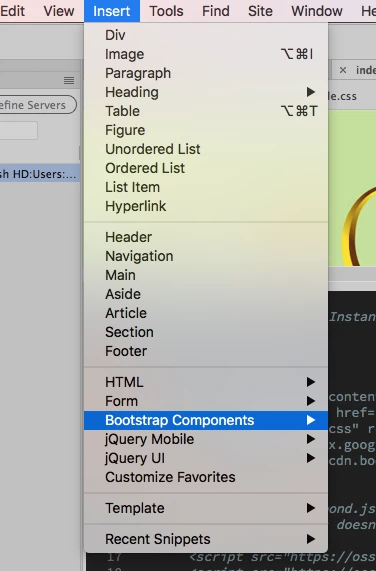
This topic has been closed for replies.
Correct answer BenPleysier

Click the Mac equivalent to CTRL+F2 which will bring up a floating Insert panel (if not already docked). There you can select Bootstrap Elements. You could also use the Snippets panel for the various inputs

1 reply

Nancy OShea
Community Expert
Community Expert
August 31, 2017

Have you saved your document?

Are you in Live View or Design View? 

Is your code free of errors?

If the code contains errors (red X), open your Output panel (Shift+F6) for details.

Nancy O'Shea— Product User & Community Expert
Cecil108
Cecil108Author
Known Participant
August 31, 2017

Hi Nancy,

I have saved my file and yet the Bootstrap Components are not showing to even start to insert, this is before the page can be checked for errors?

I'm working in design view, the Bootstrap Components were showing yesterday as I inserted an image carousel?

Thanks

BenPleysier
Community Expert
BenPleysierCommunity ExpertCorrect answer
Community Expert
August 31, 2017

Click the Mac equivalent to CTRL+F2 which will bring up a floating Insert panel (if not already docked). There you can select Bootstrap Elements. You could also use the Snippets panel for the various inputs

Wappler is the DMXzone-made Dreamweaver replacement and includes the best of their powerful extensions, as well as much more!
