
Bootstrap Navbar Issues
Does anyone know how to get a Bootstrap Menu created in Dreamweaver from appearing below my page content. I have tried adding a Z-Index property of 10 to my navbar elements but they still appear under the page content. Attached is a screenshot.
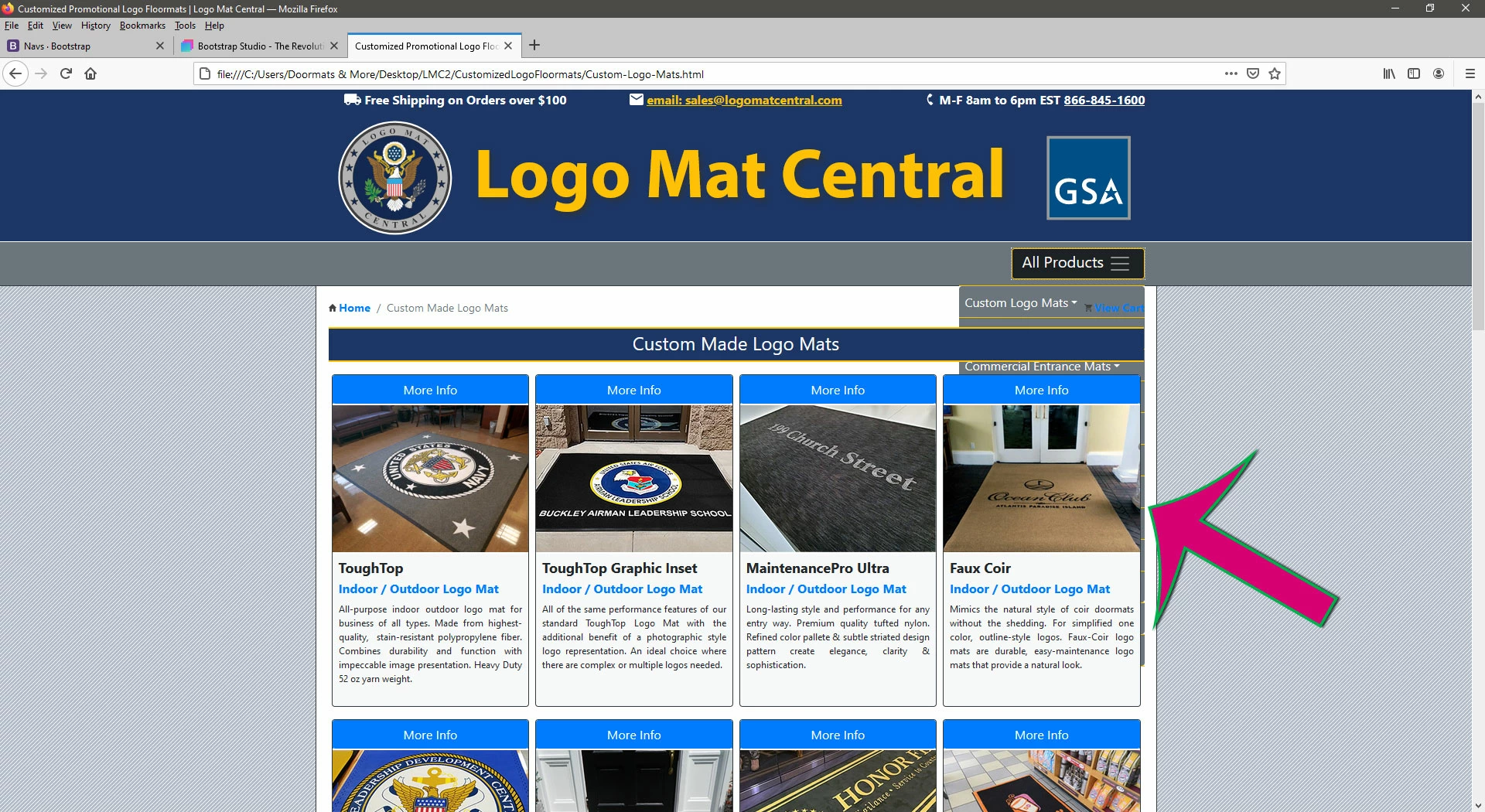
PAGE HTML:
<div class="container-fluid">
<div class="row">
<div class="col-12 bg-secondary border-top border-white" id="main-nav-row">
<nav class="navbar navbar-dark" id="main-nav">
<div class="container-fluid justify-content-end pr-0 pr-lg-3" id="main-nav-outer-container">
<button id="menu-button" class="navbar-toggler bg-dark text-white pr-3 border border-warning" type="button" data-toggle="collapse" data-target="#navbarSupportedContent1"
aria-controls="navbarSupportedContent1" aria-expanded="false" aria-label="Toggle navigation">All Products <span class="navbar-toggler-icon"></span></button>
<div class="collapse navbar-collapse p-0 mt-2" id="navbarSupportedContent1">
<ul class="navbar-nav ml-auto" id="CustomLogoMats">
<li class="nav-item dropdown border-top border-bottom border-warning"> <a class="nav-link bg-secondary dropdown-toggle p-2 rounded-top text-white" href="#" id="navbarDropdown1" role="button" data-toggle="dropdown" aria-haspopup="true" aria-expanded="false">Custom Logo Mats</a>
<div class="dropdown-menu bg-primary rounded-0 my-0 " aria-labelledby="navbarDropdown1"> <a class="dropdown-item" href="../CustomizedLogoFloormats/Custom-Logo-Mats.html">Custom Logo Mats</a> <a class="dropdown-item" href="../CustomizedLogoFloormats/FlockedCoaster.html">Custom Logo Coasters</a> </div>
</li>
</ul>
<ul class="navbar-nav ml-auto" id="CustomLogoRugs">
<li class="nav-item dropdown border-bottom border-warning"> <a class="nav-link bg-secondary dropdown-toggle p-2 text-white" href="#" id="navbarDropdown2" role="button" data-toggle="dropdown" aria-haspopup="true" aria-expanded="false">Custom Logo Rugs</a>
<div class="dropdown-menu bg-primary rounded-0 my-0" aria-labelledby="navbarDropdown2"> <a class="dropdown-item" href="../CustomizedLogoFloormats/HighDefinitionLogoRugs.html">Custom Logo Rugs</a> <a class="dropdown-item" href="../CustomizedLogoFloormats/Tradeshow-Rugs.html">Tradeshow Event Rugs</a> </div>
</li>
</ul>
<ul class="navbar-nav ml-auto" id="CommercialEntranceMats">
<li class="nav-item dropdown border-bottom border-warning"> <a class="nav-link bg-secondary dropdown-toggle p-2 text-white" href="#" id="navbarDropdown3" role="button" data-toggle="dropdown" aria-haspopup="true" aria-expanded="false">Commercial Entrance Mats</a>
<div class="dropdown-menu bg-primary rounded-0 my-0" aria-labelledby="navbarDropdown3"> <a class="dropdown-item" href="../CommercialMats/Commercial-Entrance-Mats.html">Commercial Entrance Mats</a> <a class="dropdown-item" href="../CommercialMats/CarpetMatRunners.html">Carpet Mat Runners</a> </div>
</li>
</ul>
<ul class="navbar-nav ml-auto" id="WorkSafetyMats">
<li class="nav-item dropdown border-bottom border-warning"> <a class="nav-link bg-secondary dropdown-toggle p-2 text-white" href="#" id="navbarDropdown4" role="button" data-toggle="dropdown" aria-haspopup="true" aria-expanded="false">Industrial Work Safety Mats</a>
<div class="dropdown-menu bg-primary rounded-0 my-0" aria-labelledby="navbarDropdown4"> <a class="dropdown-item" href="../AntiFatigueMats/AntiFatigueMats_Index.html">Antifatigue Traction Mats</a> <a class="dropdown-item" href="../Grid_Matting/GridMatting.html">Elevated Grid Matting</a> <a class="dropdown-item" href="../IndustrialSafetyMats/KitchenUtilityMats.html">Kitchen Utility Mats</a> <a class="dropdown-item" href="../IndustrialSafetyMats/AntiSlipRunnerMatting.html">Antislip Runner Matting</a> <a class="dropdown-item" href="../IndustrialSafetyMats/GreaseProofWorkMats.html">Grease Proof Mats</a> <a class="dropdown-item" href="../IndustrialSafetyMats/SparkResistantMats.html">Spark Resistant Mats</a> <a class="dropdown-item" href="../IndustrialSafetyMats/ElectricalSafetyMats.html">Electrical Safety Mats</a> </div>
</li>
</ul>
<ul class="navbar-nav ml-auto" id="ModularCarpetMats">
<li class="nav-item dropdown border-bottom border-warning"> <a class="nav-link bg-secondary dropdown-toggle p-2 text-white" href="#" id="navbarDropdown5" role="button" data-toggle="dropdown" aria-haspopup="true" aria-expanded="false">Modular Carpet Tiles</a>
<div class="dropdown-menu bg-primary rounded-0 my-0" aria-labelledby="navbarDropdown5">
<a class="dropdown-item" href="../Modular-Carpet-Tiles/Dura-Lock_Grizzly-Grass.html">Turf Tiles</a>
<a class="dropdown-item" href="../Modular-Carpet-Tiles/Peel-and-Stick-Carpet-Tiles.html">Peel & Stick Carpet Tiles</a>
<a class="dropdown-item" href="../Modular-Carpet-Tiles/Commercial-Entry-Tiles.html">Glue-Down Carpet Tiles</a>
<a class="dropdown-item" href="../Modular-Carpet-Tiles/Special-Event-Flooring.html">Special Event Flooring</a> </div>
</li>
</ul>
<ul class="navbar-nav ml-auto" id="CommercialFlooring">
<li class="nav-item dropdown border-bottom border-warning"> <a class="nav-link bg-secondary dropdown-toggle p-2 text-white" href="#" id="navbarDropdown6" role="button" data-toggle="dropdown" aria-haspopup="true" aria-expanded="false">Commercial Flooring</a>
<div class="dropdown-menu bg-primary rounded-0 my-0" aria-labelledby="navbarDropdown6"> <a class="dropdown-item" href="../Vinyl-Tile/index.html">Luxury Vinyl Tiles</a> </div>
</li>
</ul>
<ul class="navbar-nav ml-auto" id="SportsFlooring">
<li class="nav-item dropdown border-bottom border-warning"> <a class="nav-link bg-secondary dropdown-toggle p-2 text-white" href="#" id="navbarDropdown7" role="button" data-toggle="dropdown" aria-haspopup="true" aria-expanded="false">Sports Flooring</a>
<div class="dropdown-menu bg-primary rounded-0 my-0" aria-labelledby="navbarDropdown7"> <a class="dropdown-item" href="../Rubber-Flooring/Rubber-Flooring-Index.html">Rubber Gym Flooring</a> </div>
</li>
</ul>
<ul class="navbar-nav ml-auto" id="LogoPlaques">
<li class="nav-item dropdown border-bottom border-warning"> <a class="nav-link bg-secondary dropdown-toggle p-2 text-white" href="#" id="navbarDropdown8" role="button" data-toggle="dropdown" aria-haspopup="true" aria-expanded="false">Custom Logo Plaques</a>
<div class="dropdown-menu bg-primary rounded-0 my-0" aria-labelledby="navbarDropdown8"> <a class="dropdown-item" href="../Specialty-Items/Custom-Logo-Plaques.html">Custom Logo Plaques</a> <a class="dropdown-item" href="../Specialty-Items/Custom-Retirement-Plaques.html">Retirement Plaques</a> <a class="dropdown-item" href="../Specialty-Items/Logo-Tail-Flashes.html">Logo Tail Flashes</a> <a class="dropdown-item" href="../Specialty-Items/Logo-Desk-Name-Plates.html">Logo Desk Name Plates</a> <a class="dropdown-item" href="../Specialty-Items/Logo-Shadow-Boxes.html">Logo Shadow Boxes</a> <a class="dropdown-item" href="../Specialty-Items/Logo-Tables.html">Logo Deployment Tables</a> </div>
</li>
</ul>
<ul class="navbar-nav ml-auto" id="ChallengeCoins">
<li class="nav-item dropdown border-bottom border-warning"> <a class="nav-link bg-secondary dropdown-toggle p-2 text-white" href="#" id="navbarDropdown9" role="button" data-toggle="dropdown" aria-haspopup="true" aria-expanded="false">Challenge Coins</a>
<div class="dropdown-menu bg-primary rounded-0 my-0" aria-labelledby="navbarDropdown9"> <a class="dropdown-item" href="../Specialty-Items/Challenge-Coins.html">Challenge Coins</a> <a class="dropdown-item" href="../Specialty-Items/Challenge-Coin-Holders-Index.html">Challenge Coin Holders</a> </div>
</li>
</ul>
<ul class="navbar-nav ml-auto" id="WarehouseSale">
<li class="nav-item dropdown border-bottom border-warning"> <a class="nav-link bg-secondary dropdown-toggle p-2 text-white rounded-bottom" href="../Warehouse-Sale/index.html" id="navbarDropdown10" role="button" aria-haspopup="true" aria-expanded="false">Warehouse Sale</a>
<div class="dropdown-menu bg-primary rounded-0 my-0" aria-labelledby="navbarDropdown10"> <a class="dropdown-item" href="../Warehouse-Sale/index.html">Warehouse Sale</a> </div>
</li>
</ul>
<ul class="navbar-nav ml-auto" id="StoreInfo">
<li class="nav-item dropdown border-bottom border-warning"> <a class="nav-link bg-secondary dropdown-toggle p-2 text-white rounded-bottom" href="../UtilityPages/Contact-Us.html" id="navbarDropdown11" role="button" aria-haspopup="true" aria-expanded="false">Store Info</a>
<div class="dropdown-menu bg-primary rounded-0 my-0" aria-labelledby="navbarDropdown11"> <a class="dropdown-item" href="../UtilityPages/Contact-Us.html">Contact Us</a> </div>
</li>
</ul>
<ul class="navbar-nav ml-auto" id="Announcements">
<li class="nav-item dropdown border-bottom border-warning"> <a class="nav-link bg-secondary dropdown-toggle p-2 text-white rounded-bottom" href="../Blog/index.html" id="navbarDropdown12" role="button" aria-haspopup="true" aria-expanded="false">Announcements</a>
<div class="dropdown-menu bg-primary rounded-0 my-0" aria-labelledby="navbarDropdown11"> <a class="dropdown-item" href="../Blog/index.html">Blog</a></div>
</li>
</ul>
</div>
</div>
</nav>
</div>
</div>
</div>
ASSOCIATED CSS:
#------MAINNAV-STYLES------ {}
#main-nav {
height: 56px;
}
#main-nav-outer-container {
max-width: 68rem;
}
#menu-button {
border: 4px dashed #FFC107;
z-index: 104;
}
#main-nav ul {
width: 15rem;
}


 AdChoices