Participant
February 18, 2018
Answered

Bootstrap sizes

  • February 18, 2018
  • 1 reply
  • 881 views

Hi, I have decided to use bootstrap for the first time for a university project. (Web design isn't my course so I'm a beginner).

My tutor has told me that he will be testing the sites on a standard sized screen and on an Iphone 5, that he said was around 320px.
When i set up the site initially the small size is 768px I think. Does this mean that it will scale to small for anything under that size or do I need to change the small size to a lower number?
I have also been told about the developer tools in Google Chrome and that it allows me to view what it would be like on various phone screens, so if my settings are wrong when I come to view it, is there a way that i can change the screen size settings.

Thank you

This topic has been closed for replies.
Correct answer Nancy OShea

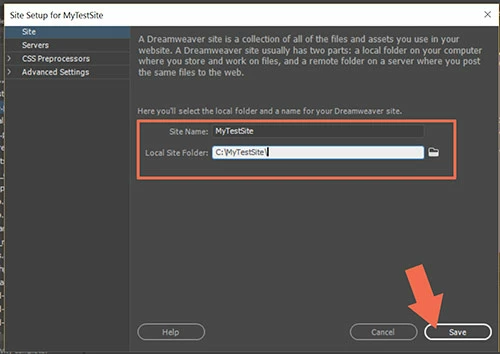
Start over.  Create a new site folder for your new project.  Site > New Site.  Example:  C:\MyTestSite\

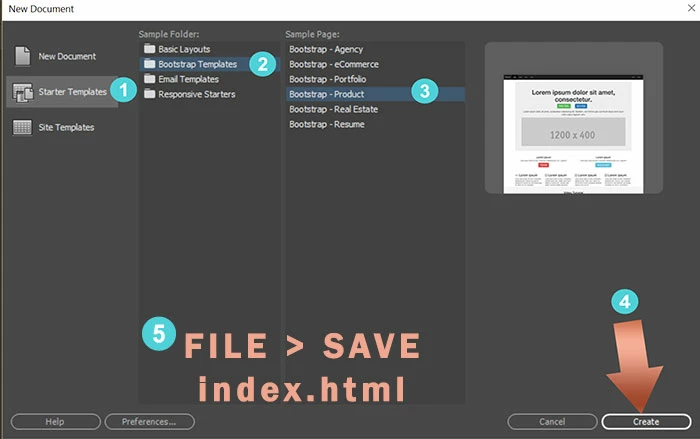
Once your site is defined, go To File > New Starter Templates > Bootstrap Templates.  Choose a layout and hit Create button.

Save your new document as index.html

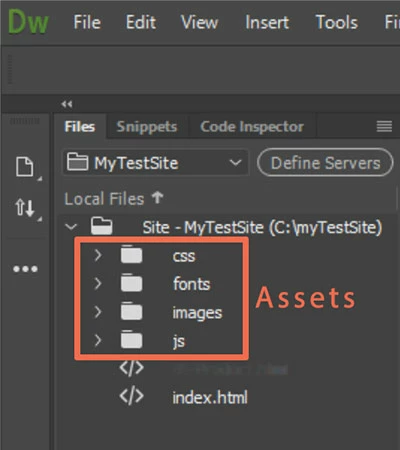
DW will create appropriately linked Assets folders & files for you.

1 reply

Nancy OShea
Community Expert
Community Expert
February 18, 2018

Bootstrap is a mobile-first framework.  You don't need to do much to have content display correctly on mobile phones as 1 column is the default.

At this stage, don't worry too much about the actual pixel values.   Just remember that Bootstrap is a 12-box grid system with 4 classes:

  • xs (mobile portrait),
  • sm (mobile landscape & tablet),
  • md (tablet landscape & desktop)
  • lg (bigger desktops). 

See below for details.

Bootstrap Grid System

Nancy O'Shea— Product User & Community Expert
davidg18Author
Participant
February 18, 2018

Thanks. I've just started it any how but it only gave me small, medium and large, no extra small.

One other problem I have is that it has put a link in the code to an old css from a previous site I wrote that wasn't bootstrap but when I created the html file there is a link at the top for bootstrap.css along with 2 javascript links. How do I correct this? Do I delete the link in the code and link the bootstrap.css (which isn't a saved file in my site folder). I did hear that I don't need to use css with bootstrap but that came from somebody who uses something other than DW.

Nancy OShea
Community Expert
Nancy OSheaCommunity ExpertCorrect answer
Community Expert
February 18, 2018

Start over.  Create a new site folder for your new project.  Site > New Site.  Example:  C:\MyTestSite\

Once your site is defined, go To File > New Starter Templates > Bootstrap Templates.  Choose a layout and hit Create button.

Save your new document as index.html

DW will create appropriately linked Assets folders & files for you.

Nancy O'Shea— Product User & Community Expert