
Inspiring
March 4, 2019
Answered

bootstrap tab bar goes wrong when correct errors on W3C

  • March 4, 2019
  • 1 reply
  • 3006 views

Got a question about bootstrap tab bar. Im using version 4.3.1

and in W3C checker I get two errors:
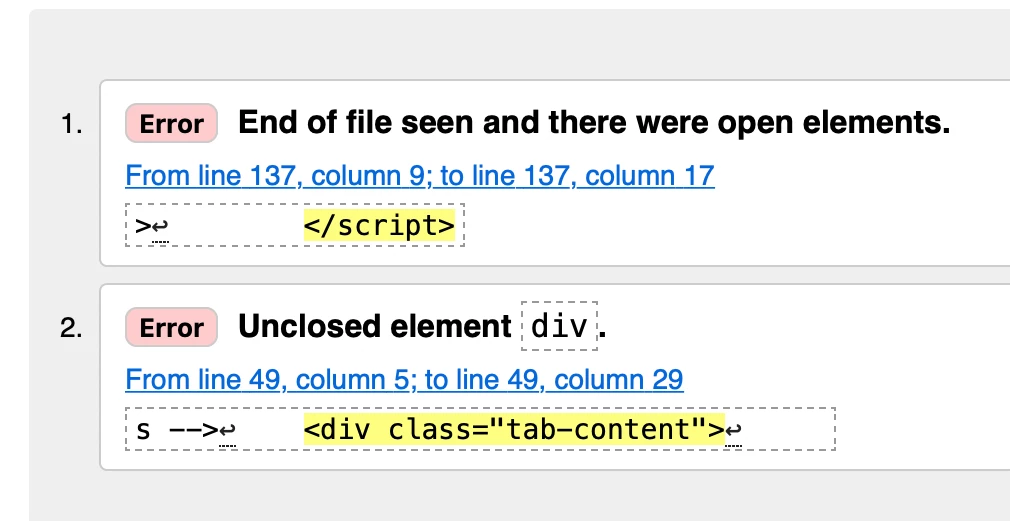
Not sure what the </script> error is as when I add the extra div as stated in error 2 it goes away.

If I correct the div error 2.  by adding the extra div  W3C says the code is correct BUT then the tab bar don't work.

Not sure why? and how to correct this?

Tim

---------

---------

<!doctype html>

<html lang="en-GB">

<head>

    <meta charset="UTF-8">

    <title>Untitled Document</title>

    <link href="https://fonts.googleapis.com/css?family=Fira+Sans:300,400,500,600,700,800,900" rel="stylesheet">

    <link href="https://fonts.googleapis.com/css?family=Encode+Sans+Semi+Expanded:500,700" rel="stylesheet">

    <link rel="stylesheet" href="css/general.css" />

    <link rel="stylesheet" href="css/owl.carousel.min.css" />

    <link rel="stylesheet" href="css/event-adverts.css" />

    <link rel="stylesheet" href="css/bootstrap-4.3.1.css" />

    <!-- jQuery library -->

    <link href="css/search-tab.css" rel="stylesheet" type="text/css">

    <script src="http://code.jquery.com/jquery-3.3.1.min.js"></script>

    <script src="https://code.jquery.com/ui/1.12.1/jquery-ui.js"></script>

    <script>

        $(document).ready(function() {

            $(".scrollable-nav").draggable({

                axis: 'x'

            });

        });

    </script>

    <link rel="stylesheet" href="https://maxcdn.bootstrapcdn.com/font-awesome/4.7.0/css/font-awesome.min.css">

    <!--script head end-->

</head>

<body class="headert-top-text">

    <!--Container Start-->

    <!-- Nav tabs -->

    <ul class="nav nav-tabs">

        <li class='nav-item'>

            <a class='nav-link active font' data-toggle='tab' href='#s1'>Login</a>

        </li>

        <li class='nav-item'>

            <a class='nav-link  font' data-toggle='tab' href='#s2'>Register</a>

        </li>

        <li class='nav-item'>

            <a class='nav-link  font' data-toggle='tab' href='#s3'>Forgot Password</a>

        </li>

    </ul>

    <!-- Tab panes -->

    <div class="tab-content">

        <div class='tab-pane container fade in show active' id='s1'>

            <div class="tab-container font">

                <div class="main-panel-settings">

                    <h4 class="card-title mt-3 text-center">Login</h4>

                    <p class="text-center">Login to your account - Add your events - Save search settings</p>

                    <p>

                        <a class="btn btn-block btn-light-blue twitter-button"> <em class="fa fa-twitter"></em>   Login via Twitter</a>

                        <a class="btn btn-block btn-blue facebook-button"> <em class="fa fa-facebook-f"></em>   Login via facebook</a>

                    </p>

                    <p class="divider-text">

                        <span class="bg-light or-text">OR</span>

                    </p>

                    <div class="form-group input-group">

                    </div>

                    <!-- form-group// -->

                    <div class="form-group input-group">

                        <div class="input-group-prepend">

                            <span class="input-group-text"> <i class="fa fa-envelope"></i> </span>

                        </div>

                        <input name="email address" class="form-control email-address-panel" placeholder="Email address" type="email">

                    </div>

                    <!-- form-group// -->

                    <div class="form-group input-group">

                        <div class="input-group-prepend">

                        </div>

                        <!-- form-group// -->

                        <div class="form-group input-group">

                            <div class="input-group-prepend">

                                <span class="input-group-text"> <i class="fa fa-lock"></i> </span>

                            </div>

                            <input class="form-control password-panel1" placeholder="Create password" type="password">

                        </div>

                        <!-- form-group// -->

                        <div class="form-group input-group">

                            <div class="input-group-prepend">

                                <span class="input-group-text"> <i class="fa fa-lock"></i> </span>

                            </div>

                            <input class="form-control password-panel2" placeholder="Repeat password" type="password">

                        </div>

                        <!-- form-group// -->

                        <div class="form-group">

                            <button type="submit" class="btn btn-primary btn-block create-account-button3" id="green-panel"> Create Account </button>

                        </div>

                        <!-- form-group// -->

                    </div>

                </div>

            </div>

        </div>

        <div class='tab-pane container fade' id='s2'>

            <div class="tab-container">

                <div class="main-panel-settings">

                    <div class="tab-menu-top-text">page2</div>

                    <div class="tab-all-selected-text">

                    </div>

                </div>

            </div>

        </div>

        <div class='tab-pane container fade' id='s3'>

            <div class="suggest-container-panel">

                <div class="tab-container">

                    <h4 class="card-title mt-3 text-center font">page 3</h4>

                </div>

            </div>

        </div>

        <!--Container end-->

        <!--Script starts-->

        <script src="js/popper.min.js">

        </script>

        <script src="js/bootstrap-4.3.1.js">

        </script>


</html>

-------

------

This topic has been closed for replies.
Correct answer osgood_

Thank you all for your comments.

Yes, I will have to find the extra or missing <div> some how!

Can I ask osgood what software do you use to reformat the text ? as it look so much more tidy ;-)

Thanks

Tim


https://forums.adobe.com/people/tim+cross  wrote


Can I ask osgood what software do you use to reformat the text ? as it look so much more tidy ;-)

Hi Tim,

I do everything manually in the code editor, apart from removing excess line spaces, in that case I use an Apple script to close the lines up, plus I like code which is all justified to the left. I seem to be able to read it faster as I scroll down the editor, rather than when its tabbed like most developers will advise using.

Anyway that code should now work and validate.

1 reply

ALsp
Legend
March 4, 2019

The tab-content DIV is not closed. Close it and both errors will go away. If you are not a good tag sleuth, place a closing DIV tag just before the closing body tag.

There are widgets for Dreamweaver far superior to Bootstrap in terms of refinement and code quality, but if you're into Bootstrap, then excuse my candor and... as you were :-)

tim crossAuthor
Inspiring
March 4, 2019

Hi ALsp,

Thank you for your reply - yes for now I will use bootstrap!

I added </div> to line 106 to close the div line

and closed the body line with </body>

but when I do this W3C says its correct but then the tabs don't work or go funny when you click on them.

(before I add the </div> it works!

tab one is ok - but when you click on tab 2 it goes like this and then tab 3 won't open.

------

-----

<!doctype html>

<html lang="en-GB">

<head>

    <meta charset="UTF-8">

    <title>Untitled Document</title>

    <link href="https://fonts.googleapis.com/css?family=Fira+Sans:300,400,500,600,700,800,900" rel="stylesheet">

    <link href="https://fonts.googleapis.com/css?family=Encode+Sans+Semi+Expanded:500,700" rel="stylesheet">

    <link rel="stylesheet" href="css/general.css" />

    <link rel="stylesheet" href="css/owl.carousel.min.css" />

    <link rel="stylesheet" href="css/event-adverts.css" />

    <link rel="stylesheet" href="css/bootstrap-4.3.1.css" />

    <!-- jQuery library -->

    <link href="css/search-tab.css" rel="stylesheet" type="text/css">

    <script src="http://code.jquery.com/jquery-3.3.1.min.js"></script>

    <script src="https://code.jquery.com/ui/1.12.1/jquery-ui.js"></script>

    <script>

        $(document).ready(function() {

            $(".scrollable-nav").draggable({

                axis: 'x'

            });

        });

    </script>

    <link rel="stylesheet" href="https://maxcdn.bootstrapcdn.com/font-awesome/4.7.0/css/font-awesome.min.css">

    <!--script head end-->

</head>

<body class="headert-top-text">

    <!--Container Start-->

    <!-- Nav tabs -->

    <ul class="nav nav-tabs">

        <li class='nav-item'>

            <a class='nav-link active font' data-toggle='tab' href='#s1'>Login</a>

        </li>

        <li class='nav-item'>

            <a class='nav-link  font' data-toggle='tab' href='#s2'>Register</a>

        </li>

        <li class='nav-item'>

            <a class='nav-link  font' data-toggle='tab' href='#s3'>Forgot Password</a>

        </li>

    </ul>

    <!-- Tab panes -->

    <div class="tab-content">

        <div class='tab-pane container fade in show active' id='s1'>

            <div class="tab-container font">

                <div class="main-panel-settings">

                    <h4 class="card-title mt-3 text-center">Login</h4>

                    <p class="text-center">Login to your account - Add your events - Save search settings</p>

                    <p>

                        <a class="btn btn-block btn-light-blue twitter-button"> <em class="fa fa-twitter"></em>   Login via Twitter</a>

                        <a class="btn btn-block btn-blue facebook-button"> <em class="fa fa-facebook-f"></em>   Login via facebook</a>

                    </p>

                    <p class="divider-text">

                        <span class="bg-light or-text">OR</span>

                    </p>

                    <div class="form-group input-group">

                    </div>

                    <!-- form-group// -->

                    <div class="form-group input-group">

                        <div class="input-group-prepend">

                            <span class="input-group-text"> <i class="fa fa-envelope"></i> </span>

                        </div>

                        <input name="email address" class="form-control email-address-panel" placeholder="Email address" type="email">

                    </div>

                    <!-- form-group// -->

                    <div class="form-group input-group">

                        <div class="input-group-prepend">

                        </div>

                        <!-- form-group// -->

                        <div class="form-group input-group">

                            <div class="input-group-prepend">

                                <span class="input-group-text"> <i class="fa fa-lock"></i> </span>

                            </div>

                            <input class="form-control password-panel1" placeholder="Create password" type="password">

                        </div>

                        <!-- form-group// -->

                        <div class="form-group input-group">

                            <div class="input-group-prepend">

                                <span class="input-group-text"> <i class="fa fa-lock"></i> </span>

                            </div>

                            <input class="form-control password-panel2" placeholder="Repeat password" type="password">

                        </div>

                        <!-- form-group// -->

                        <div class="form-group">

                            <button type="submit" class="btn btn-primary btn-block create-account-button3" id="green-panel"> Create Account </button>

                        </div>

                        <!-- form-group// -->

                    </div>

                </div>

            </div>

        </div>

    </div>

        <div class='tab-pane container fade' id='s2'>

            <div class="tab-container">

                <div class="main-panel-settings">

                    <div class="tab-menu-top-text">page2</div>

                    <div class="tab-all-selected-text">

                    </div>

                </div>

            </div>

        </div>

        <div class='tab-pane container fade' id='s3'>

            <div class="suggest-container-panel">

                <div class="tab-container">

                    <h4 class="card-title mt-3 text-center font">page 3</h4>

                </div>

            </div>

        </div>

        <!--Container end-->

        <!--Script starts-->

        <script src="js/popper.min.js">

        </script>

        <script src="js/bootstrap-4.3.1.js">

        </script>


</body>

</html>

-----

-----

Thanks

Tim

ALsp
Legend
March 4, 2019

to me, fixing a Bootstrap layout is like giving an alcoholic a tall one. Sorry, but I can't. Nancy or Ben will likely be your best sources for help. What I can tell you is that the tab-content DIV, in the state your page was when you first posted, was in fact, unclosed. The general way people check tag integrity in Dreamweaver is mostly visual, and you need to understand the code in order to do that. Using the Tag Selector Bar can help, too, but you need to start from the bottom and work up.

That said, look at the form elements in your code. Looks like you chopped off a closing tag in placing a comment. Be careful with comments.

If there is one bit of advice that you should consider is that in order to effectively use Bootstrap, you should be quite proficient in both coding and CSS. If not, you're going to be dependent on outside help, and it will often be in the form of giving you a fish, rather than teaching you to fix.

Learn to code. Once you do, you'll discover you don't need Bootstrap.