
Inspiring
March 22, 2021
Question

Bootstraps buttons drop down feature

  • March 22, 2021
  • 4 replies
  • 271 views

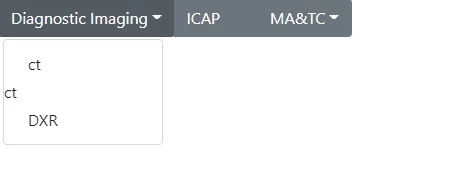
Hi I am fairly new to dreamweaver. I am using 2020.2. I inserted the bootstraps buttons drop-down. It works. I want to link the drop-downs to divs. That part is not working. Right now the divs are opening within the menu.

Any help is appreciated.
 

    This topic has been closed for replies.

    4 replies

    Inspiring
    March 22, 2021

    Thanks for the help.


    <div class="btn-group" role="group" aria-label="Button group with nested dropdown">
    <button type="button" class="btn btn-secondary dropdown-toggle" data-toggle="dropdown" aria-haspopup="true" aria-expanded="false">Diagnostic Imaging</button>
    <div class="dropdown-menu"> <a class="dropdown-item" href="#">ct</a>
    <div data-targetnametname="ct">
    ct</div>
    <a class="dropdown-item" href="#">DXR</a> </div>

    <a class="dropspot" data-rhwidget="DropSpot" data-target="ci" href="#"><button type="button" class="btn btn-secondary">Clinical Informatics</button></a>


    <button type="button" class="btn btn-secondary"><a class="dropspot" data-rhwidget="DropSpot" data-target="icap" href="#">ICAP</a></button>

    <button type="button" class="btn btn-secondary"></button>
    <div class="btn-group" role="group">
    <button type="button" class="btn btn-secondary dropdown-toggle" data-toggle="dropdown" aria-haspopup="true" aria-expanded="false"> MA&amp;TC</button>
    <div class="dropdown-menu"> <a class="dropdown-item" href="#">Dropdown link 1</a>

    <div class="drop" id="CT">Content for class "drop" id CT Goes Here</div>
    <div class="drop" id="dxr">Content for class "drop" id "DXR Goes Here</div>
    <div class="drop" id="ixr">Content for class "drop" id IGT/IXR Goes Here</div>

    Nancy OShea
    Community Expert
    Community Expert
    March 22, 2021

    How much coding experience do you have?  I ask because DW assumes you know basic HTML, CSS and JavaScript. 


    And to work with Bootstrap, a good understanding of code and Bootstrap classes is required.


    Read the chapters, do code exercises and take quizzes at the end.
    - https://www.w3schools.com/html/
    - https://www.w3schools.com/css/
    - https://www.w3schools.com/js/
    - https://www.w3schools.com/bootstrap4/


    Unfortunately, it's unclear what you're trying to do from your posted code.  Maybe if you show us an online example of what you want, we can give you better answers.


    Nancy O'Shea— Product User & Community Expert
    Inspiring
    March 22, 2021

    that is  the page online

    the rest of the page is blank because I am trying to get ti setup

    Nancy OShea
    Community Expert
    Community Expert
    March 22, 2021

    Hi @teresab82435819,

    Switch to Code view.  Scroll down to content area.  Give each target <div> tag a unique ID.


    <div class="container">

    <div class="row">

    <div class="col" id="one">

    This is division one.

    </div>


    <div class="col" id="two">

    This is division two.

    </div>


    <div class="col" id="three">

    This is division three.

    </div>


    Scroll up to your navigation menu, use your unique ids as anchors.

    <a href="#one">Division One</a>

    <a href="#two">Division Two</a>

    <a href="#three">Division Three</a>


    Hope that helps.


    Nancy O'Shea— Product User & Community Expert
    Community Expert
    March 22, 2021

    We need to see your page online to figure out what is going on as it cannot be determined from your screenshot.