
Legend
December 10, 2021
Answered

Browser caching!!

  • December 10, 2021
  • 2 replies
  • 609 views

First time building a website on this new machine and I'm having a hell of a time with getting the brower to recognise any changes I make in linked css/js files..............old machine was never this bad, the browser virtually never cached the files. This makes it virtually impossible to develop/build anything without having to repeatedely change the name of the file constantly after each change..............how are others managing this, its pure frustration? I've never experienced this high degree of constant caching by a browser. I've altered the settings in Chrome to clear 'All Time' but that dosent seem to make a lot of difference.


Cheers Os.
    This topic has been closed for replies.
    Correct answer Nancy OShea

    Use Chrome in Developer Mode (Mac: Command + Option + i). 

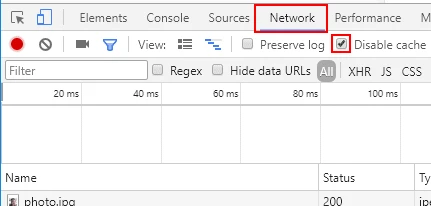
    Click on Network tab and check the box to Disable cache.  See screenshot.


    2 replies

    BenPleysier
    Community Expert
    Community Expert
    December 10, 2021

    Wait until you start docker or node projects and change sites. Mind-boggling.


    For the rest, I do as @Nancy OShea has suggested. And to be sure, I keep the developer panel open.

    Wappler is the DMXzone-made Dreamweaver replacement and includes the best of their powerful extensions, as well as much more!
    osgood_Author
    Legend
    December 10, 2021
    quote

    Wait until you start docker or node projects and change sites. Mind-boggling.


    For the rest, I do as @Nancy OShea has suggested. And to be sure, I keep the developer panel open.


    By @BenPleysier


    Hi Ben,

    Not even going there, I think this will probably be my 'swan song'............I've come to realise I no longer enjoy building websites from scratch. I had a long lay off due to Covid restrictions and I've gotten used to less stress and problems which are associated with building them. It's not as if I need to do them for the money so I wonder sometimes why keep beating myself around the head for no reason!


    Cheers

    Os

    BenPleysier
    Community Expert
    Community Expert
    December 11, 2021

    All the more reason to create a website from scratch. If there is no pressure from clients, you can experiment all you like. Keeps the mind active. 


    Hope you got through the virus thingy OK. Even there, I wonder if catching the virus is a good thing or not. It does privide a better immunity than the jabs that I have received so far.

    Wappler is the DMXzone-made Dreamweaver replacement and includes the best of their powerful extensions, as well as much more!
    Nancy OShea
    Community Expert
    Nancy OSheaCommunity ExpertCorrect answer
    Community Expert
    December 10, 2021

    Use Chrome in Developer Mode (Mac: Command + Option + i). 

    Click on Network tab and check the box to Disable cache.  See screenshot.


    Nancy O'Shea— Product User & Community Expert
    osgood_Author
    Legend
    December 10, 2021

    Hi Nancy,


    Ok, cheers I'll investigate once my head stops spinning, maybe tomorow, didnt know about disabling caching in the devtools, done that now, so we'll see how it goes!!


    Without that its a case of sometimes the changes work and sometimes it doesnt.........impossible to work like that. For some reason the browsers on my old machine didnt seem to cache files to the extent that the browsers on this new machines do and when they did a refresh usually did the trick of clearing the cache.


    Os