

PhilipSer
Participating Frequently
February 19, 2022
Question

BUG / Product issue: DW 21.2 windows manage sites when triggered from collapsed side panel

  • February 19, 2022
  • 3 replies
  • 876 views

There is a BUG in DW 21.2 (and past versions) in the "SidePanel > Files > Manage Site> Site setup" panel.
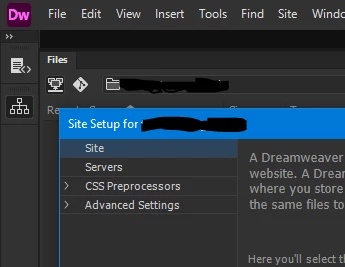
If you trigger the panel from a side panel when in collapsed mode and you click outsite of DW lets say to copy a password back to the interface, the panel hides and there is no way to recover from this locked state but to kill the app from the task manager.
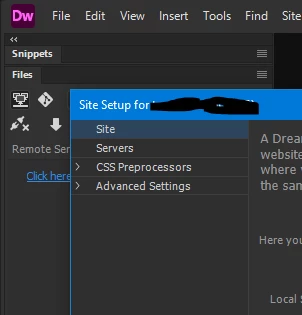


I you trigger the panel from an expanded mode or if you start it from the there "Site>Manage Sites" is no problem and you click outsite no problem.


Can anyone verify this please ?

    This topic has been closed for replies.

    3 replies

    Jon Fritz
    Community Expert
    Community Expert
    February 21, 2022

    I'm seeing the same behavior described by the OP.

    1. Click the double arrow "Collapse to Icon" button in the top right of the Files window

    2. Click on the Files window icon (opens the temporarily expanded version of the window)

    3. Click the fly out menu in the upper right of the temporarily expanded Files window and choose Site > Manage Site 

    4. Click away from DW.

    The site management dialogue fully disappears as soon as you click away from DW. It's not hidden behind the app (I tested this by narrowing my application smaller than the dialogue), it's gone and can't be brought back, effectively locking you out of DW.

    Unfortunately, Adobe will probably never fix this. DW is only minimally maintained now. 

    Nancy OShea
    Community Expert
    Community Expert
    February 21, 2022

    Fortunately, there are other ways to reach the Manage Sites panel.

    Site > Manage Sites...

    Edit > Preferences > Site > Manage Sites...


    Nancy O'Shea— Product User & Community Expert
    Jon Fritz
    Community Expert
    Community Expert
    February 21, 2022

    Personally, I have never worked with the Files window collapsed, so have never seen this issue before the OP posted it here.

    Nancy OShea
    Community Expert
    Community Expert
    February 19, 2022

    My reflex is to go to Sites menu > Manage Sites.  It always works well for me on Windows 10 with latest updates.

    If you can't live with it, try Restoring Preferences. 

    https://helpx.adobe.com/dreamweaver/kb/restore-preferences-dreamweaver.html


    Nancy O'Shea— Product User & Community Expert
    PhilipSer
    PhilipSerAuthor
    Participating Frequently
    February 19, 2022

    I've replicated the same thing to several PCs (windows 10) with clean installation of DW and this behavior is the same.

    If you open DW choose standard workspace , collapse the right panel , click to open files and from the dropdown list you select manage sites (or double click the dropdown menu)  if you click the status bar or change the focus from the DW application to an other thing you get locked and can't do anything else with DW unless you kill the program.

    Nancy OShea
    Community Expert
    Community Expert
    February 19, 2022

    Did you try the ESC key?

    Since I cannot reproduce the issue, I can't test it. Sorry.


    Nancy O'Shea— Product User & Community Expert
    Nancy OShea
    Community Expert
    Community Expert
    February 19, 2022

    I cannot reproduce it.

    • Which operating system?
    • How many displays do you have?
    • Is DW application frame floating freely over your desktop or is it maximized and docked to full screen?


    Nancy O'Shea— Product User & Community Expert
    PhilipSer
    PhilipSerAuthor
    Participating Frequently
    February 19, 2022

    1) Windows 10
    2) 2 Displays but the same thing hapens to my laptop also with 1 monitor
    3) It happens to both floating or maximized