DreamWeaverBeliever
Participating Frequently
June 11, 2024
Answered

Can Adobe Dreamweaver CS6 function with the Windows Pro 11 operating system?

  • June 11, 2024
  • 3 replies
  • 1791 views

@migos:
     Can Adobe Dreamweaver CS6 function with the Windows Pro 11 operating system?   So far I keep trying to tweak the settings in order to figure out why I keep getting this message whenever I attempt to upload a website page modification:   

"An FTP error occurred. Cannot make connection to host. The remote
host cannot be found."


As background, I still use the same webhost that I've used for nearly 2 decades.   But I switched computers and uploaded Dreamweaver CS6 to it.   Meanwhile last December Microsoft uploaded Windows 11 Pro onto my computer, you know, for my own benefit.   I had not yet begun trying to use Dreamweaver CS6 on my replacement computer.     

    If anyone here has managed to get CS5 or CS6 Adobe to function on Windows 11 Pro, please let me know so I won't give up and switch website modification brands.   I spent over $1,000 on Dreamweaver over the years and I don't need it enough to justify paying $22 monthly for "upgrades".    Any thoughts, please?    Hopefully I've simply neglected to make a setting adjustment in Dreamweaver CS6.   An FTP issue seems like it can be remedied pootentially easily, but I continue rowing with just one oar in the water.  🙂 

Correct answer Nancy OShea

I wonder if I could simply function with CS5 (instead of CS5.5 or CS6).   All I do is upload text and links and an occasional image.   But the sites have been modified with CS6 in the past.   


CS5 technology is so old it may not be compatible with newer servers. That's the risk you take with legacy software.


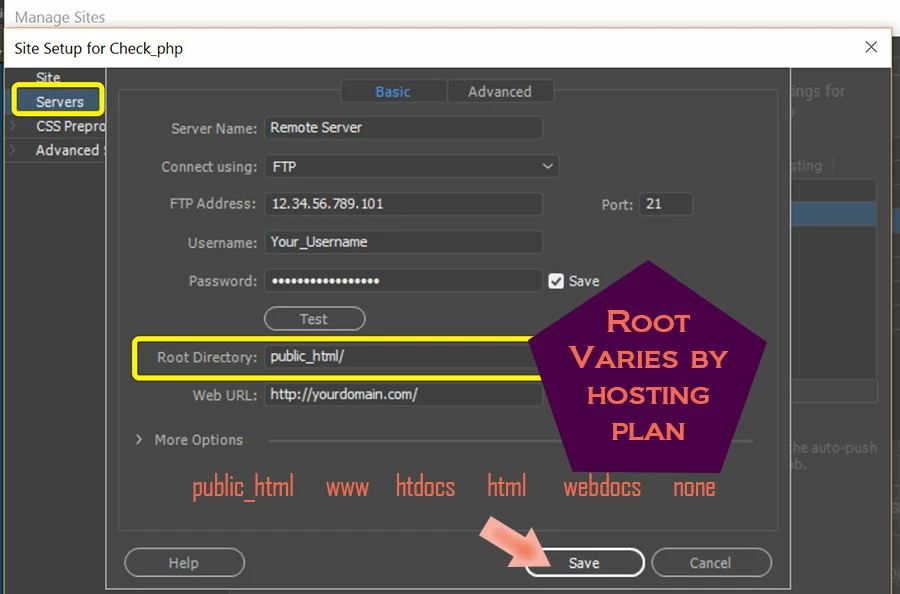
Make sure you're uploading to the correct ROOT directory on your server. Most hosting plans use public_html/ or some other designation. ROOT varies by hosting plan. 


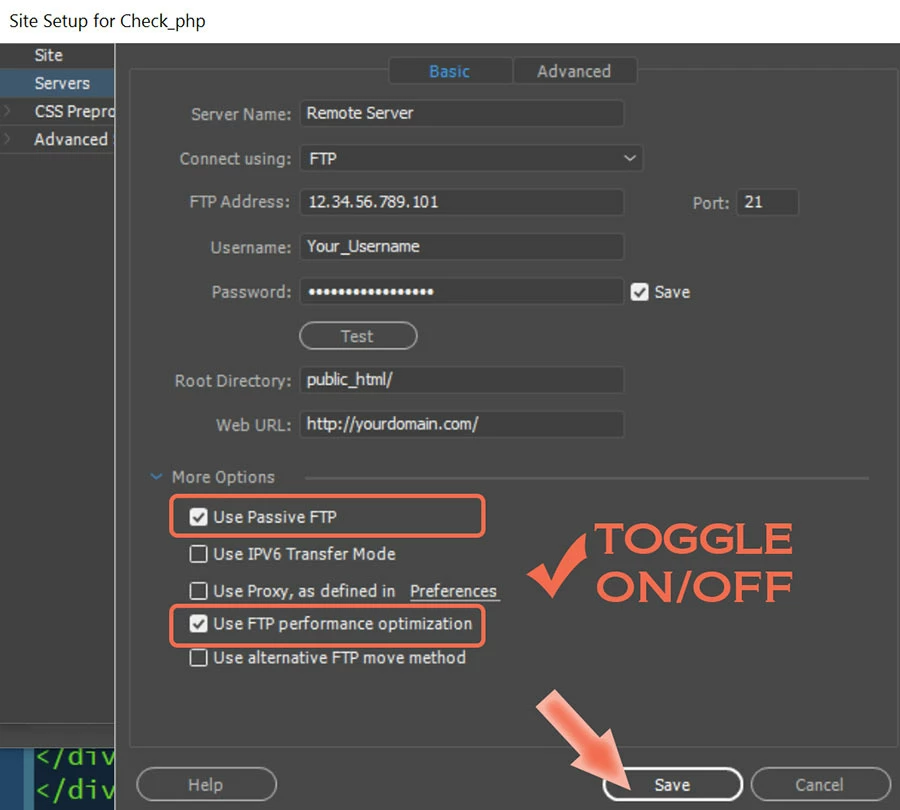
Then hit the TEST button to confirm you can reach the server.  If that fails, click on MORE OPTIONS. 


If CS5 is not compatible with your server, use FREE FileZilla client. It's a better, safer FTP because it's updated regularly with the latest security patches.  CS5 hasn't been updated in 15 years.


Click the GREEN Download button

https://filezilla-project.org/download.php?type=client 


3 replies

Nancy OShea
Community Expert
Community Expert
June 11, 2024
  • CS6 was never tested on modern operating systems.
  • 14 year old software might work or it might not. 
  • That's assuming you can still activate it.  A number of users have reported they can't because they exceeded their activation limit. 
  • Neither Adobe nor this user-to-user community can help you with an exceeded activation count.


There are modern tools you can use instead of CS6.

================
CODE EDITORS:
-- Codespaces (free, browser-based) - https://github.com/features/codespaces
-- Nova (Mac only, formerly called Coda) - https://nova.app/
-- Pinegrow - https://pinegrow.com/
-- Sublime Text - http://www.sublimetext.com/
-- Visual Studio Code (free) - https://code.visualstudio.com/
   + Free Live Preview Extension


FileZilla Free S/FTP Client (click on Green Download Button)

https://filezilla-project.org/download.php?type=client


Hope that helps.


Nancy O'Shea— Product User & Community Expert
DreamWeaverBeliever
Participating Frequently
June 20, 2024

Ben, Jon and Nancy:

   Thanks so much for the feedback.   Personally I have very simple web-publishing needs.   I simply seek to create html pages, and post text and .gif or .jpeg images into them.    I have a shared webhosting account already.   Dreamweaver CS6 hasn't been cooperating on my new Dell desktop computer, perhaps because I have Windows 11 now.   But it doesn't ask me for a registration #, so activation seemingly isn't a problem.  


   In light of the abovementioned, perhaps some of the following kindly recommended by Nancy are more useful than others.   Free's a great price, LOL.   🙂    But a free editor that messes up my website isn't what I seek.     Any recommendations by anyone reading this would be appreciated.   🙂


CODE EDITORS compatible with Windows desktop computers (says beloved Nancy, above):
-- Codespaces (free, browser-based) - https://github.com/features/codespaces
-- Pinegrow - https://pinegrow.com/
-- Sublime Text - http://www.sublimetext.com/
-- Visual Studio Code (free) - https://code.visualstudio.com/


Community Expert
June 20, 2024

The editors cannot themselves mess up your website. HTML and CSS are simply text. I would say the best place to start is to look at what you are maintaining today and make recommendations from there. It may be worth looking at a code editor, but if you are not comfortable editing code, then Visual Studio Code may not be for you and based on what you are trying to achieve other options may be better for you. Are you able to share a link of your site today?

Jon Fritz
Community Expert
Community Expert
June 11, 2024

You can test if it's a credentials issue by downloading the free Filezilla Client and trying to upload from there. If you get the same error, it's likely your hosting company updated your server and lost your credentials. It happens fairly often with shared hosting environments, especially with companies like GoDaddy.

Community Expert
June 11, 2024

I agree that $22/mo may be excessive as DW is in minimal maintenance mode so looking at alternatives may be worthwhile. Your error though has nothing to do with Windows 11. If the host cannot be found this is an issue with your FTP connection details in your site definition. First step is to reach out to your host to confirm connection details for FTP.