Known Participant
June 8, 2025
Answered

Can no longer attach my templates

  • June 8, 2025
  • 1 reply
  • 1167 views

I have been using Dreamweaver for more than 20 years and have over 2,000 webpages, all using templates. Suddenly, as all templates are present in the root directly and show up in the Files window, they do not show up in the Assets window anymore. I had DreamWeaver 2021 but uninstalled and reinstalled "DreamWeaver 2025", but it seems that the only thing that has changed is the copyright note on the startup.


Does anyone have this problem with the unusable templates?

Correct answer Nancy OShea

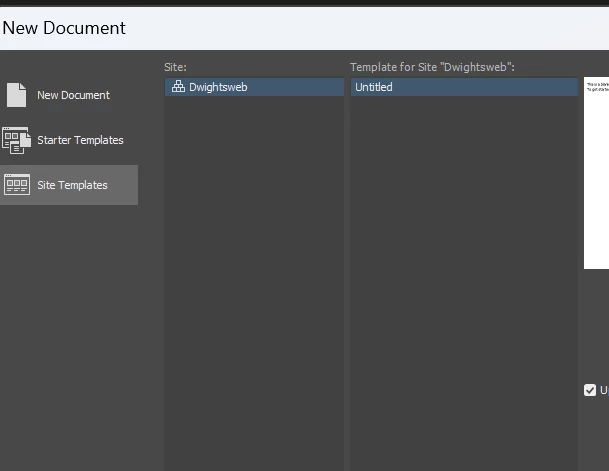
Well, not really. When I go to Site > Template, my only choice is 'untitled', presumably because none of the existing templates are listed as Assets.


That implies that your Local Site Folder is not properly defined.  Or it's on a volume that DW can't read. 

Go to Site > Manage Sites...


1 reply

Nancy OShea
Community Expert
Community Expert
June 10, 2025

2,000 files is massive.  I hope your computer has plenty of available RAM and physical disk space. 


Did you Re-create the Site Cache as previously recommended in your other post about Assets?


Nancy O'Shea— Product User & Community Expert
Known Participant
June 10, 2025

Yes, I have a 1 TB onboard disk on a new Dell (and two 2 TB backup disks off site). The RAM has never been a problem. I've been recreating the site cache many times in the past few days, especially every time I re-installed the earlier versions.

Someone else, called Glenn-p I think, just replied to one of my earlier notes to you and recommended saving out and then deleting Adobe>Dreamweaver & Adobe>Common>Sites and then restarting DM to make new settings. Does that sound worth trying to you?

Known Participant
June 10, 2025

That's from the User>App Data>Roaming and User>Local parts of the OS.