Participant
October 18, 2018
Answered

Can't Center an image, Using .center-block.
  • October 18, 2018
  • 3 replies
  • 1213 views

Hi guys,

               I'm learning a dream weaver, watching tutorial videos from course, column add image after that he added (.center-block ) dream weaver preformed required

actions. When I tried to do the same as the tutorial, nothing happen, even after I added .center-block made it class without any changes.

I used Css codes like this:

.center-block {

display:block;

margin-left:auto;

margin-right:auto; }

This topic has been closed for replies.
Correct answer Nancy OShea

mohameda72981975  wrote

i thought when i downloaded dreamweaver had full Bootstrap framework
if not can anyone tell me how please

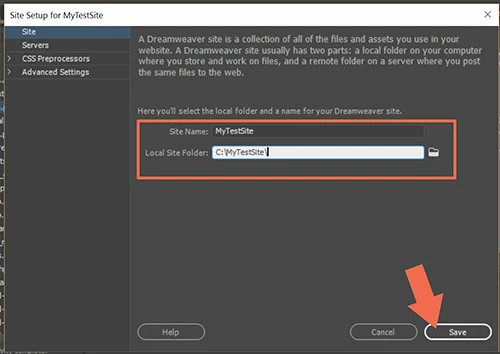
Your screenshot tells me you have not defined a local site folder yet.  That's an important first step.  Go to Site > New Site and create a folder like C:\myTestSite\

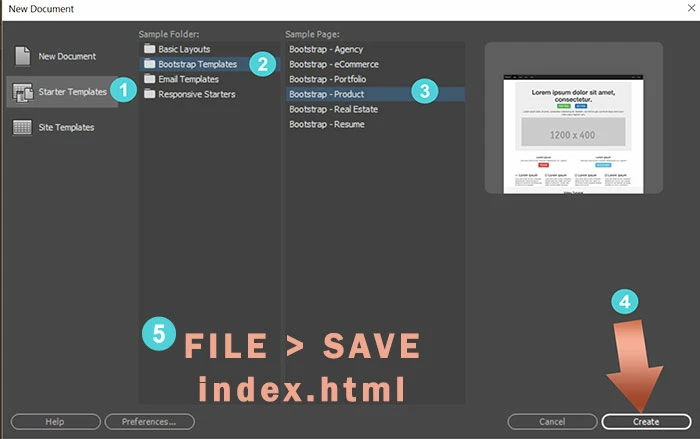
Then go to File > New > Starter Templates.  Select one of the Bootstrap starter templates and hit the Create button.

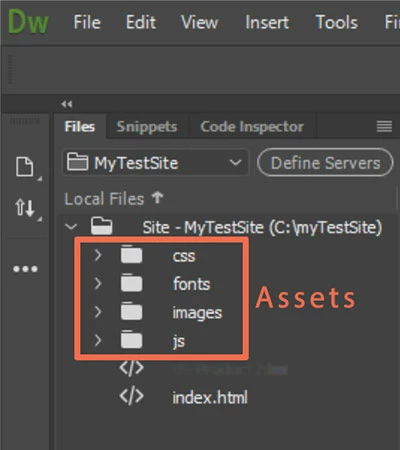
Save your document.  DW will create Assets folders for you which can be seen in your Files Panel (F8).

Now you're ready to work with Bootstrap in Dreamweaver.

3 replies

BenPleysier
Community Expert
Community Expert
October 19, 2018

Please give us a link to the video that you are watching

Wappler is the DMXzone-made Dreamweaver replacement and includes the best of their powerful extensions, as well as much more!
Participant
October 20, 2018

i don't know, if that allow, i hope so

Video

i coped the code , it's work, i'm learning so i thought when i downloaded dream weaver had full Bootstrap framework
if not can anyone tell me how please
thanks for helping and answering so fast

BenPleysier
Community Expert
Community Expert
October 20, 2018

Please keep in mind that there are two versions of Bootstrap, namely 3 and 4. Although a lot of the classes are the same in both versions, there also as many classes that are different. As an example, to center an image in

v3: <img src="https://dummyimage.com/400x300" alt="placeholder" class="center-block">

v4: <img src="https://dummyimage.com/400x300" alt="placeholder" class="d-block mx-auto">

It is best to stay with the one version and I would recommend v4.

Wappler is the DMXzone-made Dreamweaver replacement and includes the best of their powerful extensions, as well as much more!
Nancy OShea
Community Expert
Community Expert
October 18, 2018

Bootstrap 3x already contains a .center-block class.   Remove what you have and replace it with this line.

.center-block {float:none}

In this HTML example, the col-sm-6 is half the width of it's container and centered.  The text inside it is also centered.

<body>

<div class="container">

     <div class="row">

         <div class="col-sm-6 center-block">

          <p class="text-center">This is centered</p>

          </div>

     </div>

</div>

</body>

IMPORTANT!

Read the documentation for your version of Bootstrap.  Versions 3 and 4 contain very different layout methods and utility classes.   Do not combine versions.

https://getbootstrap.com/docs/4.1/getting-started/introduction/

Nancy O'Shea— Product User & Community Expert
Jon Fritz
Community Expert
Community Expert
October 18, 2018

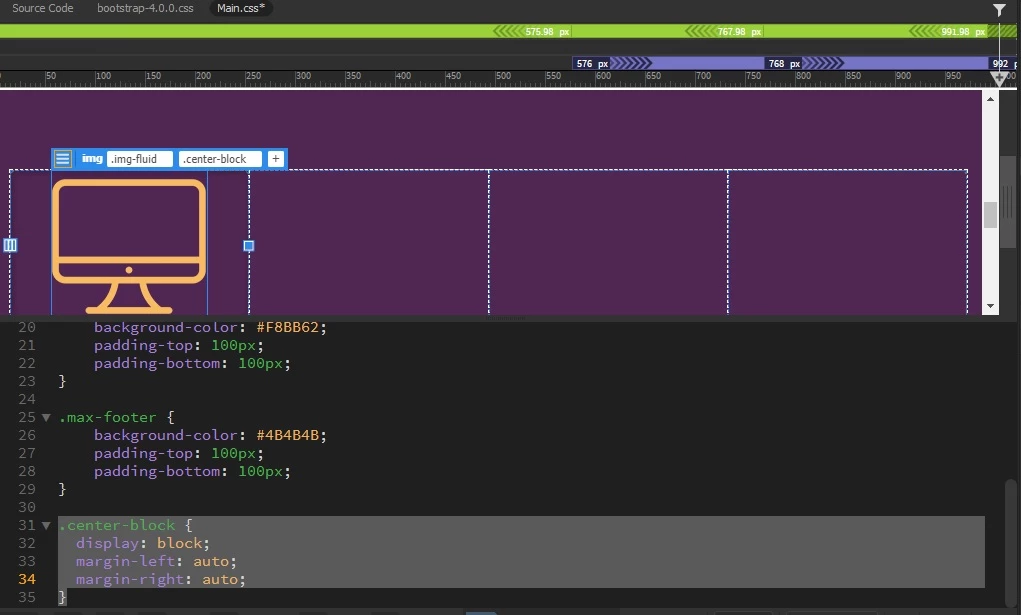
In your screen shot, the image is centered within its "1/4 of the page width" parent container.

If you want it to be centered to the page, you'd have to start with a container that is 100% of the width of the page, place the image within that, and use the margin options you've made.

Participant
October 19, 2018

thanks a lot for answer, video i was watching, he wrote .center-block without using and Css cods margin or anything, dream weaver  preformed the actions.

but when i try to do the same nothing happen, the video old, he's using version 3 but i want to know if i can make dream weaver work with it or the code change like u said i tried .center-block{float:none} nothing happen
i mean in video, he just write .center-block the image went to center, i can make it center by Css Code like i did but i want to know if i can make like him just write the code dreamweave do the rest

Jon Fritz
Community Expert
Community Expert
October 19, 2018

Are you using a Bootstrap template and have you defined a site?