Participant
January 13, 2017
Answered

Can't choose a Background Image

  • January 13, 2017
  • 1 reply
  • 289 views

Hey, I am busy with a school project and I need to put in a background image but ever since the new update of dreamweaver the tab you can click on after typing background-image: doesn't show which means I can't pick a background image. Does anyone know how to fix this or why it's not showing?

Thank you!

This topic has been closed for replies.
Correct answer Nancy OShea

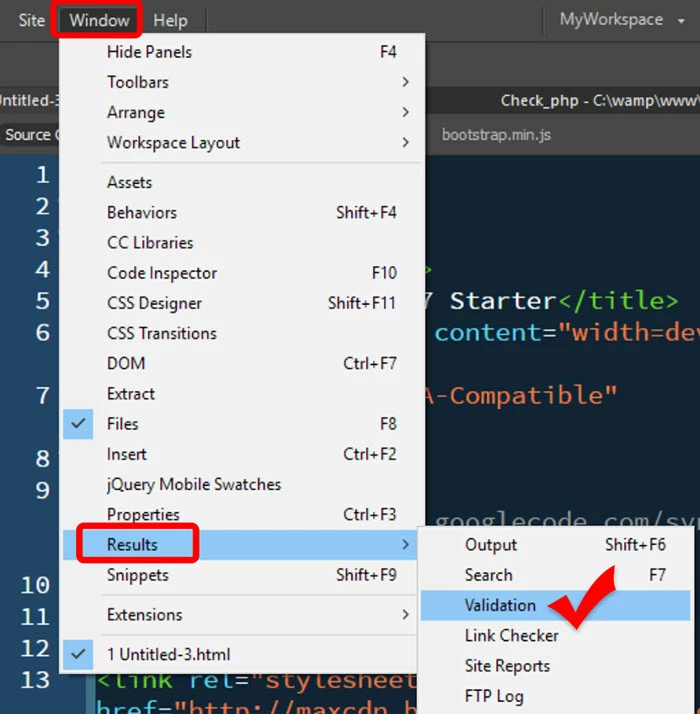
First validate your code to ensure you have no errors.  DW is fussy about code errors and some things don't work until you resolve them.  See screenshot.

If that doesn't help, try Deleting Corrupted Cache

http://forums.adobe.com/thread/494811

Failing that,  Restore Preferences.

Unusual behavior in Dreamweaver? Try restoring preferences.

Nancy

1 reply

Nancy OShea
Community Expert
Community Expert
January 13, 2017

You have the latest patch -- CC 2017.1?

You're working in a defined local site folder?

Are you in Code View?

It works for me.  See screenshot.

Nancy

Nancy O'Shea— Product User & Community Expert
Participant
January 13, 2017

I have the latest and the thing is, it works on my laptop just not on my desktop. and what is shown on your screenshot is not turning up on my screen. so I'm not sure what to do now but to work on my laptop which kinda sucks, but that's for your help!

Nancy OShea
Community Expert
Nancy OSheaCommunity ExpertCorrect answer
Community Expert
January 13, 2017

First validate your code to ensure you have no errors.  DW is fussy about code errors and some things don't work until you resolve them.  See screenshot.

If that doesn't help, try Deleting Corrupted Cache

http://forums.adobe.com/thread/494811

Failing that,  Restore Preferences.

Unusual behavior in Dreamweaver? Try restoring preferences.

Nancy

Nancy O'Shea— Product User & Community Expert