
Participating Frequently
August 30, 2020
Question

Can't Doc Documents - Can't Activate Document Toolbar

  • August 30, 2020
  • 2 replies
  • 282 views

Sorry to post. I've been trying to get DW set up for going on 3 hours now and would really like to just get on with it.
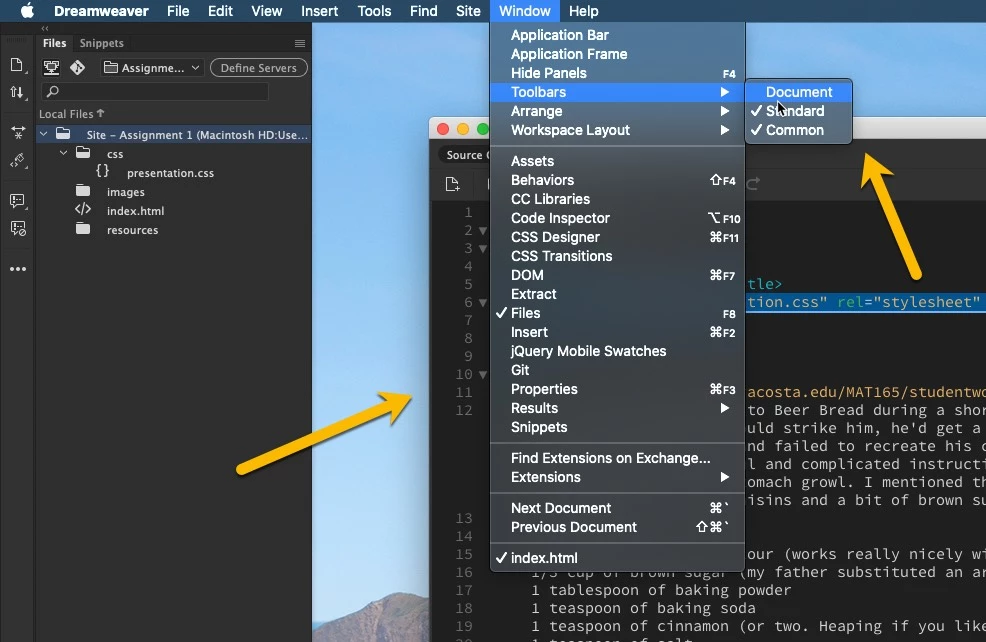
 

First problem is that when I open a document it's just kind of floating around, independent of the IDE and toolbars and panels and all of that. Tried setting preferences so that documents open in tabs, but they keep opening as independent windows. 

Second, I'm trying to get this "Document" toolbar but it won't let me select it. I can select Standard and Custom, but can not select Document at all. 

I used DW several months ago and don't think I had all these issues. I've tried resetting the workspace which structures all the panels and maximizes the document window size, but I can't seem to get the darn thing docked.

Thanks

    This topic has been closed for replies.

    2 replies

    Jon Fritz
    Community Expert
    Community Expert
    August 31, 2020

    I think on a Mac (it's been a long time since I used one), you need to have the Application Frame active as well, in order to get the "Open as Tabs" feature to function.

    In your screenshot, it looks like your Application Frame is turned off.

    It would be something to test anyway.

    BenPleysier
    Community Expert
    Community Expert
    August 31, 2020

    You are better off using the Standard version as in

    Read the docking section here https://helpx.adobe.com/au/dreamweaver/using/dreamweaver-workflow-workspace.html

    Wappler is the DMXzone-made Dreamweaver replacement and includes the best of their powerful extensions, as well as much more!