
Participant
Jan 4, 2017 4:58 PM UTC
Answered

Can't expand code

Hi all,

I've got a strange problem. I have a css file, open in DW and there is a section that I can not open/expand.

Line 71 (below) has the collapsed code, then jumps to 228.

I have tried clicking on the arrow, usually works; selecting the line then right-hand click>Selection>Expand Selection.

Neither method works.

I can open the file in notepad and all is well, I can view it online and again all is well.

I have rebooted my computer, still nothing.

All other 'sections' work fine, just the code collapsed in line 71

Any ideas?
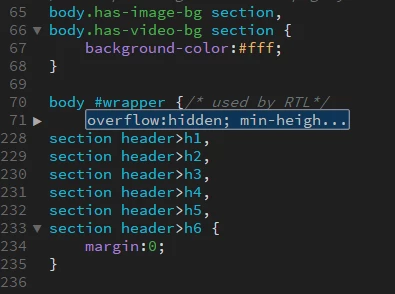
I am using DW 2017.0.1 Release 9346 build.

    This topic is closed to new replies. Start a new post to keep the conversation going.
    Jon Fritz
    Jon FritzCorrect answer
    Community Expert
    Jan 4, 2017 5:28 PM UTC

    Weird.

    Copy your css out of notepad and check it here: The W3C CSS Validation Service

    See if there are any structural defects that maybe the "latest and greatest" is having major issues with.

    2 replies

    Jon Fritz
    Community Expert
    Jon FritzCommunity ExpertCorrect answer
    Community Expert
    Jan 4, 2017 5:28 PM UTC

    Weird.

    Copy your css out of notepad and check it here: The W3C CSS Validation Service

    See if there are any structural defects that maybe the "latest and greatest" is having major issues with.

    Translate
    SnellyAuthor
    Participant
    Jan 4, 2017 6:00 PM UTC

    Thanks Jon,

    Looks like there were a few errors in the file, but looking at them compared with a backup file, it seems they were in the original.

    I've replaced my file with the backup and DW is now working correctly; maybe it was just a corrupt file...

    Translate