



Participant
November 22, 2023
Question

Can't find Adobe Fonts on the DW Font Manager panel

  • November 22, 2023
  • 3 replies
  • 1800 views

Hi everyone,

Starting to learn Adobe DreamWeaver, I was following a tutorial on how to manage fonts but can't find the Adobe Fonts on the 'Manage Fonts' panel.


Going through the DW User Guide, the Manage Fonts panel is also different from the one in my software.
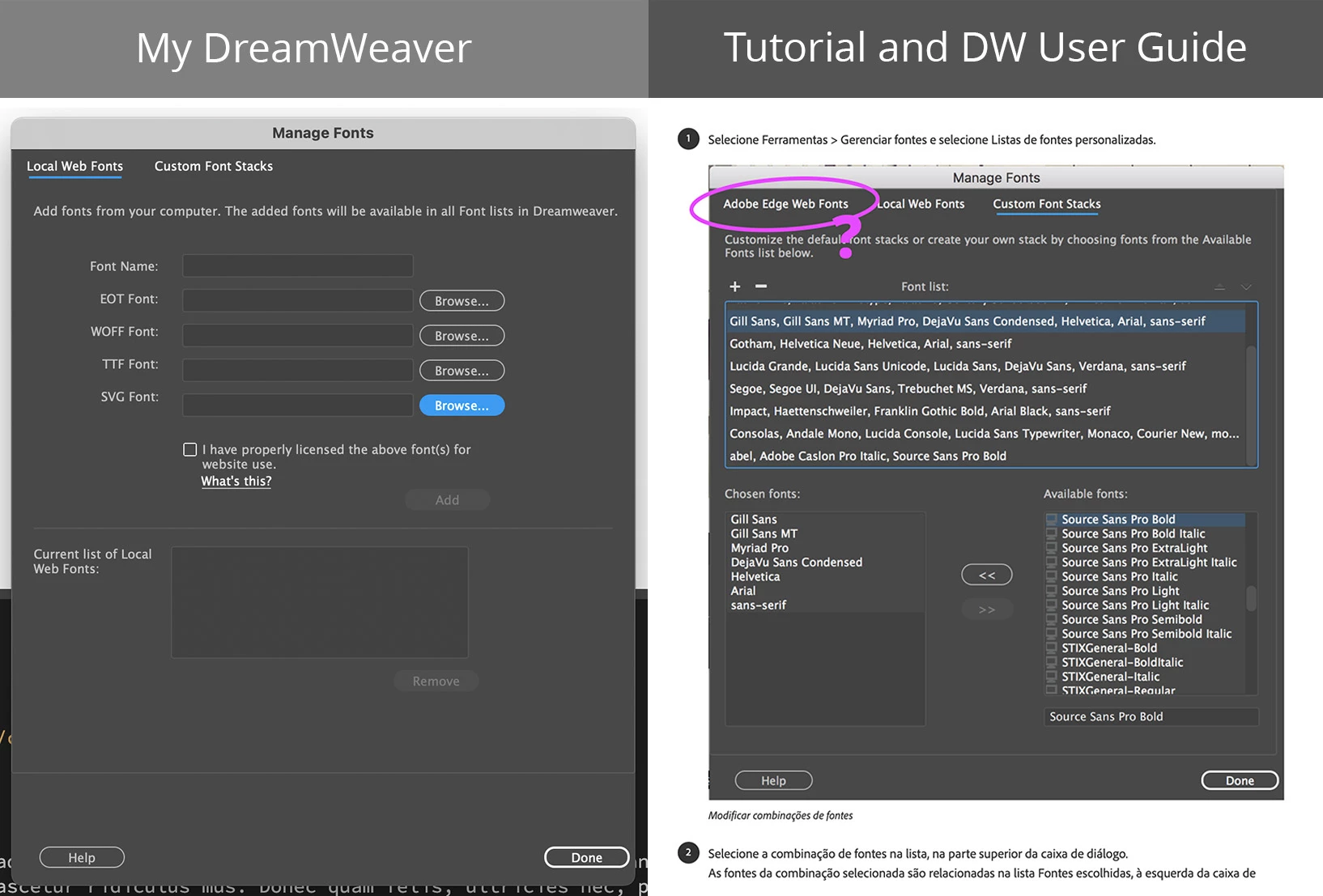


I read Adobe discontinued the Adobe Wedge Web Fonts, so how do I manage Adobe Fonts now? Through the Custom Font Stacks?...


Maybe the DW User Guide should be updated?

    This topic has been closed for replies.

    3 replies

    Nancy OShea
    Community Expert
    Community Expert
    November 22, 2023

    Understandable since Adobe Edge Fonts ended in July 2022.  There's an announcement on top of this forum's overview page.

    https://community.adobe.com/t5/dreamweaver-discussions/edge-web-font-services-will-be-unavailable-in-dreamweaver-from-july-01-2022/td-p/12606547


    Use Adobe Fonts instead.  You'll need to create a web project, activate your fonts and manually copy & paste code from your Manage Fonts Panel into the <head> tag of your documents.  You can read more about using Adobe Fonts in web projects below.

    https://helpx.adobe.com/fonts/using/add-fonts-website.html


    Hope that helps.  Post back if you have any questions.


    Nancy O'Shea— Product User & Community Expert
    Andre SecAuthor
    Participant
    November 22, 2023

    Thank you Nancy.

    Kind of the same process when I use Googhle Fonts, right?

    Nancy OShea
    Community Expert
    Community Expert
    November 22, 2023

    Similar but not the same.

    • Adobe Fonts have more fonts to choose from, many from major font foundries that Google doesn't have.
      https://fonts.adobe.com/foundries
    • In my experience, Adobe's fonts work well on all devices. 
    • You get what you pay for.


    Nancy O'Shea— Product User & Community Expert
    Jon Fritz
    Community Expert
    Community Expert
    November 22, 2023

    Adobe discontinued the Edge Web Fonts service within DW in July of 2021:

    https://helpx.adobe.com/dreamweaver/using/edge-web-fonts-and-extract-decommissioned.html 

    As Ben mentions, fonts are still available from Adobe to be used across sites, but need to be added differently than in the past. Here are some more in-depth instructions on how to do that: 

    https://helpx.adobe.com/fonts/using/add-fonts-website.html 

    Community Expert
    November 22, 2023

    Dreamweaver is in minimal maintenance mode at the moment and only getting critical updates. If you are looking to learn about web development, you would be better off focusing your time on learning more of coding and less of the application as HTML can even be edited in a simple text editing app. Unfortunately any articles will not be getting updated.


    Adobe fonts can selected from the Adobe Fonts site ( https://fonts.adobe.com/ ). Then you can add them to a web project. Once added to a web project you will be able to embed the project into your website and be given code that links to an adobe hosted css file. This can be included on your website to use. Alternatively you could download the fonts and look to load fonts into DW, but includes from hosted services are typically the way to go.

    Andre SecAuthor
    Participant
    November 22, 2023

    Thanks!