azure77
Participant
April 9, 2026
Question

Can't make new html files. No Framework

  • April 9, 2026
  • 1 reply
  • 18 views

All of a sudden, Dreamweaver is not working properly.  First, I stopped getting the breadcrumb linked files that are attached to html files to easily navigate to them.  I now have to load them individually in dreamweaver.  Second, my browser previews no longer work in any browser.  Third, now I can’t make new html files.  There is nothing listed in the framework.  I have restarted my computer, deleted preferences, even uninstalled and re-installed the application several times.  Does anyone have a solution to this.  I’m using the most current Dreamweaver version available, 21.7 build 15757.

    1 reply

    Nancy OShea
    Community Expert
    Community Expert
    April 10, 2026

    Sounds like a corrupted installation.


    Which operating system do you have?

    Most Adobe desktop apps work on these systems with latest updates.

    • Windows 11 versions 24H2 and 23H2, and Windows 10 versions 22H2 and 21H2 
    • macOS 26 (Tahoe), macOS 15 (Sequoia), and macOS 14 (Sonoma)


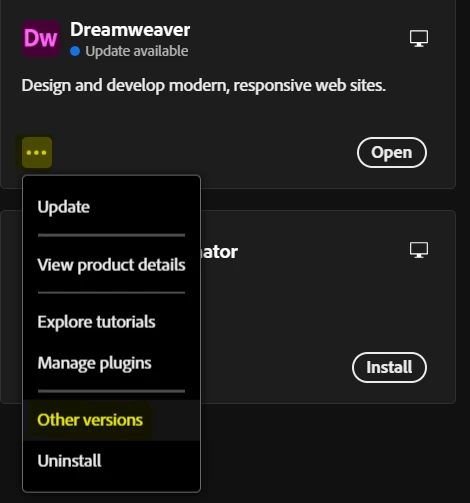
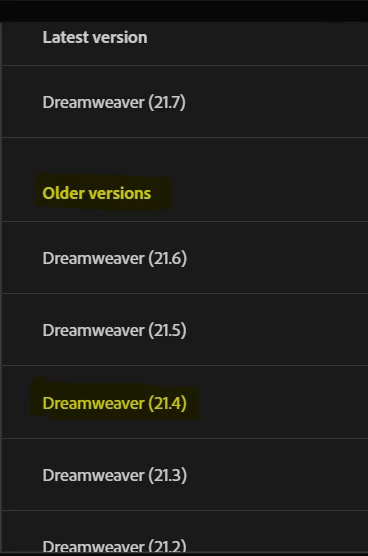
    From Creative Cloud desktop app, you could revert to a previous dot release of DW ver 21 to see if that’s more stable on your system.  See screenshots from CC.


    Hope that helps.


    Nancy O'Shea— Product User & Community Expert