


Participant
December 8, 2024
Question

Can't post to server

  • December 8, 2024
  • 3 replies
  • 284 views

I purchased a site on Domain.com and then created a website using Dreamweaver that I'd like to post there. The site is live and has  When I try to upload it I get this error message:
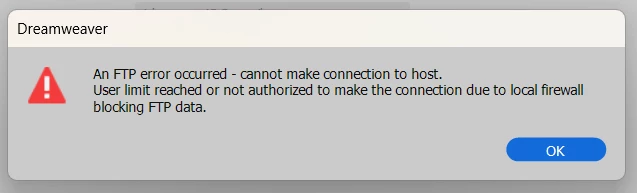
The site is live (https://jdonovan43.com) and has the appropriate SSL certificate. This could be a problem on m end with Norton or Windows Defencer. Since Domain.com doesn't seem to have customer service, I'm asking here. Any suggestions, please?

This topic has been closed for replies.

3 replies

Community Expert
December 9, 2024

Your host appears to have support via a live chat system at the bottom of the page as well as a support page: https://www.domain.com/support/contact . If they are not offering support, I would just cancel your plan and try to recoup any funds spent, or accept it as a loss and find hosting that offers you support.

Nancy OShea
Community Expert
Community Expert
December 9, 2024

Consult Domain.com documentation for details on how to FTP files to your remote server.  They offer a PDF document below.  If you still need help, contact their customer support desk.

https://www.domain.com/support/guide.mas


In Dreamweaver, go to Site > Manage Sites.  Enter your Server's log-in credentials and Root Directory.  This varies by hosting plan.


For advanced features, click on More Options.


Click the TEST button to confirm connection.


Hope that helps.


Nancy O'Shea— Product User & Community Expert
JPD43Author
Participant
December 8, 2024

Noob questiob: I have a huge HTML file that I'm trying to post but no index file. What am I doing wrong?

BenPleysier
Community Expert
Community Expert
December 8, 2024

Try using the FileZilla FTP client instead.

Wappler is the DMXzone-made Dreamweaver replacement and includes the best of their powerful extensions, as well as much more!