
Participant
November 10, 2020
Answered

Can't see full file names in Files Panel

  • November 10, 2020
  • 3 replies
  • 602 views

This is driving me mad. I am using Dreamweaver 2020 and have lost the ability to see full file names in the files panel. I used to be able to read them. When I descend a tree and file/folder info shifts right the column remains the main width so all but a few letters are available to the eye. I click “expand the file panel” and yes, the panel expands but not the column which is now hard left, but just as narrow. I have manually dragged the panel edge but the same things happens. I am sure what to do is easy – when you know how, But how? (I have reset the Standard workspace but no dice).


[Topic edited by moderator]
This topic has been closed for replies.
Correct answer Nancy OShea

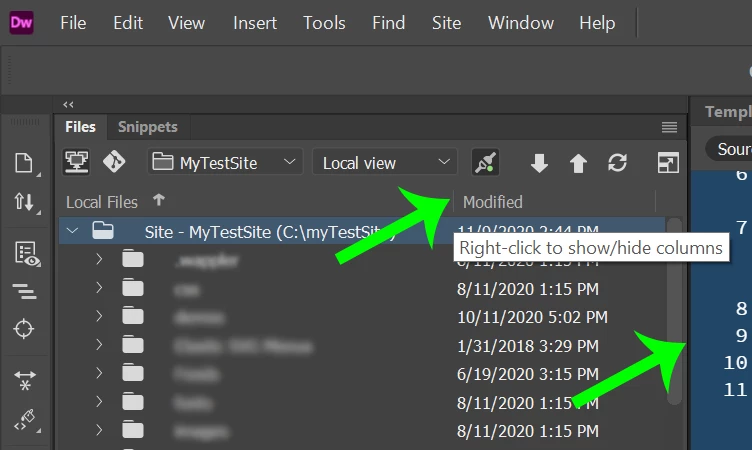
See my screenshot.  Where arrows are pointing, click & drag to make wider.


3 replies

Participant
November 11, 2020

Thank you. So, it is like all other Adobe navigation. I just couldn't make it work. Done so now.

Jon Fritz
Community Expert
Community Expert
November 10, 2020

If you don't want to make your Files window wider, you can also hover over the file names to get the full name of the truncated ones. In the image below, I was hovering over "display_assembl" ...

Nancy OShea
Community Expert
Nancy OSheaCommunity ExpertCorrect answer
Community Expert
November 10, 2020

See my screenshot.  Where arrows are pointing, click & drag to make wider.


Nancy O'Shea— Product User & Community Expert