daryam42257332
Participant
April 6, 2019
Answered

Can't use a CSS layout

  • April 6, 2019
  • 1 reply
  • 446 views

Hi,

I am learning to use Dreamweaver (new version CC2019).

There is an instruction for using CSS layouts:

  • Select File > New.

  • In the New Document dialog box, select the Blank Page category. (It’s the default selection.)

  • For Page Type, select the kind of page you want to create.

For Layout, select the CSS layout you want to use. You can choose from 16 different layouts. The Preview window shows the layout and gives a brief description of the selected layout.

However, I can't use this instruction because everything looks different in my version of the program. I can't see New Document, Blank Page, and 16 different layouts for CSS.

I just see New - Create a Document - Type of Document - CSS. The document that I create with CSS type of document does not let me insert Div.

This topic has been closed for replies.
Correct answer Nancy OShea

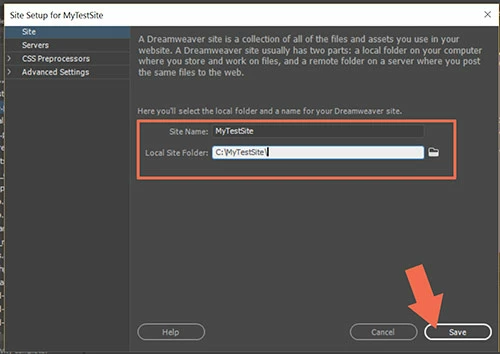
1. Go to Site > New Site and define your local site folder.  Example, C:\MyTestSite.  This is where all your project files will be stored  on your computer.

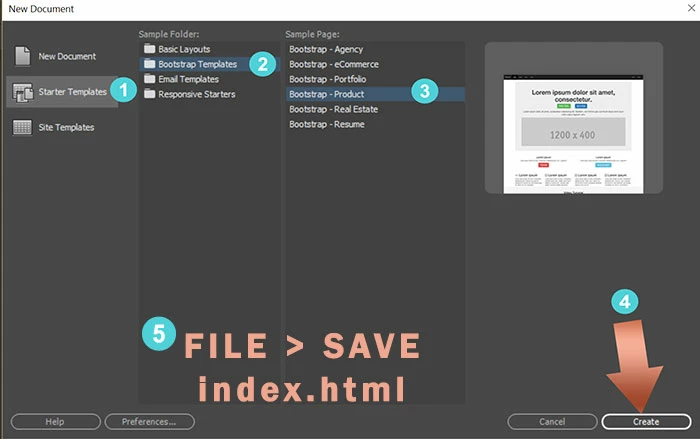
2. Go to File > New > Starter Templates.    See screenshots.

Choose a Sample page layout and hit the CREATE button.

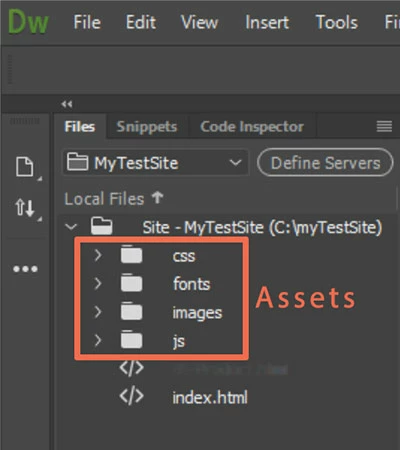
After saving your newly created document, DW will set-up assets folders which can be seen in your Files Panel (F8).   Your layout's stylesheet is inside the css folder.

1 reply

Nancy OShea
Community Expert
Nancy OSheaCommunity ExpertCorrect answer
Community Expert
April 6, 2019

1. Go to Site > New Site and define your local site folder.  Example, C:\MyTestSite.  This is where all your project files will be stored  on your computer.

2. Go to File > New > Starter Templates.    See screenshots.

Choose a Sample page layout and hit the CREATE button.

After saving your newly created document, DW will set-up assets folders which can be seen in your Files Panel (F8).   Your layout's stylesheet is inside the css folder.

Nancy O'Shea— Product User & Community Expert