Static and Motion Studio
Participating Frequently
May 27, 2018
Answered

Can you apply hyperlink to video?

  • May 27, 2018
  • 3 replies
  • 1007 views

Greetings,

I have a page with four video files. Ultimately I'd like to add a frame (i.e. picture frame) around each of these, and the area

within that frame will be hyperlinked. My search to find the solution to this has been unfruitful. I've talked with one person

who says that if you watch this on a phone, and turn it sideways all the hyperlinks will be stacked, instead of in

their designated positions (horizontally across the screen). I sure would be grateful for any suggestions.

    This topic has been closed for replies.
    Correct answer Nancy OShea

    If your layout is responsive for all devices, as it should be, vertically stacked would be expected on mobile devices.  I don't understand the problem.

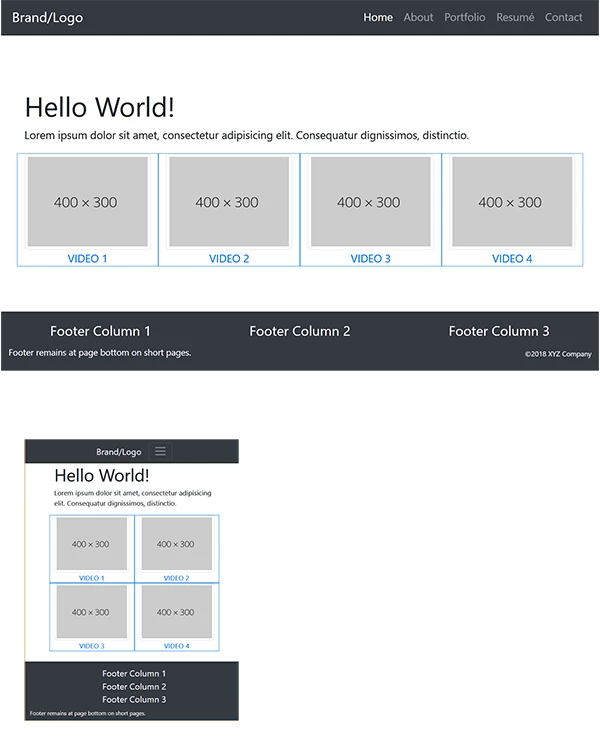
    Below a Bootstrap 4 layout:  4 across on desktop, 2 across on tablet, vertically sacked on mobile.

    <!doctype html>

    <html lang="en">

    <head>

    <meta charset="utf-8">

    <title>Bootstrap 4 with Flexbox</title>

    <meta http-equiv="X-UA-Compatible" content="IE=edge">

    <meta name="viewport" content="width=device-width, initial-scale=1">

    <!--Bootstrap 4 CSS-->

    <link href="https://maxcdn.bootstrapcdn.com/bootstrap/4.0.0-beta/css/bootstrap.min.css" rel="stylesheet" integrity="sha384-/Y6pD6FV/Vv2HJnA6t+vslU6fwYXjCFtcEpHbNJ0lyAFsXTsjBbfaDjzALeQsN6M" crossorigin="anonymous">

    <style>

    body { min-height: 100vh; padding-top:25vh;}

    .flex-grow { flex: 1; }

    </style>

    </head>

    <body class="d-flex flex-column">

    <!--responsive navbar-->

    <nav class="navbar navbar-dark navbar-expand-lg bg-dark justify-content-center fixed-top"> <a class="navbar-brand" href="#">Brand/Logo</a>

    <button class="navbar-toggler" type="button" data-toggle="collapse" data-target="#navbarsExampleDefault" aria-controls="navbarsExampleDefault" aria-expanded="false" aria-label="Toggle navigation"> <span class="navbar-toggler-icon"></span> </button>

    <div class="collapse navbar-collapse" id="navbarsExampleDefault">

    <ul class="navbar-nav ml-auto">

    <li class="nav-item active"> <a class="nav-link" href="#">Home <span class="sr-only">(current)</span></a> </li>

    <li class="nav-item"><a class="nav-link" href="#">About</a></li>

    <li class="nav-item"><a class="nav-link" href="#">Portfolio</a></li>

    <li class="nav-item"><a class="nav-link" href="#">Resum&eacute;</a></li>

    <li class="nav-item"><a class="nav-link" href="#">Contact</a></li>

    </ul>

    </div>

    </nav>

    <div class="container flex-grow">

    <div class="row">

    <div class="col">

    <h1>Hello World!</h1>

    <p>Lorem ipsum dolor sit amet, consectetur adipisicing elit. Consequatur dignissimos, distinctio.</p>

    </div>

    </div>

    <div class="row text-center">

    <div class="col-sm-6 col-md-3 border border-primary"><a href="#">

    <img class="img-thumbnail" src="https://dummyimage.com/400x300">

    VIDEO 1</a>

    </div>

    <div class="col-sm-6 col-md-3 border border-primary"><a href="#">

    <img class="img-thumbnail" src="https://dummyimage.com/400x300">

    VIDEO 2 </a>

    </div>

    <div class="col-sm-6 col-md-3 border border-primary"><a href="#">

    <img class="img-thumbnail" src="https://dummyimage.com/400x300">

    VIDEO 3 </a>

    </div>

    <div class="col-sm-6 col-md-3 border border-primary"><a href="#">

    <img class="img-thumbnail" src="https://dummyimage.com/400x300">

    VIDEO 4 </a>

    </div>

    </div>

    </div>

    <footer class="bg-dark text-white mt-4">

    <div class="container-fluid py-3">

    <div class="row">

    <div class="col-md-4 text-center">

    <h5>Footer Column 1</h5>

    </div>

    <div class="col-md-4 text-center">

    <h5>Footer Column 2</h5>

    </div>

    <div class="col-md-4 text-center">

    <h5>Footer Column 3</h5>

    </div>

    </div>

    <div class="row">

    <div class="col-md-6">

    <small>Footer remains at page bottom on short pages.</small></div>

    <div class="col-md-3"></div>

    <div class="col-md-3 text-right small align-self-end"><small>©2018 XYZ Company</small></div>

    </div>

    </div>

    </footer>

    <!--latest jQuery Core-->

    <script src="https://code.jquery.com/jquery-3.2.1.min.js" integrity="sha256-hwg4gsxgFZhOsEEamdOYGBf13FyQuiTwlAQgxVSNgt4=" crossorigin="anonymous"></script>

    <!--Popper JS-->

    <script src="https://cdnjs.cloudflare.com/ajax/libs/popper.js/1.11.0/umd/popper.min.js" integrity="sha384-b/U6ypiBEHpOf/4+1nzFpr53nxSS+GLCkfwBdFNTxtclqqenISfwAzpKaMNFNmj4" crossorigin="anonymous"></script>

    <!--latest Bootstrap 4 JS-->

    <script src="https://maxcdn.bootstrapcdn.com/bootstrap/4.0.0-beta/js/bootstrap.min.js" integrity="sha384-h0AbiXch4ZDo7tp9hKZ4TsHbi047NrKGLO3SEJAg45jXxnGIfYzk4Si90RDIqNm1" crossorigin="anonymous"></script>

    </body>

    </html>

    3 replies

    Nancy OShea
    Community Expert
    Nancy OSheaCommunity ExpertCorrect answer
    Community Expert
    May 27, 2018

    If your layout is responsive for all devices, as it should be, vertically stacked would be expected on mobile devices.  I don't understand the problem.

    Below a Bootstrap 4 layout:  4 across on desktop, 2 across on tablet, vertically sacked on mobile.

    <!doctype html>

    <html lang="en">

    <head>

    <meta charset="utf-8">

    <title>Bootstrap 4 with Flexbox</title>

    <meta http-equiv="X-UA-Compatible" content="IE=edge">

    <meta name="viewport" content="width=device-width, initial-scale=1">

    <!--Bootstrap 4 CSS-->

    <link href="https://maxcdn.bootstrapcdn.com/bootstrap/4.0.0-beta/css/bootstrap.min.css" rel="stylesheet" integrity="sha384-/Y6pD6FV/Vv2HJnA6t+vslU6fwYXjCFtcEpHbNJ0lyAFsXTsjBbfaDjzALeQsN6M" crossorigin="anonymous">

    <style>

    body { min-height: 100vh; padding-top:25vh;}

    .flex-grow { flex: 1; }

    </style>

    </head>

    <body class="d-flex flex-column">

    <!--responsive navbar-->

    <nav class="navbar navbar-dark navbar-expand-lg bg-dark justify-content-center fixed-top"> <a class="navbar-brand" href="#">Brand/Logo</a>

    <button class="navbar-toggler" type="button" data-toggle="collapse" data-target="#navbarsExampleDefault" aria-controls="navbarsExampleDefault" aria-expanded="false" aria-label="Toggle navigation"> <span class="navbar-toggler-icon"></span> </button>

    <div class="collapse navbar-collapse" id="navbarsExampleDefault">

    <ul class="navbar-nav ml-auto">

    <li class="nav-item active"> <a class="nav-link" href="#">Home <span class="sr-only">(current)</span></a> </li>

    <li class="nav-item"><a class="nav-link" href="#">About</a></li>

    <li class="nav-item"><a class="nav-link" href="#">Portfolio</a></li>

    <li class="nav-item"><a class="nav-link" href="#">Resum&eacute;</a></li>

    <li class="nav-item"><a class="nav-link" href="#">Contact</a></li>

    </ul>

    </div>

    </nav>

    <div class="container flex-grow">

    <div class="row">

    <div class="col">

    <h1>Hello World!</h1>

    <p>Lorem ipsum dolor sit amet, consectetur adipisicing elit. Consequatur dignissimos, distinctio.</p>

    </div>

    </div>

    <div class="row text-center">

    <div class="col-sm-6 col-md-3 border border-primary"><a href="#">

    <img class="img-thumbnail" src="https://dummyimage.com/400x300">

    VIDEO 1</a>

    </div>

    <div class="col-sm-6 col-md-3 border border-primary"><a href="#">

    <img class="img-thumbnail" src="https://dummyimage.com/400x300">

    VIDEO 2 </a>

    </div>

    <div class="col-sm-6 col-md-3 border border-primary"><a href="#">

    <img class="img-thumbnail" src="https://dummyimage.com/400x300">

    VIDEO 3 </a>

    </div>

    <div class="col-sm-6 col-md-3 border border-primary"><a href="#">

    <img class="img-thumbnail" src="https://dummyimage.com/400x300">

    VIDEO 4 </a>

    </div>

    </div>

    </div>

    <footer class="bg-dark text-white mt-4">

    <div class="container-fluid py-3">

    <div class="row">

    <div class="col-md-4 text-center">

    <h5>Footer Column 1</h5>

    </div>

    <div class="col-md-4 text-center">

    <h5>Footer Column 2</h5>

    </div>

    <div class="col-md-4 text-center">

    <h5>Footer Column 3</h5>

    </div>

    </div>

    <div class="row">

    <div class="col-md-6">

    <small>Footer remains at page bottom on short pages.</small></div>

    <div class="col-md-3"></div>

    <div class="col-md-3 text-right small align-self-end"><small>©2018 XYZ Company</small></div>

    </div>

    </div>

    </footer>

    <!--latest jQuery Core-->

    <script src="https://code.jquery.com/jquery-3.2.1.min.js" integrity="sha256-hwg4gsxgFZhOsEEamdOYGBf13FyQuiTwlAQgxVSNgt4=" crossorigin="anonymous"></script>

    <!--Popper JS-->

    <script src="https://cdnjs.cloudflare.com/ajax/libs/popper.js/1.11.0/umd/popper.min.js" integrity="sha384-b/U6ypiBEHpOf/4+1nzFpr53nxSS+GLCkfwBdFNTxtclqqenISfwAzpKaMNFNmj4" crossorigin="anonymous"></script>

    <!--latest Bootstrap 4 JS-->

    <script src="https://maxcdn.bootstrapcdn.com/bootstrap/4.0.0-beta/js/bootstrap.min.js" integrity="sha384-h0AbiXch4ZDo7tp9hKZ4TsHbi047NrKGLO3SEJAg45jXxnGIfYzk4Si90RDIqNm1" crossorigin="anonymous"></script>

    </body>

    </html>
    Nancy O'Shea— Product User & Community Expert
    Static and Motion Studio
    Participating Frequently
    May 29, 2018

    Nancy, I'm grateful for you providing the example. Fortunately I know someone who has a much better grasp of this who can decipher the code.  Should it help, and I'm not asking more than what Dreamweaver can deliver, ultimately the page I'd like to create would look like this

    SaMS gallery - YouTube

    sans the numbers, which I placed as a reference for someone to indicate which page these would by hyperlinked to.  My dream is to when the page loads the videos play automatically, and are hyperlinked, plus able to maintain their position on a phone when turned sideways.  Something tells me I may really be dreaming.

    B i r n o u
    Legend
    May 29, 2018

    nope you're not dreaming,  it is dooable. since HTML5 there are what we call HTML5 api, and from there most of what you describe can be easly handle in pure JavaScript and workable in all modern browser

    it seams that you're french, am I right ?

    pziecina
    Legend
    May 27, 2018

    Another item to remember is that most smartphones now, do not autoplay videos, and start any video playback, (when selected) by opening a new browser tab in which to play the video.

    BenPleysier
    Community Expert
    Community Expert
    May 27, 2018

    A hyperlink reacts to a mouse/touch event. If you want to start the video with a mouse/touch event and you have a hyperlink as well, I think that the browser will get confused.

    Wappler is the DMXzone-made Dreamweaver replacement and includes the best of their powerful extensions, as well as much more!
    Static and Motion Studio
    Participating Frequently
    May 29, 2018

    Ben, thank you for the reply.  I, in my naiveté, had been under the impression that a page comprised of a video file could play automatically when the page was loaded. In my case four videos. Someday I suspect this may work as I'd hoped.