Inspiring
June 25, 2017
Answered

Cannot associate git repositpory

  • June 25, 2017
  • 2 replies
  • 4370 views

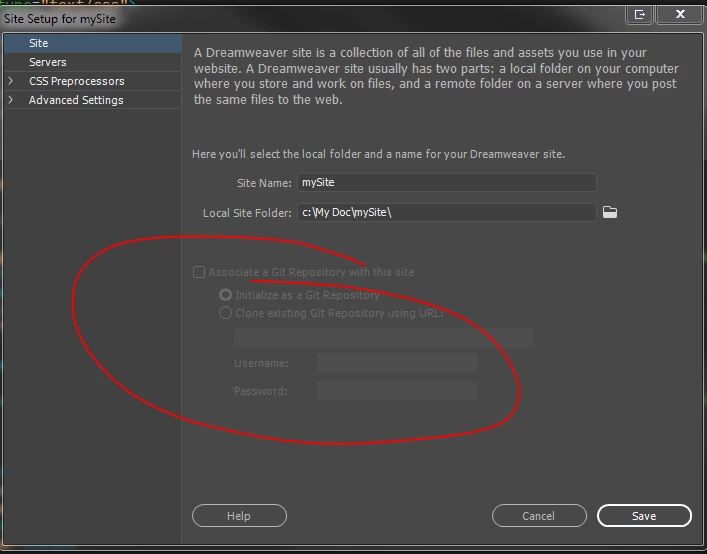
Can anyone suggest why the option to associate a git repository is grayed out and I am unable to select it?

I do remember that it was available before i installed git on my PC.

I am running DR CC 2017 on PC
This topic has been closed for replies.
Correct answer karpiyon

I think this problem was related to my specifc computer or its firewall setting, in case git need to communicate .

I temporarilt installed DW on another machine and all works smoothly.

2 replies

karpiyonAuthorCorrect answer
Inspiring
June 29, 2017

I think this problem was related to my specifc computer or its firewall setting, in case git need to communicate .

I temporarilt installed DW on another machine and all works smoothly.

Preran
Community Manager
Community Manager
June 26, 2017

Just to be sure, are you following the process mentioned in this doc?

Learn how to download and use Git with Dreamweaver CC.

Thanks,

Preran

Participating Frequently
July 2, 2017

I have the same problem and it is still not solved. I could associate a Git repository in a first step. I made no further steps but decided to reinstall the Git client in another folder and I run in this problem. I have reinstalled the Git client in the first directory but the problem remains. Nevertheless I am able to see content in the git-Window

git.jpg

Participating Frequently
July 9, 2017

Problem solved. The option 'Associate a Git Repository with this site' isn't available any longer as soon as the site was associated. You can do this only once. The option comes back after deleting the .git-folder in the root-directory of the associated site.
