studio 3D
Inspiring
February 8, 2017
Answered

cannot copy Preview on Device URL

  • February 8, 2017
  • 3 replies
  • 994 views

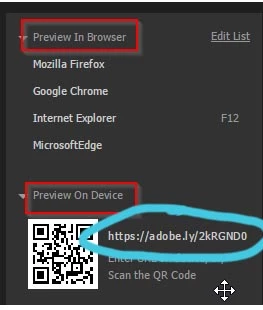
Next to the QR scan code is the adobe.ly url, but there's no way for me to copy it. I can't even manually type it into the browser since when I go to the browser the code/url disappears. Is this a bug, or? thanks!

    This topic has been closed for replies.
    Correct answer Jon Fritz

    Thanks for the help, but I don't understand why I don't seem to be clear. I know the Preview in Browser (F12) for which I have to SAVE ALL and REFRESH browser each time I want to update. But if I use the PREVIEW ON DEVICE URL on my DESKTOP, everything updates instantly, even if I switch tabs in Dreamweaver! But the only way I can do it is to WRITE DOWN the URL, then manually write it into the browser. If we cannot (easily) use the URL, why is it there??    There should be a  COPY icon... ??

    1456975082886.pngIf I press PREVIEW ON DEVICE button, it just closes window. THANK YOU for your help!


    CC2017 has some new/changed features when compared to CC2015.

    In CC2017, F12 (the old Preview in Browser function) has been replaced the new Live Preview function. Hitting F12 at any time "should" open the page in the chosen browser and show you your edits live, as you make them.

    The Device Preview has been changed, you no longer get the "double document" icon, as shown in your CC2015 screen capture. (I assume) it was removed because you "should" be able to simply hit F12, at any time, to get the same thing that you used to get by copying the url and pasting into the browser window.

    Technically, it "should" be a one keystroke solution to the old copy/open browser window/click/paste that you were doing.

    I put the quotes around should each time because it works pretty sporadically for me.

    Make sure to go into DW's Help menu and submit a Feature Request/Bug Report to get the old copy icon back into the program. If enough people ask for it or vote up on your submission, Adobe may put it back.


    3 replies

    studio 3D
    studio 3DAuthor
    Inspiring
    February 8, 2017

    The QR code works fine on tablet/mobile. But for desktop, seems I used to be able to copy the adobe.ly URL, and it worked fine. In fact, if I write down the URL, and transcribe it to the browser, it works fine. But it would sure be a lot easier if I could just copy and paste it in the browser. Also, I find it interesting that this question is marked "ANSWERED" even though it's not! I still can't copy the URL... it should be very easy!

    pziecina
    Legend
    February 9, 2017

    I would like to see the return of an app like Edge Inspect incorporated into Dw's device preview, as an alternative option.

    Anyone know what happened to it?

    Niharika Jha
    Adobe Employee
    Adobe Employee
    February 8, 2017

    Hi,

    Copying functionality is not there, since to preview on devices you need to either scan QR code or type the URL on the device's browser.

    Are you able to preview by scanning the QR code on your device? If the URL vanishes, can you try clicking on the icon again and see if it pops up?

    If you need to preview on the desktop that you are working on, you can use Real Time Preview (press F12) and it will preview on the default browser that you set in DW.

    Regards,

    Niharika Gupta

    studio 3D
    studio 3DAuthor
    Inspiring
    February 8, 2017

    Thanks... I do want to preview on desktop. I can go F12, but the browser needs constant refreshing, instead of updating instantly. Why even bother giving a URL if it's not usable?

    Jon Fritz
    Community Expert
    Community Expert
    February 8, 2017

    DW has a few different preview options...

    Device Preview (QR and URL): For testing other devices on the same network, if you don't have a local testing server set up.

    Live Preview: For testing the site LIVE on the local machine in a given browser. Unfortunately, it's pretty glitchy and rarely works correctly for long.

    Open In Browser (undocumented, possibly left in the program by accident): Works like the old Preview in Browser, but requires a few clicks. You can either right click on the file name in the Files window or, if your documents are set to tabs in DW and not floating windows, right click the document name tab and choose Open in Browser.

    Personally, since I have a local testing server set up, I never use the first one. I prefer to give the website location as the IP address + the site's root folder for testing purposes on other devices. Live Preview works every now and again, but requires a connection to Adobe's servers and doesn't play nice with a local testing server set up. Open in Browser is fine for me and is what I use in most cases.

    BenPleysier
    Community Expert
    Community Expert
    February 8, 2017

    Have you followed the instructions as per Preview, inspect Dreamweaver web pages on multiple devices

    Wappler is the DMXzone-made Dreamweaver replacement and includes the best of their powerful extensions, as well as much more!