Participating Frequently
June 12, 2017
Answered

cannot select snippits

  • June 12, 2017
  • 2 replies
  • 257 views

When I select a snippit the name of it immediately changes, as if I want to

rename it. I cannot insert the snippit while its name is in this mode.

It's extremely frustrating!

Steve

    This topic has been closed for replies.
    Correct answer anissa_thompson

    I've noticed this too; it seems to be an issue if I'm using the trackpad on my laptop, which tends to convey longer "press-and-hold" reaction on a single-click action on an item in the Snippets list.  You can use the Trigger shortcuts to add a snippet without having to traverse the panel groups:

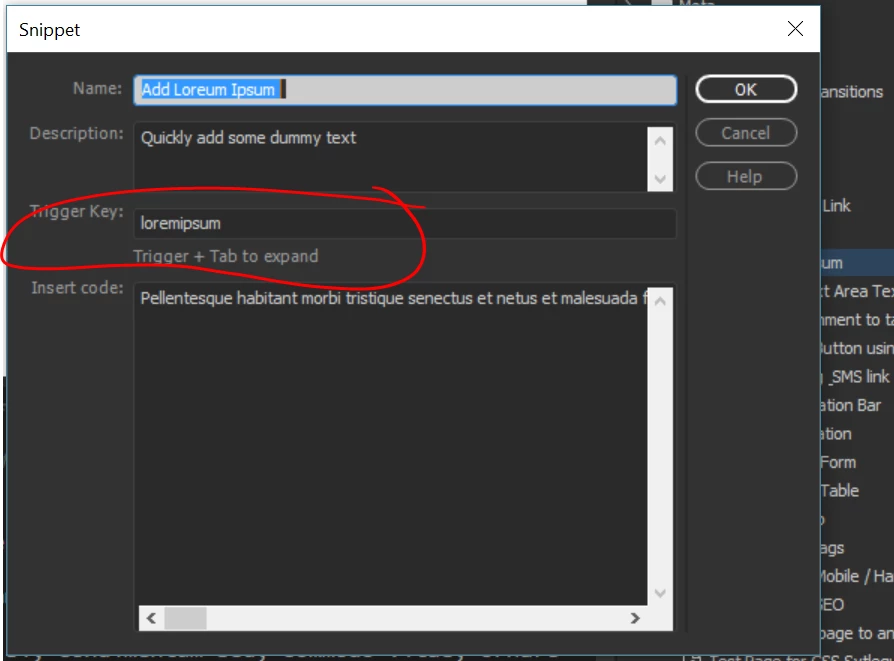
    You can create your own shortcuts by adding them when you create or edit a snippet:

    Then, when you're ready to add a snippet, you simply type the snippet trigger (using the example above, "loremipsum"), immediately followed by the Tab key. The snippet should be entered, and you don't have to have the Snippets panel open to use it.

    2 replies

    Nancy OShea
    Community Expert
    Community Expert
    June 12, 2017

    Double-click on the Left side icon of Snippet name.  Or as Anissa said, create a Trigger Key (a keyboard stroke) followed by the Tab key.

    Nancy O'Shea— Product User & Community Expert
    anissa_thompson
    Community Expert
    anissa_thompsonCommunity ExpertCorrect answer
    Community Expert
    June 12, 2017

    I've noticed this too; it seems to be an issue if I'm using the trackpad on my laptop, which tends to convey longer "press-and-hold" reaction on a single-click action on an item in the Snippets list.  You can use the Trigger shortcuts to add a snippet without having to traverse the panel groups:

    You can create your own shortcuts by adding them when you create or edit a snippet:

    Then, when you're ready to add a snippet, you simply type the snippet trigger (using the example above, "loremipsum"), immediately followed by the Tab key. The snippet should be entered, and you don't have to have the Snippets panel open to use it.

    Hope this helps! Make sure to press "✔ Correct Answer" on this post if this answers your question. Happy Creating!Anissa • @anissat
    schtevmalAuthor
    Participating Frequently
    June 12, 2017

    Cool beans!