


Participant
September 15, 2022
Question

Cant edit html file after downloading to one.com

  • September 15, 2022
  • 3 replies
  • 729 views

I am currently a graphic designer student and are doing a task where I make a website. So, I am half way in the html coding and was asked to download the html files to one.com so my teacher could see the website. But now I can not edit more in the html files in dreamweaver... how do I fix this?


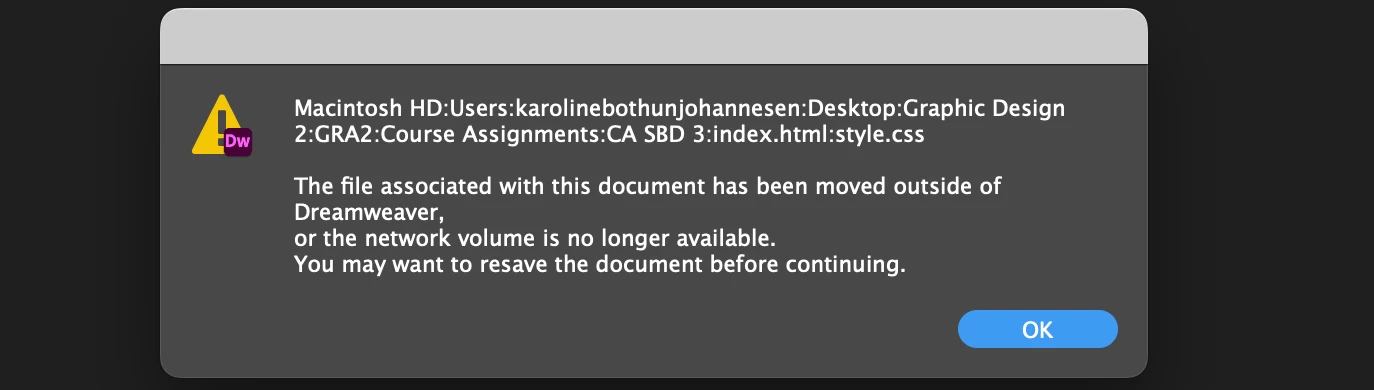
This shows when I try to save the files:
    This topic has been closed for replies.

    3 replies

    Nancy OShea
    Community Expert
    Community Expert
    September 15, 2022

    @Karoline Bøthun,

    Is this your computer or a school lab computer?


    If it's your computer, don't you have a local site folder on your computer's hard drive?


    On Mac, click the Finder icon in the Dock to open a Finder window.

    Choose View > Show Path Bar, or press the Option key to show the path bar momentarily. The location and nested folders that contain your site files are displayed near the bottom of the Finder window.


    In Dreamweaver, go to Site > New Site and enter the location of your local site folder.


    Nancy O'Shea— Product User & Community Expert
    B i r n o u
    Legend
    September 15, 2022
    quote

    I am not using any usb key but if I make new files for for my html files in adobe dreamweaver and saves them in another folder on my computer, will that work?


    By @Karoline Bøthun


    Hello Karoline,


    To complete what already said @L e n a , I think that you should take 5 minutes to understand how DW works, or how to use it.


    Both links she gave you are very instructive.

    Define a website https://helpx.adobe.com/dreamweaver/how-to/define-a-dreamweaver-site.html

    Uploading files https://helpx.adobe.com/dreamweaver/using/getting-putting-files-server.html


    You'll also find plenty informations from


    Please don't hesitate to ask again, if you still face problem and issue

    Participant
    September 15, 2022

    Thanks, both of you! I will read up and will reach out if there is something I dont understand:)

    Community Expert
    September 15, 2022

    Two questions :

    • Did you define a website in DW ?
    • How did you upload files to one.com ?
    Participant
    September 15, 2022

    Hi:)

    I am not sure what you mean if i defined a website in DW, but I can send you the coding I have done maybe it shows there?

    (I am not that into coding yet, started with it last week;))

    I will also send a screenshot of where the files are in one.com:


    Community Expert
    September 15, 2022

    Hi Karoline !


    Well, you can find info on defining a website here, https://helpx.adobe.com/dreamweaver/how-to/define-a-dreamweaver-site.html


    When you upload files, that do mean that files are then located on a webserver, and those files canno’t be edited anymore by DW itself.

    DW works only with local files located in your computer.


    The dialog box you got, can also means that your very first files where located on an external drive as an USB key.

    So if you remove the key, or plug it again on a different letter assignation, that can cause the troubles that you get.


    Of course, if you send a screenshot of your code (the part located in the HEAD of the HTML document), that will be helpfull