broomeGirl
Inspiring
February 18, 2023
Answered

Cant place the last div of text, titles and images in the row

  • February 18, 2023
  • 2 replies
  • 1215 views

This is the HTML website I am having a problem with.


http://sunrisecarhirebroome.com.au/ 


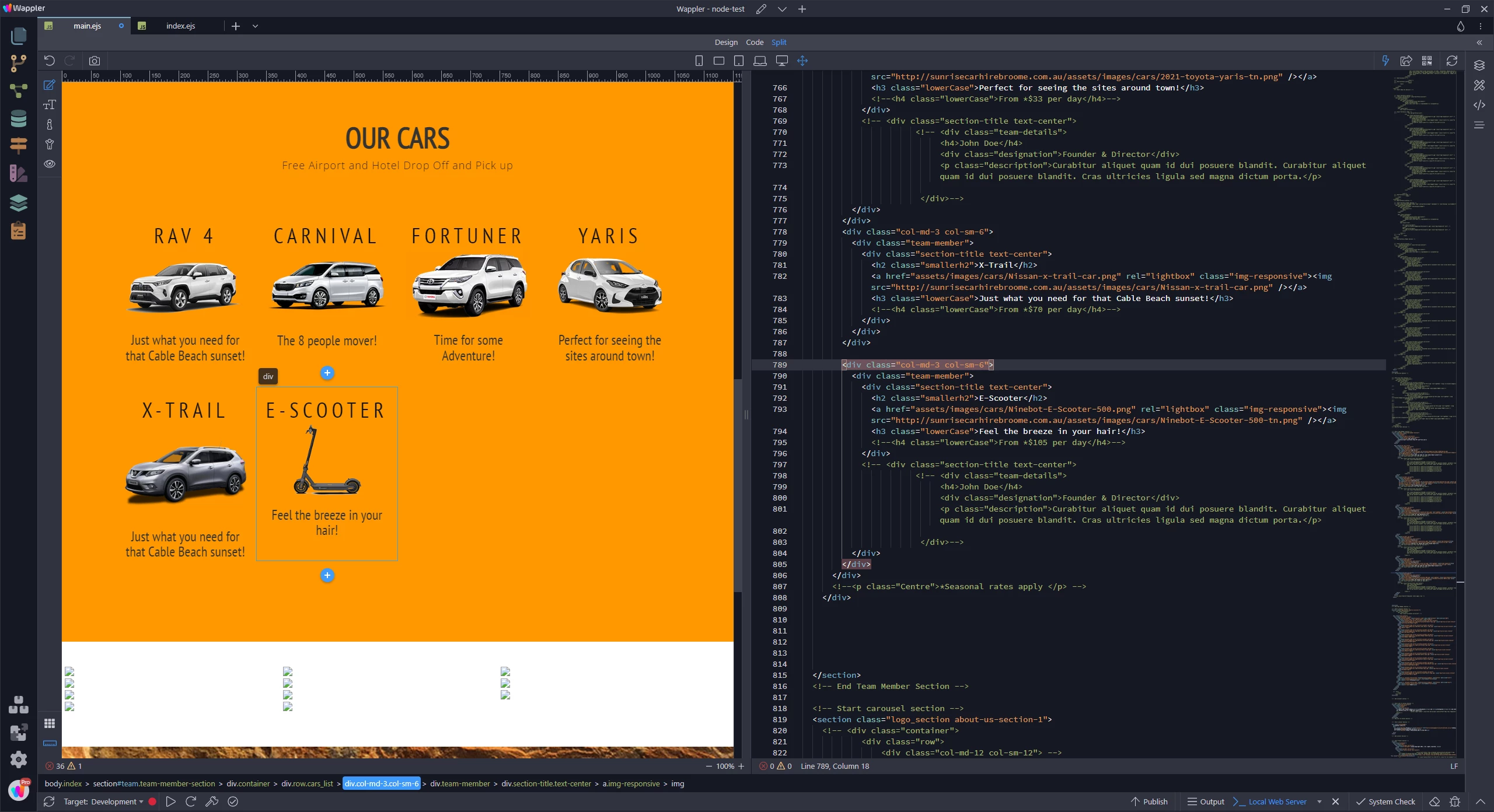
There are 2 rows of cars.  The bottom row next to the XTrail is meant to be the e-scooter.


I have copied the code from the Xtrail for the escooter and changed the image and the title but it has dropped out of the row.


I checked for unclosed divs and cant find any, checked parenthsis, colons etc and cant find any errors.

I have gone crossed eyed looking for the error.


I have added a div and then removed it.


Maybe a fresh pair of expert eyes can show me where I have gone wrong.


Thanks a million

    This topic has been closed for replies.
    Correct answer BenPleysier

    Move the code for the scooter to under the code for the X-Trail as in


    2 replies

    Nancy OShea
    Community Expert
    Community Expert
    February 18, 2023

    Use the online validation service to find your code errors. 

    See details below.

    https://validator.w3.org/nu/?doc=http%3A%2F%2Fsunrisecarhirebroome.com.au%2F


    HINT:  <style> tags go inside the <head> tag, not outside it.


    Nancy O'Shea— Product User & Community Expert
    broomeGirl
    Inspiring
    February 18, 2023

    Thanks Nancy .. you are awesome 🙂

    BenPleysier
    Community Expert
    BenPleysierCommunity ExpertCorrect answer
    Community Expert
    February 18, 2023

    Move the code for the scooter to under the code for the X-Trail as in


    Wappler is the DMXzone-made Dreamweaver replacement and includes the best of their powerful extensions, as well as much more!
    broomeGirl
    Inspiring
    February 18, 2023

    Thank you so much .. I have one more thing that is also doing my head in .. just below the cars is a carousel of logos and I want to change the background.

    6 times I have changed it and uploaded and replaced the css for it and it just wont change.  I have changed it in the inspector and it works no problem, just not the style sheet.  I have checked the paths its saving to and uploading to and there is absolutely no reason it shouldnt change other than to do my head in.  Please see screenshots.

    Nancy OShea
    Community Expert
    Community Expert
    February 18, 2023

    Please FIX your code errors.  Some of them are critical.


    Nancy O'Shea— Product User & Community Expert