



Nancy OShea
Community Expert
Community Expert
November 3, 2016
Question

CC 2017 Issues people are having.

  • November 3, 2016
  • 18 replies
  • 9892 views

#1 Code Color Choices removed. This needs to be easier than manually editing LESS and JSON files.   I would much prefer to have my old code colors back but they are in an XML file and it's going to take some major doing to translate that to LESS.

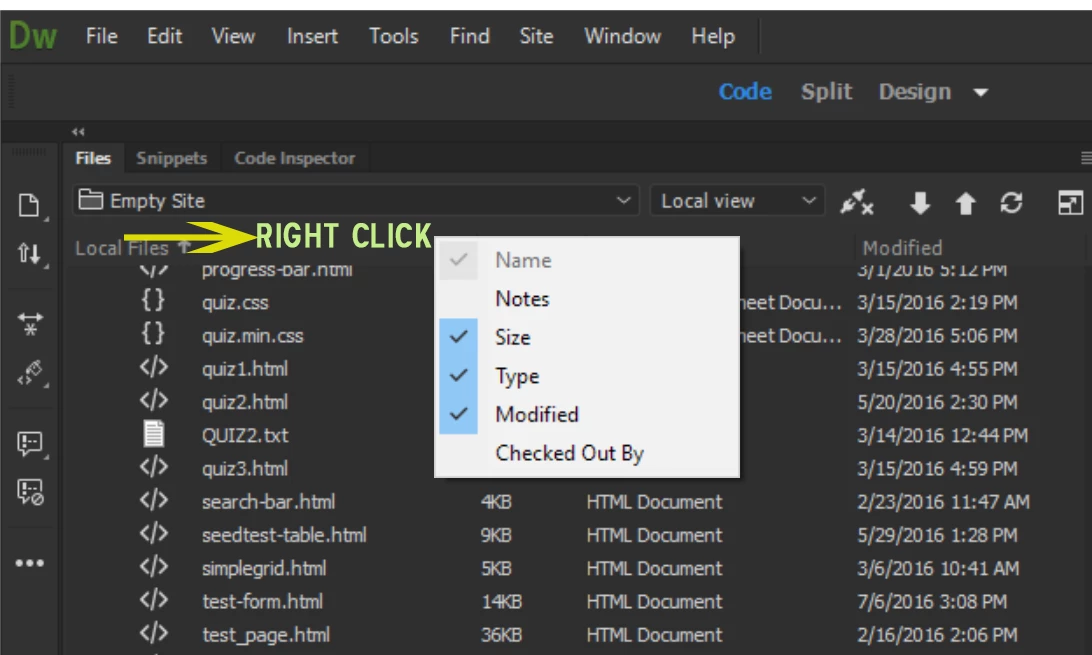
#2 Files Panel Headers.  I think this should be turned on by default instead of making people hunt for ways to turn it on.
#3 Hi-Def Aware UI Scaling. The lack of support for this is really hurting some people.  'Nuff said.

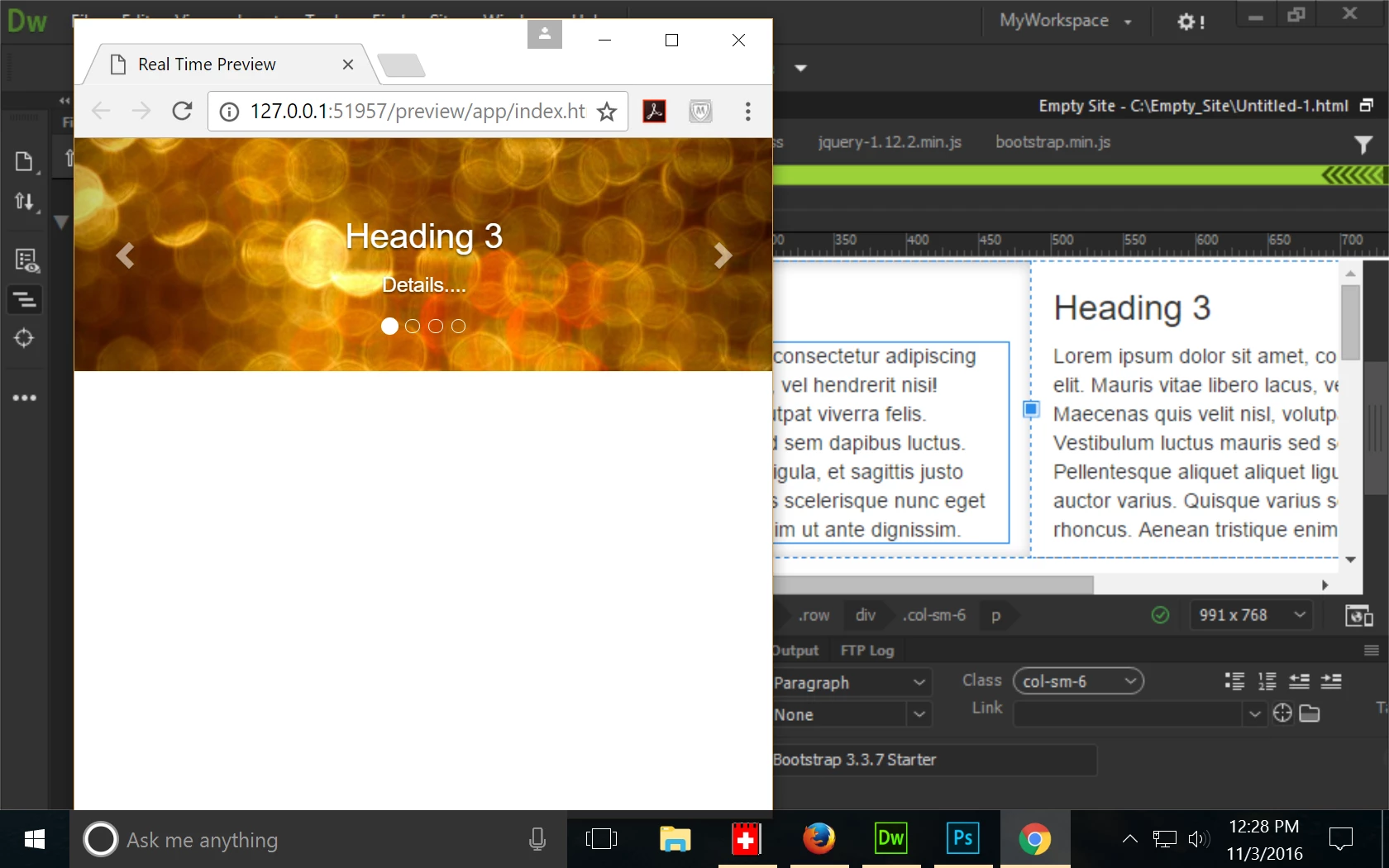
#4  Preview in Browser/Real Time Preview.  Is there any way to turn off Real Time Preview?  I'm getting really wacky results with it.

This is what I'm trying to view - a basic Bootstrap,  2-column layout.

Real Time Preview is showing a Bootstrap Carousel that doesn't exist in this document.  Not even close.
If anyone has more stuff to add, please chime in.

Nancy O.

    This topic has been closed for replies.

    18 replies

    pixelwash
    Participating Frequently
    January 6, 2017

    I like some of the general directions 2017 seems to be heading, but lots of super simple basic functionality doesn't work for me - and having an obvious easy to hit and see button to update the live view in the UI was very handy, now gone, the "live view in browser" is a nightmare, and the preview in browser functionality is now buried and hidden within a popup menu, and worst of all, changing code in split view does not seems to be quickly and easily reflected in the preview, even when using the new  function key or menu.  I'm on a Mac.

    I've gone  back to  2015, and there was clearly enough wrong in terms of basic functionality of 2017 for me to suspect that it won't be fixed for a while i.e. at least six months, there is THAT much wrong with it.

    Nancy OShea
    Community Expert
    Community Expert
    January 6, 2017

    I'm using the current version -- CC 2017.1 with latest patch --  in full production without any problems on Win10, 64-bit.   I work mainly with HTML, PHP, LESS/CSS and JavaScript files.  No latency issues in Code or Design View.

    Refresh button is on the properties panel.  See screenshot.

    I rarely use Real-Time Preview because it gets in the way of my testing server.   So I right-click on open document and select Open in Browser.  It's reflexive for me.   I no longer think about it.

    If you have further issues,  I suggest you Submit Bug/Feature Requests from the Help menu.

    Nancy

    Nancy O'Shea— Product User & Community Expert
    pixelwash
    Participating Frequently
    January 7, 2017

    Nancy, thanks for the response. I'm using the latest version on the Mac, according to the Adobe app manager, and I find overall UI behavior can become sluggish when you move from one window to the next - working simply within the code view seems faster though, which is good.

    Thanks for pointing out where they have moved the "refresh" button - that is a great relief to see..

    When I saw that it had gone from its old spot, I found another thread elsewhere asking the same question, and it was not answered by the Adobe guy, I guess he misunderstood the question, as he didn't provide an answer, hence me thinking the functionality was gone.

    And although I've used Windows at one point for many years, I really appreciate the basic Mac approach of avoiding the right click in the core UI if you can, and I think the current developers are clearly Windows-centric, as they have lost sight of that central UI design paradigm in the new Dreamweaver, as right-clicking has become integral.

    Which is not an impossible situation on the Mac, as you can hold the option/command key down when you click to emulate the right click, but I just think that it is just bad/lazy UI design for both platforms - key operations, like previewing your work in the browser should be "level one" menus (i.e. directly accessed, not through "secondary" mouse buttons and/or co-function keys), with customizable keyboard commands, and alternative ways to get there also.

    Inspired by getting my refresh button back, I'll give it another go, and try and better pinpoint when it is misbehaving for me.

    Participating Frequently
    December 20, 2016

    lol

    guess theres no need for me to ask how to add a background image to an inline style/ nah, didn't think so. Guess its just me. I'll just type it in manually.

    style="background-image: image()"

    No auto url browser. Wont switch on in the option list.

    Pesky old features from last years version. This is the future where everything is dysfunctional. Just like society.

    Jon Fritz
    Community Expert
    Community Expert
    December 20, 2016

    mrtechnicalweb2 wrote:

    lol

    guess theres no need for me to ask how to add a background image to an inline style/ nah, didn't think so. Guess its just me. I'll just type it in manually.

    style="background-image: image()"

    You meant "background-image:url()" right?

    Because the code hinting won't give you anything as soon as you hit the i in that second image after the colon.

    CSS errors have historically caused all kinds of issues with the automated hinting functions in DW. Make sure your css isn't missing something, run the validator here: The W3C CSS Validation Service

    Legend
    November 26, 2016

    I would really, really like to know on who's say the Brackets rubbish was done. It is a massive waste of development time, the DW developers are going round in circles and removing familiar, very useful features we've been using for years which is brainless.

    If you put a group of experienced users of Dreamweaver, who use it every day on a professional level and  gave them a choice of the the existing code editor with a few improvements or a lame Brackets integration with loss of advanced code colouring and the very good find and replace, I can't believe users would go for the Brackets option.

    DW 2017 looks more like someone's pet project than a result of real users feedback, demands and needs.

    Paul-M - Community Expert
    Nancy OShea
    Community Expert
    Community Expert
    November 26, 2016

    It's unlikely that you will get anyone to comment about corporate or upper management decision making.  

    Personally, I like Brackets as a code editor.  It's lean, fast and efficient.  So I don't have any prejudice against its integration into DW.

    Like you, I hope to see more DW improvements in future updates.  This is just a first model off the  production line.  I'm sure the Model-T had its fair share of problems, too.  But that didn't stop Ford's production of the automobile and send us all back to horse drawn carriages, did it?  Neither should DW revert back.   It needs to move forward while addressing the needs of it's users.

    Nancy

    Nancy O'Shea— Product User & Community Expert
    Participating Frequently
    November 27, 2016

    First impressions on trying DW 2017 to update the legacy PHP site that I maintain. Overall I like the direction, some things seemed to perform better than 2015. The default workspace setup kind of urged me to reorient my usual view, which was probably available before, I just hadn't found it. I'm not used to the new editor features, although I see it underlining character strings in code nearby the one I am actually selecting, I'm not sure how to use this yet, but it looks promising once I come to understand it. So far I did not need any sort of multiple editing, and it behaved well for my usage in that respect.

    Since I have this PHP site I do find Live View useful, but I don't like to work in it all the time. It's handy to verify some things.

    Problems:

    - The responsiveness of switching between Design (or Live) view, source code view, and the Properties panel is a little weird. Sometimes I had to click back and forth to get its attention where I wanted it. I used to click an image in design and have the source code jump there. It sort of does that, sometimes, and when it does, it changes differently than before. Like putting the first line of relevant code on the bottom of the code panel, when it used to bring it more to the center of the panel.

    - I used to type in source code, in a quoted argument field, an '&' character and immediately get a drop down to offer various HTML substitutions usually leading with '&', which is usually what I wanted. This is not working anywhere near reliably for me in 2017.

    - Biggest issue was when I went to synchronize with my remote server, after making changes and verifying them on my test server. Chose to 'Put newer files to remote' as always, ran preview, got the list, looked it over, clicked OK and... hang. Mac spinning lollipop of death. I had to revert to 2015 to complete this step. This step is kind of important to me.

    Known Participant
    November 24, 2016

    I must agree that the real-time live preview is the most horrendous, troublesome thing I have had to work with. As a user of dreamweaver since the days of MX, this has completely changed the way I preview my work. All I want to do is to quickly view my page. Quickly inspect my code. Quickly tweak a few css values via inspect element. Instead I am presented with a page I didn't want, my code is difficult to read because of the hundreds of extra classes inserted into my code. It's just a nightmare. Yes I am aware I can right click the file tab. But what is the point of a keyboard shortcut that doesn't work how it is meant to work. Bad bad idea for the majority of users. Please turn this feature off as default, and let people turn it on if they need it.

    Participating Frequently
    November 15, 2016

    With latest update Adobe had decided that the default file view columns are...none. Yes, I can go into each and every one of the many sites I manage, and edit its file view column preferences. This is a real time-waster, and one of those annoying reduced functionality with latest update issues.

    Is there a way to set the file view column preferences for ALL sites I manage without editing each one individually and then waiting for Dreamweaver to recreate the cache? We are talking 10,000's of pages here over the multiple sites...

    Thanks in advance for tips to handle this chore.

    Nancy OShea
    Community Expert
    Community Expert
    November 15, 2016

    Sorry.  I don't have a shortcut for you.

    It would be better if they had turned those column headers on by default. At least with Modified Dates on so we could see the most recent files.

    Nancy O.

    Nancy O'Shea— Product User & Community Expert
    Participating Frequently
    November 15, 2016

    Thanks Nancy, appreciate your reply!

    Legend
    November 10, 2016

    1) The code colouring options need sorting our asap, I'm not talking about adding it back into the preferences, if it was flexible enough I'd be happy to edit the LESS theme file, it only needs doing once. But the problem is I can't set language specific code colouring, so PHP almost blends in with the HTML, you can edit the .cm-meta class and it helps a little bit but it's a very, very poor solution. In brackets you can do something called mode-aware styles for themes but it doesn't seem to work from within Dreamweaver. Please ask a Dreamwever engineer to at least give a solution to this ASAP please.

    2) The new code hints are twitchy/glitch and a bit annoying tbh, the old code hints and how they worked were familiar and much better.

    3) Please restore the option to wrap when creating a new snippet, it's been removed from the UI thus creating more work for us. The Keywords Triggers is a welcome.useful addition, along with Preprocessors.

    4) Live preview function is a waste of time and has some weird glitches, live preview can be done via Chrome or Firefox extensions anyway.

    5) At launch when I open a page in code view it take at least 10 seconds to render the view. I turned of Sync in setting off Adobe CC settings and it quickened things up a bit but still pretty slow.

    6) I don't  know why Adobe was so desperate to integrate Brackets, does it even support Brackets extensions from within Dreamweaver? If not then that makes it even more pointless.

    If it aint broke then don't try to fix it! Dreamweaver could have been something amazing by now but Adobe just seem to have this scatter-gun approach to what they do with it !! There's so many features people have been crying out for but it falls on deaf ears almost every time. I think Adobe is out of touch with the real Dreamweaver users, maybe because were busy and not posting on the forum or feature request site every 5 minutes. This is n ot my normal mode but I'm just plain fed up!!

    My advise (it'll never happen)

    Restore old code view engine / ditch Brackets & just add some features that people have been requesting for YEARS, one example bookmark line/ move to bookmark feature. If you can't do that, give us an option to switch to the old code view engine, I was happy  that and Emmet integration, which btw there was a 3rd party extension for anyway before Adobe integrated it

    Ditch LIve View (it's useless, always has been no matter how Adobe keep trying to push it, they are flogging a dead horse, it's laggy, twitchy, has performance issues, totally user unfriendly & plain awful) and put some work into Design View. Design View is handy, it was never meant a an accurate preview but a useful tool for navigating around pages and ding trivial task like inserting images.

    Paul-M - Community Expert
    paulk7737514
    Inspiring
    November 4, 2016

    And then this one:

    Nancy OShea
    Community Expert
    Community Expert
    November 4, 2016
    Nancy O'Shea— Product User & Community Expert
    paulk7737514
    Inspiring
    November 4, 2016

    Thank you. I applied the dark code code theme under preferences in 2017 and I guess it's not that bad. Lots of green and purple.

    paulk7737514
    Inspiring
    November 4, 2016

    Is there a cache file I can delete to stop getting these JS errors? I downloaded CC2017 without preserving 2015. Still have 2017 installed but re-installed 2015. Clicked in a CSS file and got the following error:

    paulk7737514
    Inspiring
    November 4, 2016

    Reverting to the earlier version unfortunately means you lose whatever updates were made before the 2017 version was released.

    Nancy OShea
    Community Expert
    Community Expert
    November 4, 2016

    What do you mean by updates?  Your site files are saved to your hard drive exactly the same as before.  If you edit filename.foo in your local site folder, save, close app.  Reopen filename.foo from local site folder in  another application, your files changes should be there. 

    Nancy O.

    Nancy O'Shea— Product User & Community Expert
    paulk7737514
    Inspiring
    November 4, 2016

    I downloaded without going to the advanced options and keeping 2015. So it was deleted and I had to re-install.

    paulk7737514
    Inspiring
    November 4, 2016

    And the Insert menu is ridiculous! Icons help you be more productive, why remove this feature???

    Jon Fritz
    Community Expert
    Community Expert
    November 4, 2016

    paulk7737514 wrote:

    And the Insert menu is ridiculous! Icons help you be more productive, why remove this feature???


    ??

    My insert menu still has icons, there's an option to turn off the labels, but the icons are there.

    Or do you mean the File menu? That thing has some kind of disease in the new version.

    paulk7737514
    Inspiring
    November 4, 2016

    Don't you mean the Toolbar? There used to be several insert menus, one for HTML, one for PHP, etc. underneath the main menu.

    And I really miss all the bright colors designating different types of code, especially the bright yellow for comments. All the code is in the same drab color scheme!!!