Inspiring
December 1, 2022
Answered

Change LInk sitewide problem

  • December 1, 2022
  • 1 reply
  • 397 views

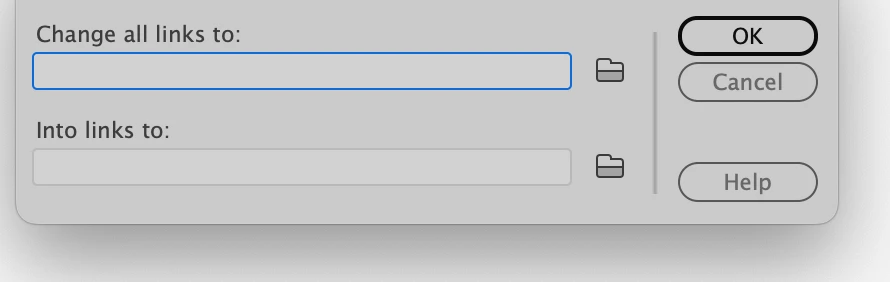
I used to use this feature years ago, but rusty, but went to:  this box  below. I typed (pasted in)  looks perfect, but does not work, I click ok and nothing happens.  Used to work perfect. I have nothing more to add. I put perfect url into top field, the new link I want to change to bottom, I click ok, nothing happens. Used to work perfect.

 

This topic has been closed for replies.
Correct answer Nancy OShea

DW CC (version 2021),

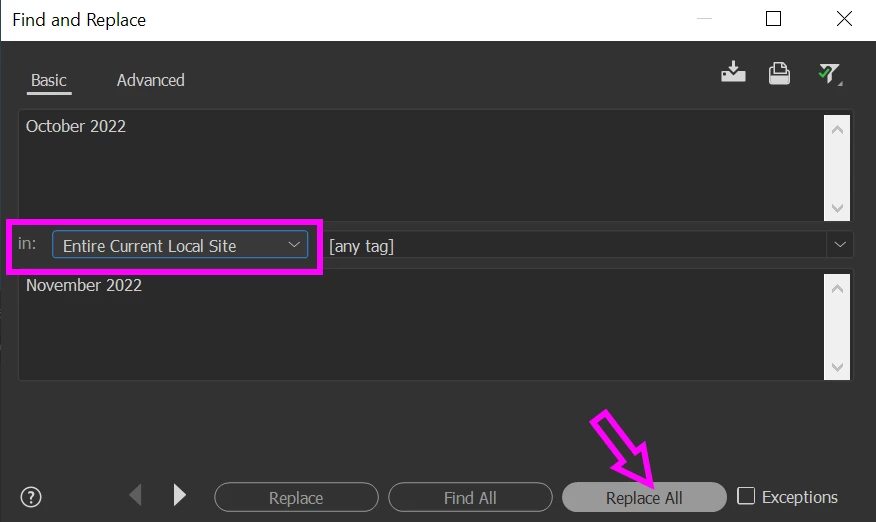
Find > Find & Replace in Files (Ctrl + Shift + F). 

See screenshot.


This is assuming your local site is defined and resides on your primary computer hard drive.  F&R won't work on your remote site.


1 reply

Nancy OShea
Community Expert
Nancy OSheaCommunity ExpertCorrect answer
Community Expert
December 1, 2022

DW CC (version 2021),

Find > Find & Replace in Files (Ctrl + Shift + F). 

See screenshot.


This is assuming your local site is defined and resides on your primary computer hard drive.  F&R won't work on your remote site.


Nancy O'Shea— Product User & Community Expert
larry45Author
Inspiring
December 1, 2022

Nancy thanks, turn out, I got someone on the Adobe DW team on phone, India, and find and replace works good, but even then you have to put in the Href code, would have never thought of that.


He also said the link sitewide, works, but you have to have servers set up.  

Nancy OShea
Community Expert
Community Expert
December 1, 2022

Great!  I'm glad technical support was able to help you.


Nancy O'Shea— Product User & Community Expert