j-z
Participant
May 26, 2020
Question

Change panel colors to contrast dark BG of DW

  • May 26, 2020
  • 4 replies
  • 713 views

I often lose track of my panels because they blend in too much with the background color or DW. I don't see a way to set a contrasting color, or even a lighter grey.
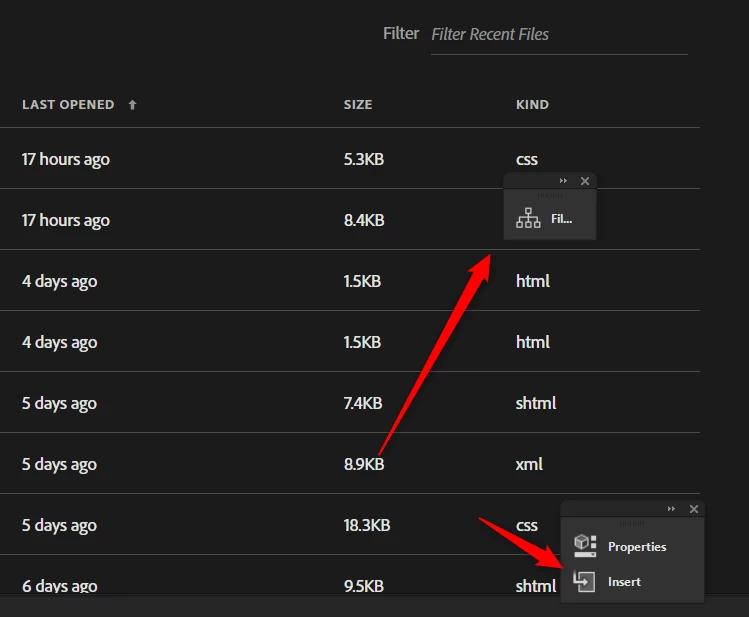

    This topic has been closed for replies.

    4 replies

    j-z
    j-zAuthor
    Participant
    May 28, 2020

    Thank you Nancy, Paul and Jon. I'll try docking the panels and see how that goes.

    Legend
    May 26, 2020

    Just dock them like Nancy says ... see screenshot below of my workspace ... If you have a multi-display set up you can also drag panels to a second display.


    Paul-M - Community Expert
    Nancy OShea
    Community Expert
    Community Expert
    May 26, 2020

    There might be less confusion if you kept your panels docked.  Also, create a custom Workspace and save it so everything remains in the same place.

    https://helpx.adobe.com/dreamweaver/using/dreamweaver-workflow-workspace.html


    Nancy O'Shea— Product User & Community Expert
    Jon Fritz
    Community Expert
    Community Expert
    May 26, 2020

    There is no way to change them, from within the program, outside of the four themes under Edit > Preferences > Interface.

    I'm sure there's a program file somewhere in the installation that could be modified to change them though.