

tuilorraine
Inspiring
April 14, 2018
Answered

changes made in Css Designer don't show up in css code

  • April 14, 2018
  • 1 reply
  • 1187 views

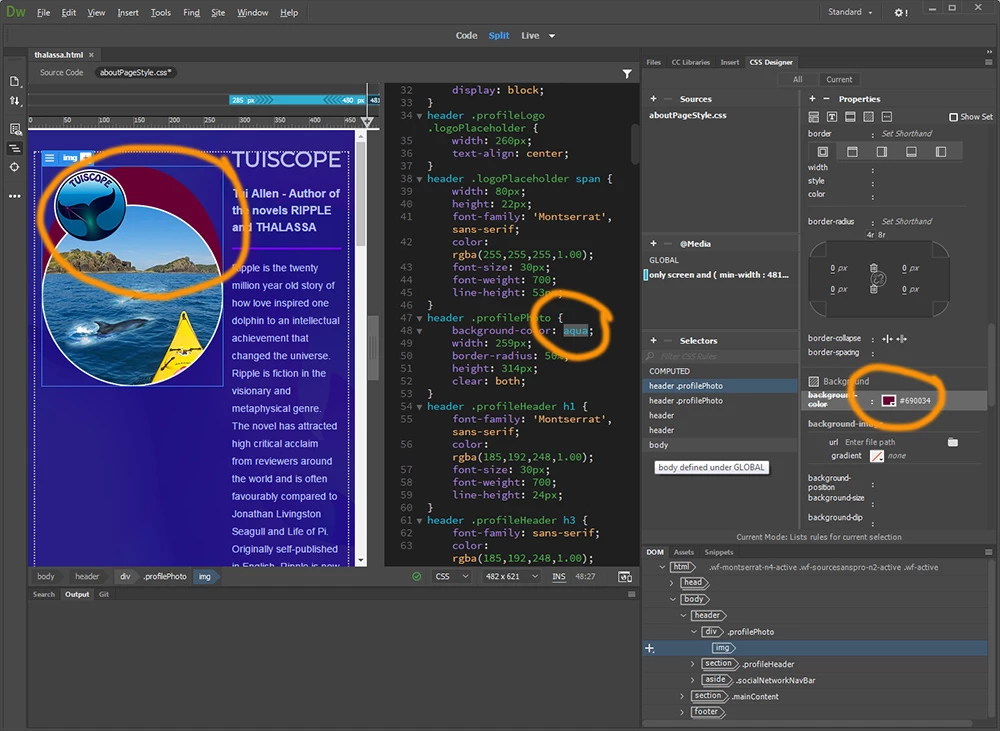
I'm working with a Dreamweaver starter template (in Windows.) When I make a change to the css code, it does not change in the css designer panel. Also vice versa : when I make change in the designer panel it does not change the code. This problem is only apparent in the website I'm building from one of the adobe starter templates.
Another page I built by following a youtube tutorial video does not have this problem. You see how the code states aqua. The css designer panel and the page preview both show the dark red color.
I really don't want aqua or dark red. It is a png image and I want its transparency to work so I don't get anything there except the dark-blue background image on the page. .But I may need to solve this problem first.
    This topic has been closed for replies.
    Correct answer ALsp

    Go into preferences and turn off "Enable Related Files". If that doesn't work, check to see that you have saved the file in a properly defined local site.

    1 reply

    ALsp
    ALspCorrect answer
    Legend
    April 14, 2018

    Go into preferences and turn off "Enable Related Files". If that doesn't work, check to see that you have saved the file in a properly defined local site.

    tuilorraine
    Inspiring
    April 14, 2018

    That worked. It now functions as you'd expect.

    I'd have thought I'd have to turn ON enable related files. But thank-you.

    ALsp
    Legend
    April 14, 2018

    We are one of the largest producers of Dreamweaver extensions and have been analyzing flaws in the Related Files feature for a few years. While many Adobe staff and experts believe Related Files is a feature, we know it is a serious problem.