Participating Frequently
July 11, 2017
解決済み

Changing Links

  • July 11, 2017
  • 返信数 2.
  • 908 ビュー

When editing in DreamWeaver, you can click/drag text you want to edit.  When you "right-click" options come up, but "change link" is grayed out.  Why?

    このトピックへの返信は締め切られました。
    解決に役立った回答 Nancy OShea

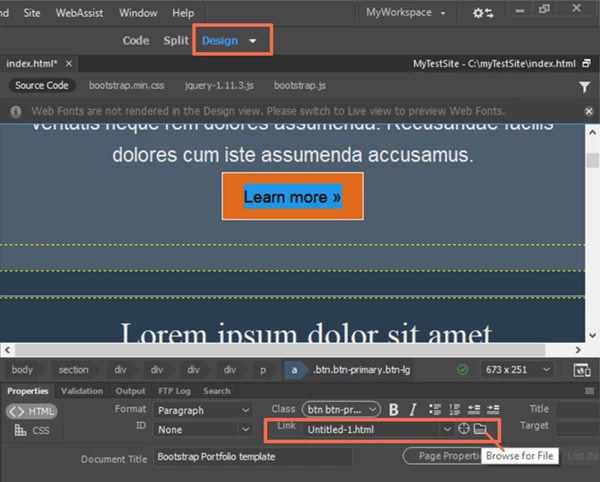
    Use Design View & the HTML Properties Panel.  See screenshot.

    返信数 2

    imjustjanie作成者
    Participating Frequently
    October 31, 2017

    Funny after the latest update, I was not able to right-click "update link" again it was grayed out... kept playing with it, but don't know what I changed, but it did start working again.. Just very frustrating that every time there's an update, it takes me several hours to "get back to normal"?

    Nancy OShea
    Community Expert
    Nancy OSheaCommunity Expert解決!
    Community Expert
    July 11, 2017

    Use Design View & the HTML Properties Panel.  See screenshot.

    Nancy O'Shea— Product User & Community Expert
    imjustjanie作成者
    Participating Frequently
    July 11, 2017

    It is a correct answer, but I still don't understand why I can't right-click the mouse and have it there.  I've always used it that way and it's habit after many years of editing this site.

    Thank you for your quick response though :-)

    Nancy OShea
    Community Expert
    Community Expert
    July 11, 2017

    In Design view, right clicking on linked text works fine for me.

    That said, are you working in Design view?  Is your text linked?  And are you working with valid HTML code?

    Nancy O'Shea— Product User & Community Expert