dakotaleonard13
Participant
September 21, 2018
Answered

Changing Template Fonts

  • September 21, 2018
  • 2 replies
  • 486 views

Hey, I'm a student in High School. I am creating a website for a company, and I like the font on the template, but It just doesn't fit the company. I have been trying to change it using a google font. I cannot get the navigation text to change, all I can change is the button text on the homepage. Whenever I go into the CSS rule for the Navigation text and change the font-family: it changes the text to the default serif font. Does anyone know why this is happening??

This topic has been closed for replies.
Correct answer Nancy OShea

Do you have a domain name and web hosting account?  You should have at least temporary web hosting for testing and debugging.  Some things don't work locally.  They have to be hosted on a server.

When you get hosting, your provider will e-mail you the FTP log-in details.

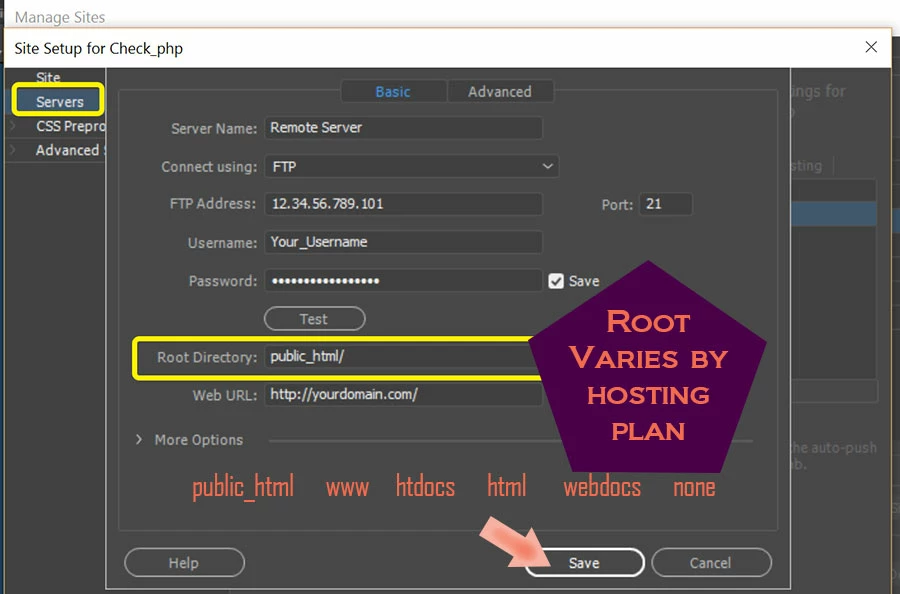
  1. Go to Site > Manage Sites and enter your server's log-in details as shown below. 
  2. Hit the TEST button to confirm it works.
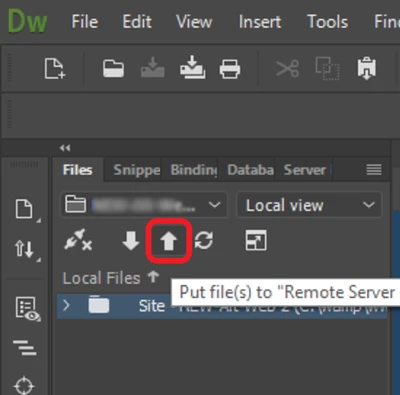
  3. Once your site is set-up, you can upload local files to your remote server by pressing the UP arrow in your Files Panel (F8).

2 replies

dakotaleonard13
Participant
September 24, 2018

I have attached the google font correctly because it works on the button font but for some reason, I am unable to change the Navigation font.

I am using whatever the split view in Dreamweaver is and I have tried viewing in the browser also.

I am not really sure what you mean by that or how to go about doing that, but if you are able to explain how to do that I would be open to doing that.

Thanks!

Nancy OShea
Community Expert
Nancy OSheaCommunity ExpertCorrect answer
Community Expert
September 25, 2018

Do you have a domain name and web hosting account?  You should have at least temporary web hosting for testing and debugging.  Some things don't work locally.  They have to be hosted on a server.

When you get hosting, your provider will e-mail you the FTP log-in details.

  1. Go to Site > Manage Sites and enter your server's log-in details as shown below. 
  2. Hit the TEST button to confirm it works.
  3. Once your site is set-up, you can upload local files to your remote server by pressing the UP arrow in your Files Panel (F8).

Nancy O'Shea— Product User & Community Expert
Jon Fritz
Community Expert
Community Expert
September 21, 2018

Have you attached the Google font to the page correctly?

What are you using when you see the serif font (design View, Live View, Real Time Preview, Open in Browser, etc)?

Could you upload your work in progress to a test location on a server you control and post a link to it here so we can see what's happening in our browsers? Once the issue is found, you can delete the test location from your server.

dakotaleonard13
Participant
September 24, 2018

I have attached the google font correctly because it works on the button font but for some reason, I am unable to change the Navigation font.

I am using whatever the split view in Dreamweaver is and I have tried viewing in the browser also.

I am not really sure what you mean by that or how to go about doing that, but if you are able to explain how to do that I would be open to doing that.

Thanks!