Participant
November 19, 2023
Question

"class" keyword generating Syntax error message but Javascript functions

  • November 19, 2023
  • 2 replies
  • 1065 views

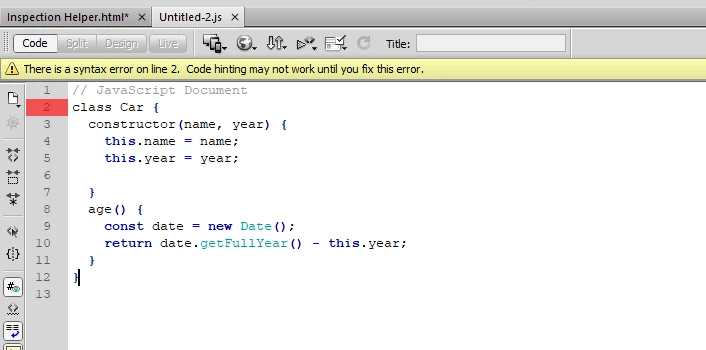
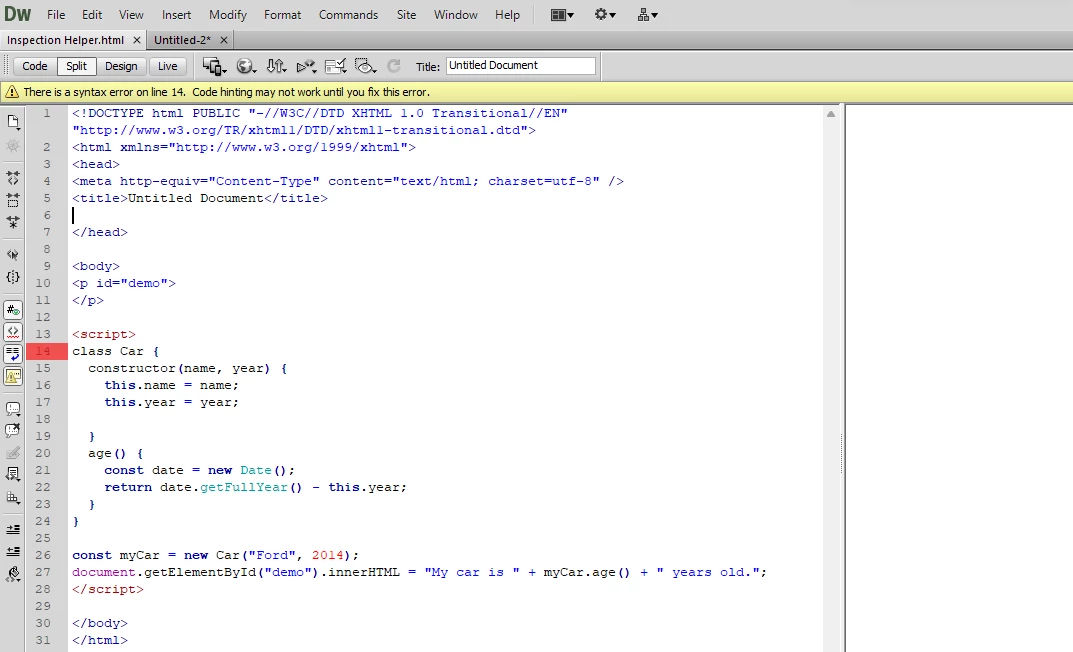
I'm a pretty basic user of Dreamweaver so potentially this is something simple but I couldn't find any references on the internet of similar issues.  Issue I'm having is Dreamweaver keeps warning me "There is a syntax error on line xx.  Code hinting may not work until you fix this error."


I've used my own examples and pasted directly from W3School thinking, "hey maybe you're tired and class is actually spelled calss in this universe." to no avail.


More of an annoyance than a show stopper as the code does execute as expected.  My primary annoyance is the loss of code hinting as I'm no keyboard superstar  😄


Version: CS6 version 12.0 Build 5861

Platform: Windows 11 Version 23H2

Steps to reproduce:  type class within <script></script> tags.  Tried both HTML and Javascript files.


This topic has been closed for replies.

2 replies

Legend
November 20, 2023

The bigger question is I don't know why you are using the very verbose 'class constructor' method when you could just use a simple function( see below code example).


Since a couple of years back if you use 'React.js' practically every developer using that js framework dropped using the class constructor workflow and opted to use functions when they were introduced, cleaner and simpler in my view.


<script>

const carAge = (year) => {
const date = new Date();
return date.getFullYear() - year
}


document.getElementById("demo").innerHTML = `My car is ${carAge(2014)} years old`;
</script>


No on-point developer uses - + "blah" + "blah" anymore. Template literals ` ` made it far easier to concatenate long strings which include javascript variables/functions.


Just as an aside note I doubt DW will support the new arrow function => (in terms of valid syntax code). If not you can just use the old way of writing a function (which in my opinion is somewhat clearer):


<script>

function carAge(year) {
const date = new Date();
return date.getFullYear() - year
}


document.getElementById("demo").innerHTML = `My car is ${carAge(2014)} years old`;
</script>

B i r n o u
Legend
November 20, 2023
quote

The bigger question is I don't know why you are using the very verbose 'class constructor' method when you could just use a simple function( see below code example).

By @osgood_


it all depends on how @Sicarii Origin wants to inherit a secondary class, or benefit from the instantiation phase ?

Legend
November 20, 2023
quote
quote

The bigger question is I don't know why you are using the very verbose 'class constructor' method when you could just use a simple function( see below code example).

By @osgood_


it all depends on how @Sicarii Origin wants to inherit a secondary class, or benefit from the instantiation phase ?


By @B i r n o u


Without ALL the information it's not conclusive, I'd have to know what the end game is. The only thing I can assume is that the OP doesn't exactly know what they are doing because I cant accept that any advanced developer would need to copy code from the W3 schools website (which can sometimes be a little behind the curve) not using template literals is an example, is my personal opinion.


Mind you the last time you pasted some javascript you were still using 'var' (tongue in cheek :))


Nancy OShea
Community Expert
Community Expert
November 20, 2023

CS6 is 10+ year old software that hasn't been updated since its release in 2012.  It's outdated, discontinued and unsupported.  

Why are you using it?   Do yourself a favor and get a modern code editor. 


CODE EDITORS:
-- Adobe Dreamweaver CC - https://www.adobe.com/products/dreamweaver.html
-- Codespaces (free, browser-based) - https://github.com/features/codespaces
-- Nova (Mac only, formerly called Coda) - https://nova.app/
-- Pinegrow - https://pinegrow.com/
-- Sublime Text - http://www.sublimetext.com/
-- Visual Studio Code (free) - https://code.visualstudio.com/
-- Wappler ~ Visual Web App Builder - https://wappler.io/

That said, this code does not throw errors in latest version of Dreamweaver CC (ver 21.3) with Code Linting enabled.

<h1>JavaScript Class Methods</h1>
<p>How to define and use a Class method.</p>

<p id="demo"></p>

<script>
class Car {
  constructor(name, year) {
    this.name = name;
    this.year = year;

  }
  age() {
    const date = new Date();
    return date.getFullYear() - this.year;
  }
}

const myCar = new Car("Ford", 2014);
document.getElementById("demo").innerHTML =
"My car is " + myCar.age() + " years old.";
</script>


Nancy O'Shea— Product User & Community Expert