


Known Participant
May 31, 2024
Answered

Clean up CSS file - want one style per line / row

  • May 31, 2024
  • 2 replies
  • 886 views

Hi!  


I have a long (and a pain to scroll down) css file because each style looks like this:


.top-socials a {
height: 29px;
width: 29px;
display: flex;
align-items: center;
justify-content: center;
color: var(--pink);
background-color: #ffffff;
border-radius: 50%;
font-size: 19px;
}


I want to remove all blanks after the semicolons so that it looks like this instead:


.top-socials a {height: 29px;width: 29px;display: flex;align-items: center;justify-content: center;color: var(--ink);background-color: #ffffff;border-radius: 50%;font-size: 19px;}


Can someone tell me what find/replace expression I can run to fix this for the entire css file?  


Thank you in advance!!
    This topic has been closed for replies.
    Correct answer L e n a

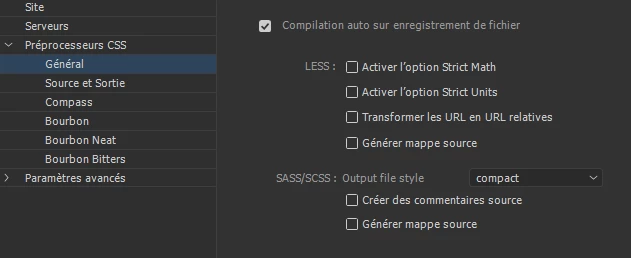
    An alternative to regular expressions, and a feature proposed by Dw , could be to rename your CSS file to SCSS... simply change the extension.
    From the site parameters, check the automatic compilation box... and from the Output file style menu, depending on your needs, opt for compact or compressed.

    • compact will keep one line per statement,
    • compressed will reduce all returns...


    So, each time you save your SCSS file, even if you don't write SCSS and stick to CSS syntax... a CSS file will be generated formated as you wish.
    In my opinion, it's more suitable than search and replace with REGEX... (although I'm fond of it).

    2 replies

    L e n aCommunity ExpertCorrect answer
    Community Expert
    June 3, 2024

    An alternative to regular expressions, and a feature proposed by Dw , could be to rename your CSS file to SCSS... simply change the extension.
    From the site parameters, check the automatic compilation box... and from the Output file style menu, depending on your needs, opt for compact or compressed.

    • compact will keep one line per statement,
    • compressed will reduce all returns...


    So, each time you save your SCSS file, even if you don't write SCSS and stick to CSS syntax... a CSS file will be generated formated as you wish.
    In my opinion, it's more suitable than search and replace with REGEX... (although I'm fond of it).

    Known Participant
    June 3, 2024

    Had no idea you could do that, thank you!  This tidied up my css file in a flash.  The "compact" mode is exactly want I wanted / needed.  

    Nancy OShea
    Community Expert
    Community Expert
    May 31, 2024
    Known Participant
    June 3, 2024

    Thanks, Nancy.  So, is there anything that can be done within Dreamweaver so that I don't have to rely on a website to do it?  For instance, if I want to remove blank rows from my code, I do a find / replace where I find "[\r\n]{2,}" and replace with "\n".  I was hoping someone could tell me what I could run to do the same thing to get all of the returns removed inside of the brackets for invididual styles.  

    Nancy OShea
    Community Expert
    Community Expert
    June 3, 2024

    My server has GZIP compression so I don't worry about white space in files.  My scripts are compressed for me by the server.


    That said, white space in scripts is far more user-friendly to work with than minified scripts.  I'm just not sure what's to be gained from doing this locally.


    Nancy O'Shea— Product User & Community Expert