
Inspiring
February 23, 2021
Question

Clearing Cache in Dreamweaver 2019

  • February 23, 2021
  • 1 reply
  • 860 views

Hi,


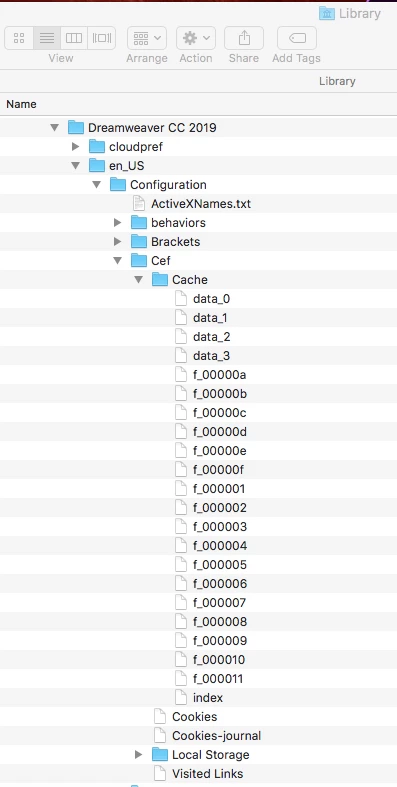
I am trying to clear the cache on my 2019 version of Dreamweaver. I was forwarded the following link, but have not been unable to find the correct file. I am running a Mac with OS 10.12.6 and here is the path: Library>Application Support>Dreamweaver CC 2019> en_US>Configuration>Cef>Cache


https://www.dmxzone.com/go/16740/clearing-dreamweaver-s-cache/


What file(s) do I need ti toss in order to clear the cache, or should I toss the entire folder? 


Any help would be appreciated.


Mark
This topic has been closed for replies.

1 reply

Jon Fritz
Community Expert
Community Expert
February 23, 2021

What are you attempting to do exactly?

If you're clearing the program cache, the file is usually the last one listed in the Configuration folder itself. It's going to be called  "WinFileCache-(random numbers here).dat". In your screen shot, you are 2 folders too far into your directory structure.

If you're trying to clear the ridiculously bad idea that was Live View's browser emulator cache in DW2019, you need to delete or rename the Visited Links file shown at the bottom of your screen capture.

Inspiring
February 23, 2021

Hi Jon,


It was recommended to me that I clear the cache before resetting the preferences, with the hope that it eliminates any cache-related issues that might be effecting the program. I don't care at all about the Live View issue.


Regarding your comment, I looked again and don't see any folder or file name as you suggest. I'm including two pics for your review.


Thanks.