
Participant
November 6, 2018
Answered

Click on small image to enlarge in table above [for e-comm site]

  • November 6, 2018
  • 3 replies
  • 4113 views

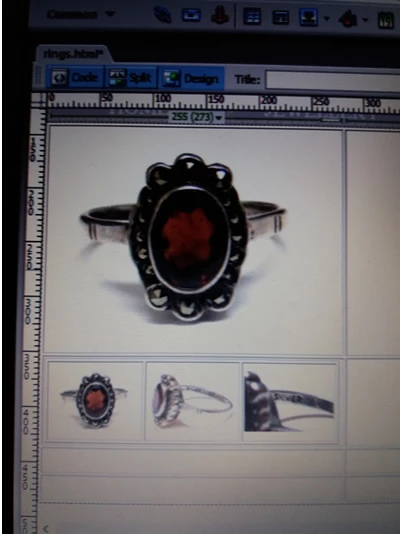
Hi I am trying to create a simple table where a person clicks on one of the smaller images and the larger then appears in the table above. i have inserted a picture of wht i am tring to do Many thanks
This topic has been closed for replies.
Correct answer hans-g.

Hello osgood_,

prompted by "Is that ancient stuff ... " I had a look at my old fashioned first drafts. I found this page from 2012: DisjointTest

Have fun watching! And Garyreg, on the other hand maybe it could be for you.

Hans-Günter

3 replies

Jon Fritz
Community Expert
Community Expert
November 6, 2018

Yes, you can do this in DW without coding, though I have no idea if the code works well on mobile devices...

1. In the main Properties window, give each image a unique ID that makes sense to you (bigpic, smallone, smalltwo...)
2. Open the Behaviors window under Window > Behaviors

3. Click on one of the small images, then the + in the Behaviors window

4. Choose Swap Image

5. In the dialogue that comes up, select the id of your big image

6. Uncheck the box for "Restore images onMouseOut"
7. Hit OK
8. Click the onmouseover showing to the left of your new behavior in the Behaviors window

9. Change it to onClick from the dropdown menu

10. Repeat the same steps for the other small images (set the Swap Image to the large image's id, uncheck the box, set to onclick)

That should do it.

Legend
November 6, 2018

https://forums.adobe.com/people/Jon+Fritz+II  wrote

Yes, you can do this in DW without coding, though I have no idea if the code works well on mobile devices...

1. In the main Properties window, give each image a unique ID that makes sense to you (bigpic, smallone, smalltwo...)
2. Open the Behaviors window under Window > Behaviors

3. Click on one of the small images, then the + in the Behaviors window

4. Choose Swap Image

5. In the dialogue that comes up, select the id of your big image

6. Uncheck the box for "Restore images onMouseOut"
7. Hit OK
8. Click the onmouseover showing to the left of your new behavior in the Behaviors window

9. Change it to onClick from the dropdown menu

10. Repeat the same steps for the other small images (set the Swap Image to the large image's id, uncheck the box, set to onclick)

That should do it.

Is that ancient stuff still included in DW?????..............hummm

hans-g.
hans-g.Correct answer
Legend
November 7, 2018

Hello osgood_,

prompted by "Is that ancient stuff ... " I had a look at my old fashioned first drafts. I found this page from 2012: DisjointTest

Have fun watching! And Garyreg, on the other hand maybe it could be for you.

Hans-Günter

GaryregAuthor
Participant
November 6, 2018

Hi Thanks very much for your reply, is there a simpler way than coding? Thanks

Legend
November 6, 2018

Garyreg  wrote

Hi Thanks very much for your reply, is there a simpler way than coding? Thanks

No, that is the simplest it gets, using pure javascript and no frameworks.

If you dont want to code then you might benefit from an alternative program like Wappler or maybe an extension for Dreamweaver such as something from PVII Project Seven - both paid for commercial product/s

If you Google for either they will come up top.

GaryregAuthor
Participant
November 6, 2018

Thanks very much for your help

Legend
November 6, 2018

Code example below:

<!DOCTYPE html>

<html lang="en">

<head>

<meta charset="UTF-8">

<title>Javascript Image Gallery</title>

<style>

body {

margin: 0;

}

* {

box-sizing: border-box;

}

img {

max-width: 100%;

height: auto;

}

.gallery_wrapper {

width: 50%;

margin: 0 auto;

}

.gallery {

display: flex;

justify-content: space-between;

}

figure {

margin: 0;

padding: 0;

width: 32%;

}

.fadeIn {

opacity: 0;

-webkit-animation: fadeIn 1s ease both;

animation: fadeIn 1s ease both;

}

@-webkit-keyframes fadeIn {

from {opacity: 0}

to {opacity: 1}

}

@keyframes fadeIn {

from {opacity: 0}

to {opacity: 1}

}

</style>

</head>

<body>

<div class="gallery_wrapper">

<div class="large_image">

<img src="https://source.unsplash.com/1200x900/?nature,water" alt="">

</div>

<!-- end large_image -->

<div class="gallery">

<figure>

<img src="https://source.unsplash.com/1200x900/?nature,water" class="gallery_image" alt="">

</figure>

<figure>

<img src="https://source.unsplash.com/1200x900/?nature,trees" class="gallery_image" alt="">

</figure>

<figure>

<img src="https://source.unsplash.com/1200x900/?nature,leaves" class="gallery_image" alt="">

</figure>

</div>

<!-- end gallery -->

</div>

<!-- end gallery_wrapper -->

<script>

// create variables

const gallery_image = document.querySelectorAll('.gallery_image');

const large_image = document.querySelector('.large_image');

// loop trough all gallery images and add an event listener

for(var i = 0; i < gallery_image.length; i++) {

gallery_image.addEventListener('click', getLargeImage);

}

//function which is called when image is clicked

function getLargeImage(){

const imgSrc = this.getAttribute('src');

large_image.innerHTML = '<img class="fadeIn" src="'+ imgSrc + '">';

}

</script>

</body>

</html>