
Participant
February 18, 2021
Question

closing script tag causing issues

  • February 18, 2021
  • 2 replies
  • 1032 views

Hi everyone, 


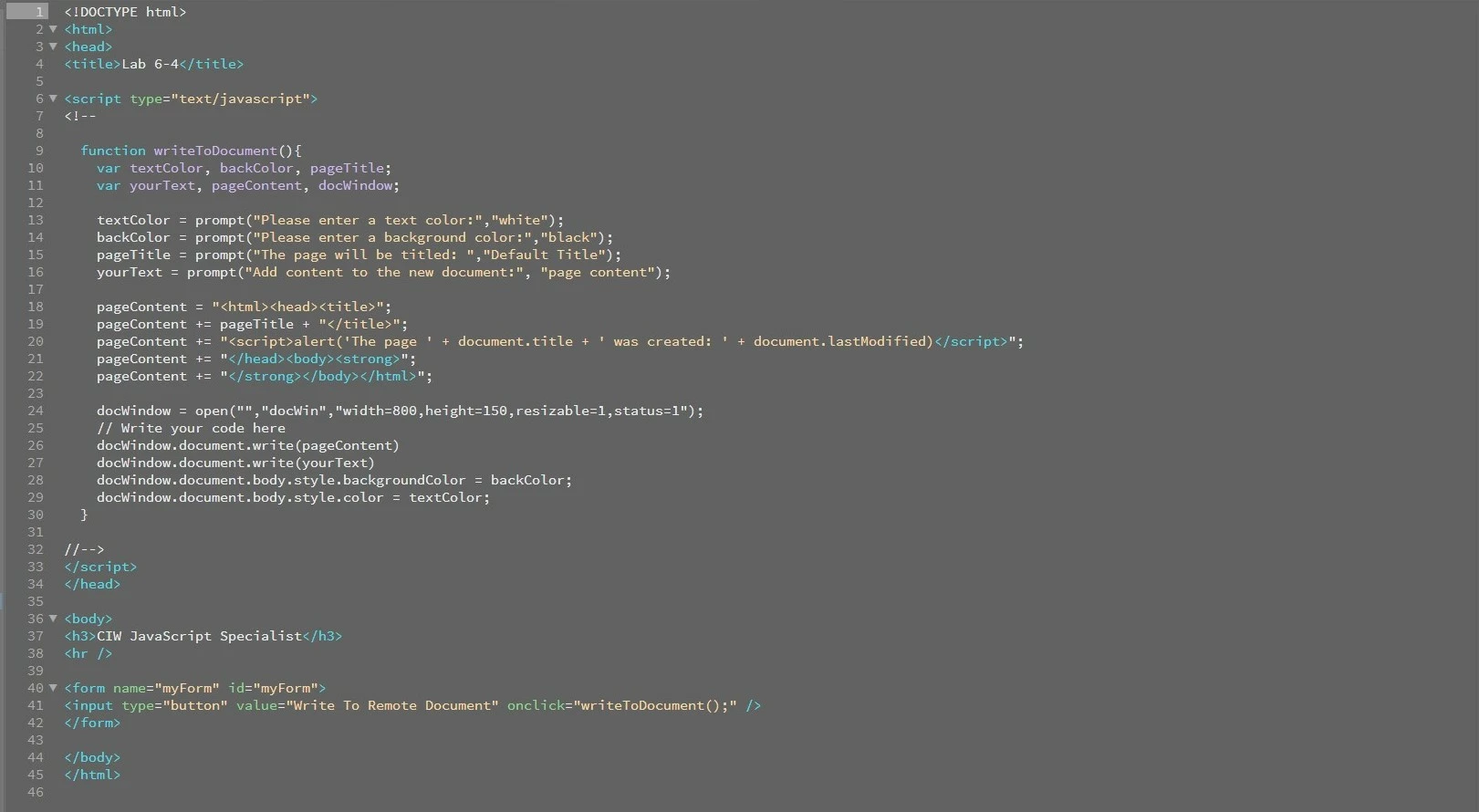
I have a simple piece of code but the cosing script tage on line 20 is causing an issue. As you can see in the image i have attached i am adding a string to the pageContent variable. inside the string i have a script tag containing an alert. the opening tag works perfectly the way it should but the closing script tag has decided to connect to the open script tag on line 6. This shouldnt happen as the closing script tag is inside the string and should not perform as a tag.


is there a setting i need to change to fix this or is there a problem with the software ? 
 

    This topic has been closed for replies.

    2 replies

    Nancy OShea
    Community Expert
    Community Expert
    February 18, 2021

    I'm not a huge fan of Code Linting but try this online JS validation tool:

    https://codebeautify.org/jsvalidate


    Also what happens when you test your script in real browsers, does the script work as intended without errors?


    Nancy O'Shea— Product User & Community Expert
    Participant
    February 18, 2021

    The code works perfectly if i load it up in a browser with no errors, if however i load it up using the preview in browser it doesnt function how it should because the opening script tag on line 6 is connecting to the closing script tag on line 20 instead of line 33 link its meant to. 


    I have also loaded the file in other various programmes and the code appears how it should. 


    Here is an image of the code using visual studio code, which you can see the closing script tag isn't active because its part of the string. 


    I use alot of adobe programmes and love the look and feel of Dreamweaver so i dont want to use any other programme but there is clearly something not right here?


    Nancy OShea
    Community Expert
    Community Expert
    February 18, 2021

    Optionally, you may turn off Code Linting from Dreamweaver Preferences.


    But keep in mind that Design View is not a browser.  And Live View is not a real browser either.  It's a Chrome emulation.


    Real-Time Preview is another issue.  I have disabled RTP from my Preferences because it doesn't play nice with my local testing server.  Old fashioned preview in browser without interference from Adobe's servers is better for my workflow.


    Nancy O'Shea— Product User & Community Expert
    Legend
    February 18, 2021

    Try:


    document.lastModified + ' ' ')</script>";


    I cant test it at the moment but l think you need to close the string within the alert() function


    These days its easier to use template literals when working with javascript as using + ' blah' + variable can become confusing


    Participant
    February 18, 2021

    Thanks for the reply.


    That didn't fix the problem im afraid. The closing script tag on line 20 is part of the string so it shouldn't function as a tag until the function has be activated and the new window opens with the content that the pageContent Variable hold.


    I can't see any issues with the coding which leaves me to believe that its a programme problem with dreamweaver? 

    Legend
    February 18, 2021

    Does it still give you issues if you just use, as a test:


    "<script>alert('Hello');</script>";


    Maybe its just because you are missing the closing ; after the alert closing bracket?


    Im thinking its a code misconfiguration  rather than Dreamweaver related