Participant
July 7, 2017
Answered

Code document work space Dreamweaver CC

  • July 7, 2017
  • 1 reply
  • 228 views

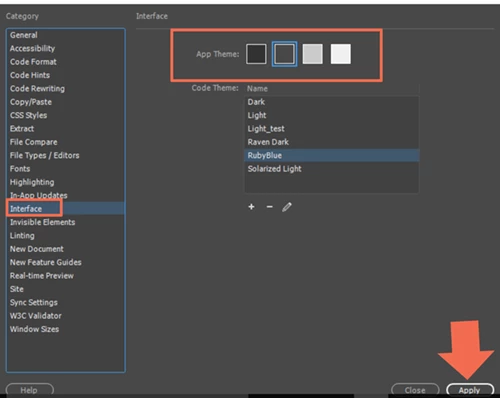
When I first downloaded the new update of Dreamweaver CC it offered a setup that allowed the user to choose that background color of the document work space. I set it at black but am now wanting to change it to a lighter shade. How is the done I have checked the preferences and can not find anything.

Thanks

Jim Zeller

This topic has been closed for replies.
Correct answer Nancy OShea

Edit > Preferences > Interface.  Choose your favorite App Theme.  Hit Apply.

1 reply

Nancy OShea
Community Expert
Nancy OSheaCommunity ExpertCorrect answer
Community Expert
July 7, 2017

Edit > Preferences > Interface.  Choose your favorite App Theme.  Hit Apply.

Nancy O'Shea— Product User & Community Expert