WolfShade
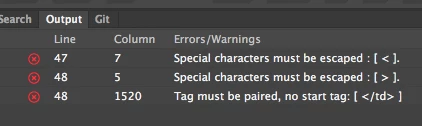
It's straightforward HTML. I put the space as mentioned between the ; after the color and the 'h' of height and removed the " before height but the errors don't go away.
Alan

English100, the second " for your style attribute needed to stay there, just place a space between " and height.
<td style="border: 2px solid #000A00;" height="25" colspan="3" align="left" bgcolor="#99CC66">
^^^
BTW.. align="left" has been deprecated; you'd be better off adding that to your style.
<td style="border: 2px solid #000A00; text-align: left;" height="25" colspan="3" bgcolor="#99CC66">
HTH,
^ _ ^
UPDATE: Actually, now that I think about it, you should also add height and background-color to your style - CSS is the present and future of HTML. 
<td style="border: 2px solid #000A00; text-align: left; height: 25px; background-color: #99CC66;" colspan="3">
BTW.. the background-color you are using can also be done in shorthand: #9C6;




 AdChoices