This topic is closed to new replies. Start a new post to keep the conversation going.

5 replies

Nancy OShea
Community Expert
Community Expert
Jul 13, 2019 6:09 PM UTC

Do you have Linting and Code Hints enabled in Preferences?  I'm using the 2019 version here.  Some new preference options have been added to mine.    See screenshots.

I have a PHP document open and JS Code Hints work fine for me.

Translate
Nancy O'Shea— Product User & Community Expert
Participating Frequently
Jul 13, 2019 9:56 PM UTC

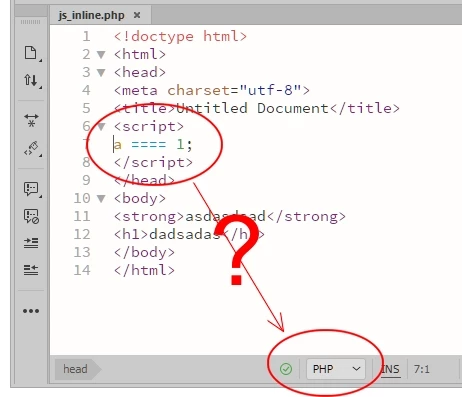
I'm sorry, the problem is not with code hinting but with linting in javascript (or bug warnings in javascript).
I already checked the Enabled Linting option and it is checked. Also, in * .js files it works as expected, but when I have an inline script on a * .php page it does not work as you can see in the image I submitted in this post.

Translate
Nancy OShea
Community Expert
Community Expert
Jul 13, 2019 10:06 PM UTC

If you want to use  linting, keep JavaScript inside a .js file and PHP code in a .php file.

Translate
Nancy O'Shea— Product User & Community Expert
Legend
Jul 13, 2019 8:59 AM UTC

I dont use  DW but l seem to remember in later versions you have to save the file before errors are detected. I also dont know if its capable of flagging errors outside of the scope of the file, in your case php

Translate