

Participant
February 12, 2018
Answered

Code View Issues

  • February 12, 2018
  • 1 reply
  • 438 views

Dreamweaver has started pushing all my code to the left side for the last few months. I cannot figure out what's wrong or how to fix it - HELP!
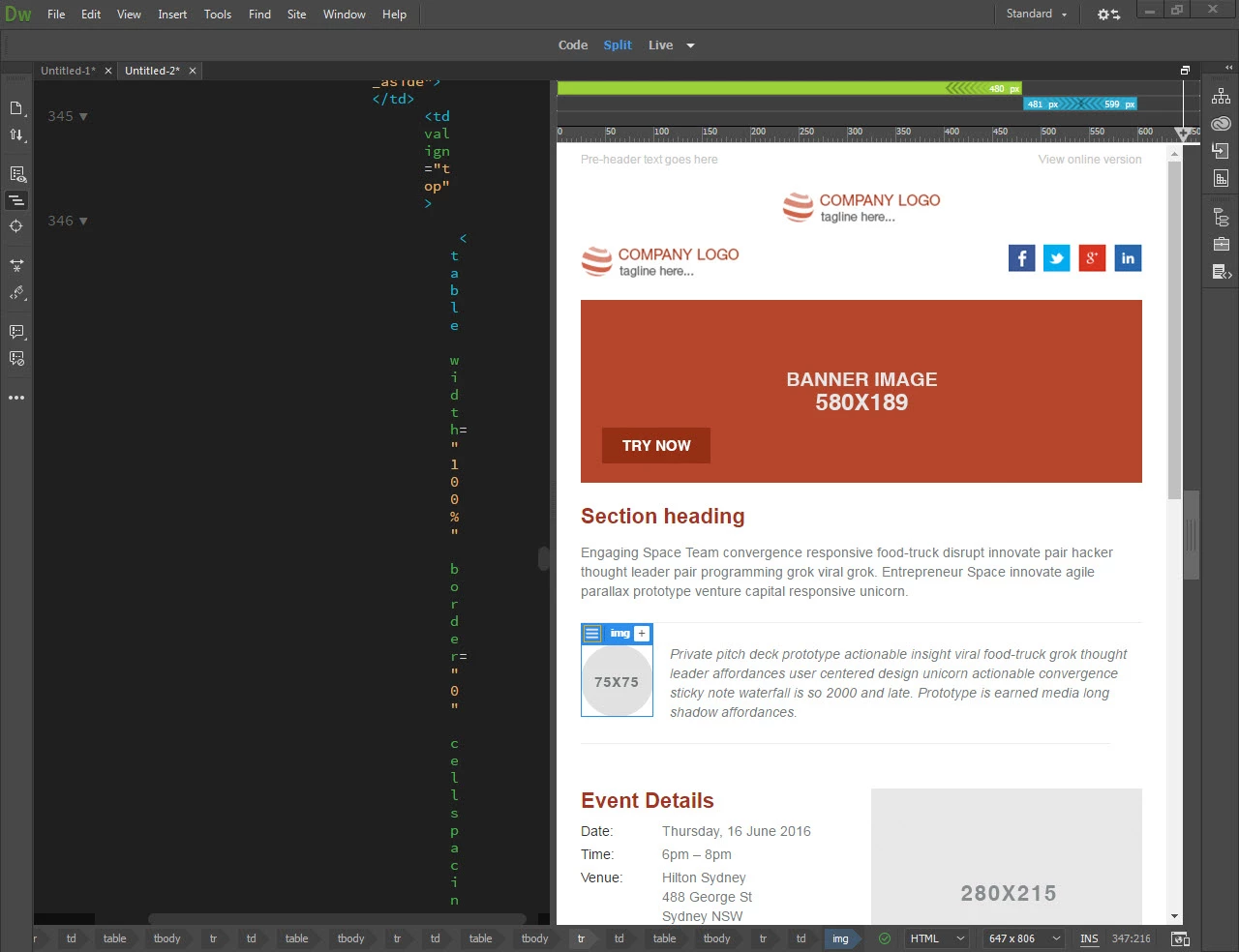

This topic has been closed for replies.
Correct answer Jon Fritz

That is caused by a group of issues...

1. Having Code View on the left (instead of bottom)

2. While having Word Wrap turned on in Code View

3. While having prodigious amounts of Tabs in your code

There are a few different ways to fix it...

1. Go to View > Split > Split Vertically (this will give your code more room horizontally)
2. Or click the 3 horizontal dot icon on the bottom of your vertical toolbar on the left of the screen and add the Word Wrap option, then turning Word Wrap off (your code will scroll left and right instead of stacking each letter).
3. Or remove the massive number of Tabs in your code, or reduce their size in the Preferences > Code Format and run Edit > Code > Apply Source Formatting

1 reply

Jon Fritz
Community Expert
Jon FritzCommunity ExpertCorrect answer
Community Expert
February 12, 2018

That is caused by a group of issues...

1. Having Code View on the left (instead of bottom)

2. While having Word Wrap turned on in Code View

3. While having prodigious amounts of Tabs in your code

There are a few different ways to fix it...

1. Go to View > Split > Split Vertically (this will give your code more room horizontally)
2. Or click the 3 horizontal dot icon on the bottom of your vertical toolbar on the left of the screen and add the Word Wrap option, then turning Word Wrap off (your code will scroll left and right instead of stacking each letter).
3. Or remove the massive number of Tabs in your code, or reduce their size in the Preferences > Code Format and run Edit > Code > Apply Source Formatting

Participant
February 12, 2018

Thanks for the tips but still not seeing a fix. I've always been able to view the code split vertically and prefer it that way.

I tried turning word wrap off which didn't squeeze the code all to one side but I still have to scroll left to get the rest of the code. So still not a workable solution.

Lastly, I couldn't find Edit in Code Format under Preferences. Below is what I'm seeing:

Jon Fritz
Community Expert
Community Expert
February 12, 2018

What you're seeing is the new "How the Brackets implementation works" since Adobe ported it over to handle code in DW.

If you don't want a horizontal code view window, or a horizontal scrolling code view, you're left with the 3rd option of reducing the space generated by Tab...

Go to Edit > Code > Apply Source Formatting and see if that doesn't clean up your Tabs right away, they look a little long to begin with.

If it doesn't shrink up the massive space in your code enough, try changing that "Tab Size: 4" from your screen shot to 2, click Apply then go to Edit > Code > Apply Source Formatting.
