Inspiring
April 15, 2017
Answered

Code view scroll bar buttons

  • April 15, 2017
  • 3 replies
  • 5016 views

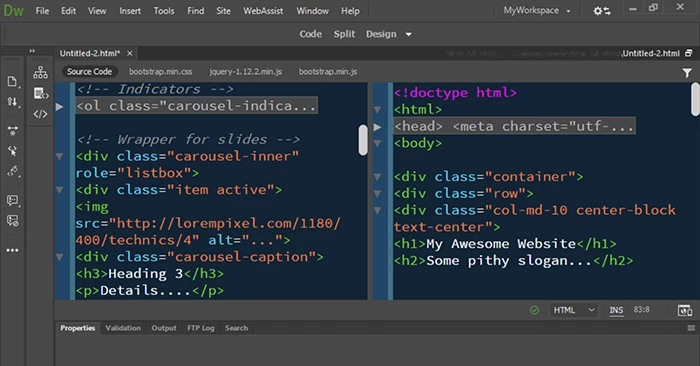
Am I the only one who doesn't actually have "up" and "down" buttons and the top and bottom of their scroll bar in the DW 2017 code view. I find myself using the slider and scrolling so fast I lose my code.

This topic has been closed for replies.
Correct answer Nancy OShea

I don't know where they would fit buttons.   The workspace is kind of tight as it is.

The scrollbars work well for me on Win10.

I often work in Code-Code,  Split Vertically  so I can readily jump to different places in the document.   And I turn off Live View because it slows me down.
3 replies

Participant
July 21, 2017

Agree.

Have exactly the same issue, impossible working without that scroll up and down!

Very well explained by Nedlaw, 100% agree, current scroll is not accurate:

"Holding the thumb (that's the scrolling marker that runs up and down the scrollbar) is not accurate enough. It often pages up or pages down -- especially in long code sequences."

Thank you

Community Manager
July 21, 2017

Please log this as feature request at below link, we will prioritize accordingly.

Adobe Dreamweaver: Ideas: Hot (1482 ideas) – Adobe Dreamweaver CC: Feature Ideas

Participant
July 22, 2017

Hi lnayal,

Thanks for your input, did not know about "Adobe Dreamweaver: Ideas"

Had a look and have seen there was already an open request about:

Up and Down Arrows for Scrolling – Adobe Dreamweaver CC: Feature Ideas

As been said: Who in their right mind removed them in the first place?

Cannot believe nobody at Adobe takes care of this issue.

Thank you

Inspiring
April 19, 2017

Hey Nancy, I just noticed this on my "live" view side of DW... Those little up and down arrows don't seem to take up much room...lol. I'm just a wishful kind of guy.

Legend
May 10, 2017

I agree. Use DreamWeaver code view daily, and I'm missing the "doghouses" that scroll up and down (and right/left when necessary). I don't have a scroll wheel on my mouse. Holding the thumb (that's the scrolling marker that runs up and down the scrollbar) is not accurate enough. It often pages up or pages down -- especially in long code sequences. Using the dog houses, I used to be able to reveal a line at a time. Please Adobe -- If you have the scrollbar, you have room for an arrow at the top and an arrow at the bottom -- and it's going to make life much more pleasant. Thanks.

-Jeff Walden

Nancy OShea
Community Expert
Community Expert
April 15, 2017

I use keyboard arrows,  PgUp & PgDn.   Unless there is something wrong with your computer, keyboard direction keys should work.

Nancy

Nancy O'Shea— Product User & Community Expert
Inspiring
April 15, 2017

Thanks, Nancy. That's what I do. Problem is when I've already got my hand on the mouse and use it to click on an element in the live/design pane, DW automatically selects the code (or text) in code view and defaults to the bottom of the code window. If I press the up or down arrow key, I'm still in the live/design view, not code view. So clicking on code view changes the focus of what's selected. Rinse. Repeat.

I may sound whiny, but would standard up and down buttons be appropriate?

Nancy OShea
Community Expert
Nancy OSheaCommunity ExpertCorrect answer
Community Expert
April 16, 2017

I don't know where they would fit buttons.   The workspace is kind of tight as it is.

The scrollbars work well for me on Win10.

I often work in Code-Code,  Split Vertically  so I can readily jump to different places in the document.   And I turn off Live View because it slows me down.

Nancy O'Shea— Product User & Community Expert