


Coding error "must be paired, no start tag" & "Duplicate attribute name [class] was found"
Note: I'm new to coding so maybe I just made a silly mistake, but I really can't figure out what it is.
I'm adding some styles to my HTML and it's not reflecting on the navigation bar. I've added some styles to images just centering them and adding some padding using the same technique (having its own class) and that is working fine.
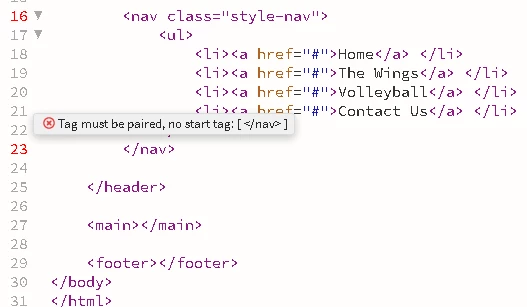
I have two errors First " Must be paired, no start tag" This is referring to my nav tag. I do have a start tag so I'm unsure as to why it's telling me I don't. I also tried erasing this section and rewriting it.
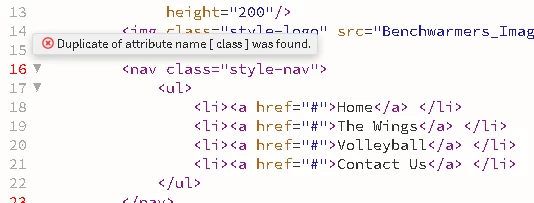
The second error "Duplicate attribute [class] was found" I do have two .style-nav classes. One for Ul and the other for Ul, Li, and a. I tried merging them and this error did not go away. However this error is on my HTML sheet and not the CSS one, so I may be misunderstanding the error. I don't have any other navs on my HTML sheet and the style class is only applied in that one spot so I am unsure what the error is referring to.
Here is a link to all the code on the JS Bin Site.
https://jsbin.com/dezusareku/edit?html,css,output
and also the errors

 AdChoices