


Coldfusion Code Highlighting - Commented code not displaying properly in Dreamweaver 2017
In previous versions, including Dreamweaver 2016, if you used Coldfusion commenting it would highlight the commented code in bright yellow (so you knew it was disabled). It appears now it is not highlighting properly. I was thinking it may have something to do with the document type being set to HTML but when I looked for an option to change it to Coldfusion, there is no option to do so.
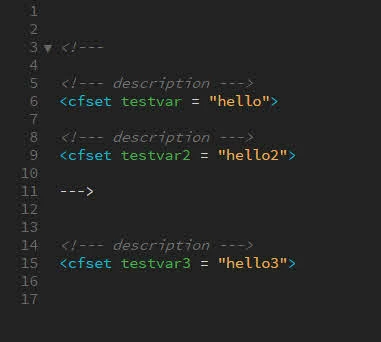
I will try to explain my issue. If I had some code that included coldfusion comments...I could comment out sections of code in my document (including lines with comments) by simply wrapping everything with a surrounding comment tag. You can still do this, but the highlighting doesn't show all the code enclosed in the outer wrapping comment tag as being disabled. This makes it very confusing when you are trying to test and debug sections that you have commented out.
See screenshot. Even though I have clearly commented out line 3-11 and it will not execute, Dreamweaver displays it like it is still valid code and will be executed. This is very misleading and hard to debug when you have several lines of code that have been commented out. How can I get Dreamweaver to properly highlight the commented / disabled code?

 AdChoices