


Participant
December 10, 2024
Question

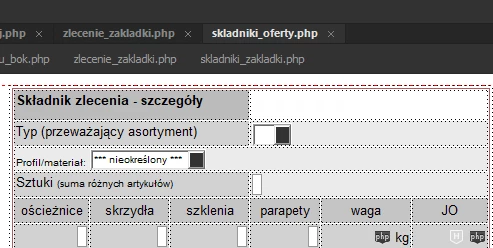
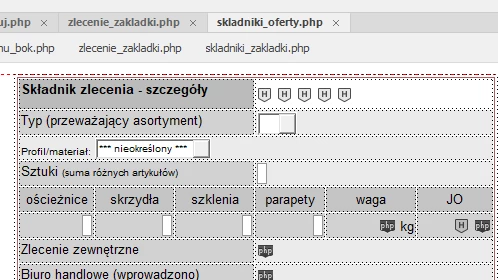
colors of hidden forms elements in project mode are invisible

  • December 10, 2024
  • 2 replies
  • 136 views

In interface dark mode, the icons showing where are the hidden html form fields, are white, and they are not visible in the project that has a white background. For example anchor icon are yellow, and it is great, like in old version DW


This topic has been closed for replies.

2 replies

Jon Fritz
Community Expert
Community Expert
December 11, 2024

Unfortunately there is no Preference or Setting you can change, aside from selecting the other App Theme options, to change your Hidden Form Element "H" icon from white to another color within DW's interface, if you have the darkest App Theme selected.

With enough digging you may be able to find the icons, or possibly the code that controls their display, within the program files themselves. Over the years, I've made numerous changes to program files to make DW work better for me, but it's always a bit risky.

The easiest fix would be to select the second darkest App Theme. As Nancy eluded to, DW is on its last legs.


Nancy OShea
Community Expert
Community Expert
December 10, 2024

Disable CSS Styles.

View > Design View Options > Style Rendering > untick Display Styles. 


You'll see an unstyled version of your form.  This has no effect on Live view or Preview in browsers.


NOTE: Dreamweaver is in minimal maintenance status.  No new features will be added except essential security updates. 


Nancy O'Shea— Product User & Community Expert