
Participant
July 3, 2021
Answered

Comment créer un menu déroulant dans DW ?

  • July 3, 2021
  • 3 replies
  • 448 views


Hello,

I would like to have a horizontal menu at the top of the screen with 6 menus (ex ;: tab)
then as soon as you click on each menu:
 be able to display the sub-menus below.
Completely new to DW, I don't know if I have to do it by coding
or if there is a + simple method (via options of DW or in WYSIWYG
Thank you.
    This topic has been closed for replies.
    Correct answer BenPleysier

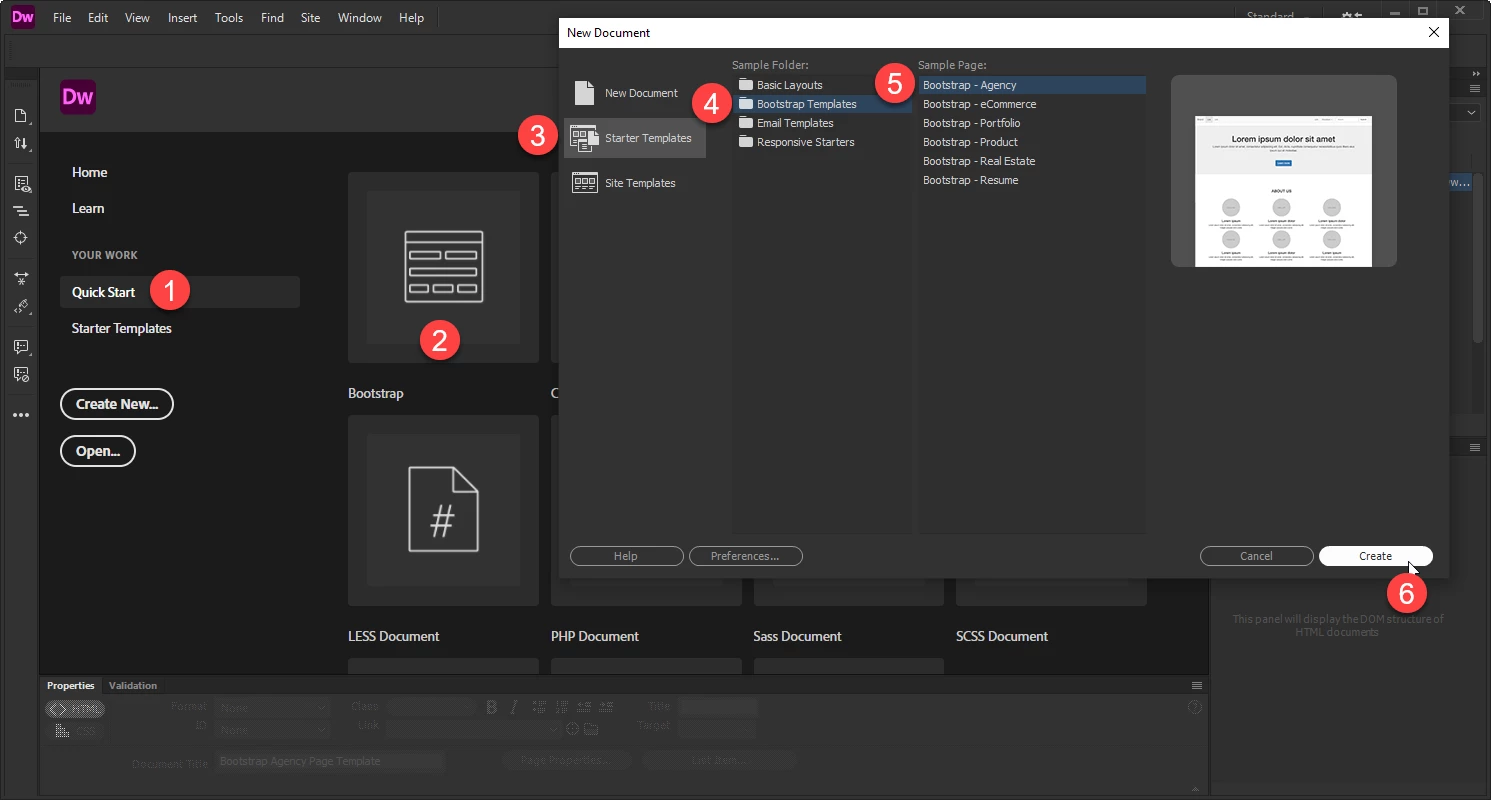
    Open Dreamweaver and in the welcome panel follow the shown steps

    This will give you someting to start with.

    3 replies

    Phil5E57Author
    Participant
    July 4, 2021

    Hello,


    Thanks a lot for your answers !!!:-))

    But I am still very surprised that a complete tool such as DW does not offer the possibility
    to simply make drop-down menus ... ???
    (however, very frequent menus that we see on most sites:
    I'm obviously talking about a horizontal menu at the top of the screen with several tabs and in each tab of the submenus)
    In addition, DW does well to insert forms, tables, .., simply without using any code.
    Anyway, my site will not be responsive (only on PCs)

    Rem: I saw that we could use Spry and apparently we could create this type of menus, I don't know
    not what you think?
    Thank you

    Nancy OShea
    Community Expert
    Community Expert
    July 4, 2021

    Go to Insert > Bootstrap Components...  See screenshot.

    That said, you need to start with a Bootstrap layout and understand how to work with Boostrap.


    Bootstrap Tutorial

    https://www.w3schools.com/bootstrap4/


    Nancy O'Shea— Product User & Community Expert
    Nancy OShea
    Community Expert
    Community Expert
    July 3, 2021

    You should definitely learn to work with code. There's no such thing as WYSIWYG. 


    The prevailing trend in responsive, mobile-first web design is to avoid the use of complicated menus.  There's not enough real estate for complex menu systems on small devices.  And complex menus are awkward to access with an average adult-sized finger tip.  For best results, keep your site menus simple.  Place promininent links inside your page content like this example with Bootstrap Cards.

    https://getbootstrap.com/docs/4.0/components/card/


    Nancy O'Shea— Product User & Community Expert
    BenPleysier
    Community Expert
    BenPleysierCommunity ExpertCorrect answer
    Community Expert
    July 3, 2021

    Open Dreamweaver and in the welcome panel follow the shown steps

    This will give you someting to start with.

    Wappler is the DMXzone-made Dreamweaver replacement and includes the best of their powerful extensions, as well as much more!