Scott Witte
Known Participant
January 8, 2020
Answered

Compare With Remote is missing

  • January 8, 2020
  • 1 reply
  • 700 views

Suddenly I can't compare or sync local files with the remote server on one of my sites. Instead, it syncs/compares with the Testing server. I can still put or pull to/from the remote, just not sync or compare.


My other sites, using the same remote server, work as expected so it is probably a setting that went wrong but I can't find it. The server is set as FTP and Remote. The connection tests fine. I have tried deleting, then adding the Remote server again. If I delete the Testing server so there is just the Remote server, I have no sync/compare option. 


Does anyone have a clue??
This topic has been closed for replies.
Correct answer Nancy OShea

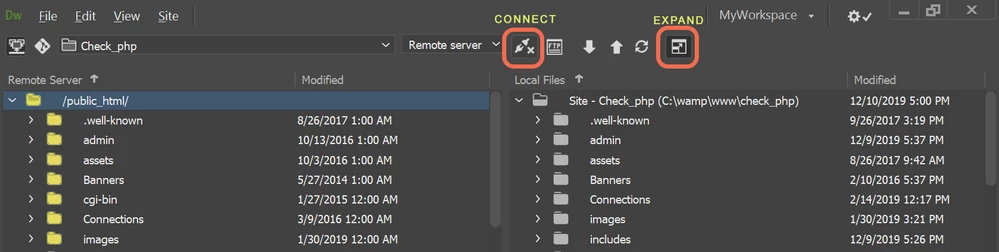
Click on Expanded in the Files Panel and make sure the REMOTE SERVER is connected.  See screenshot.  


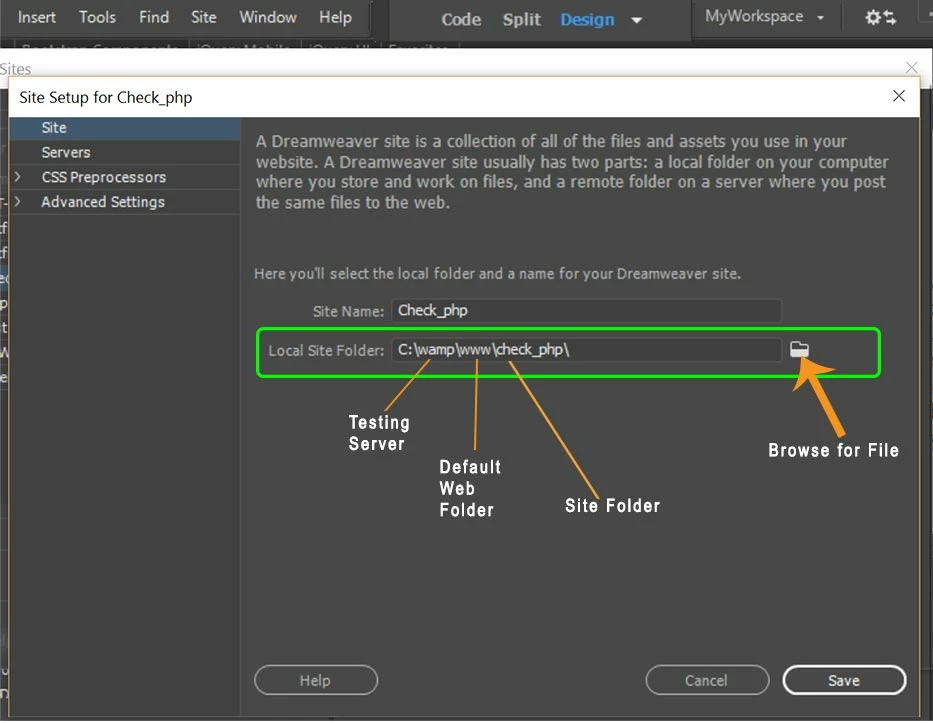
To keep things simple,  my local site folder resides in my local Testing Server.  That way, I have nothing to push.  Saving files automatically saves them to the testing server.  Ctrl+Shift+U uploads files to remote server.   It's one less thing to think about.


1 reply

Nancy OShea
Community Expert
Nancy OSheaCommunity ExpertCorrect answer
Community Expert
January 8, 2020

Click on Expanded in the Files Panel and make sure the REMOTE SERVER is connected.  See screenshot.  


To keep things simple,  my local site folder resides in my local Testing Server.  That way, I have nothing to push.  Saving files automatically saves them to the testing server.  Ctrl+Shift+U uploads files to remote server.   It's one less thing to think about.


Nancy O'Shea— Product User & Community Expert
Scott Witte
Known Participant
January 8, 2020

That was it! Can't imagine how it got switched from remote to testing server but everything is okey-dokey now.


Thanks!