



Sara_Reese
Inspiring
Jan 4, 2013 1:50 PM UTC
Answered

Contact Form Improvements

Hello, I have a working contact form on what will be my works new website, but as its a first attempt it's still not quite right! and I'm not too sure how to fix it / if its possible.

the contact form is here: http://reese-test.co.uk/contact.php

1) When you click on "Send Query" without any of the fields filled in you get a pop-up as shown below (pic 1), which is nice, but if you fill in a name and then click "Send Query" it takes you to the contact_form_handler.php page and just displays the Errors in plain text as shown below (pic 2)
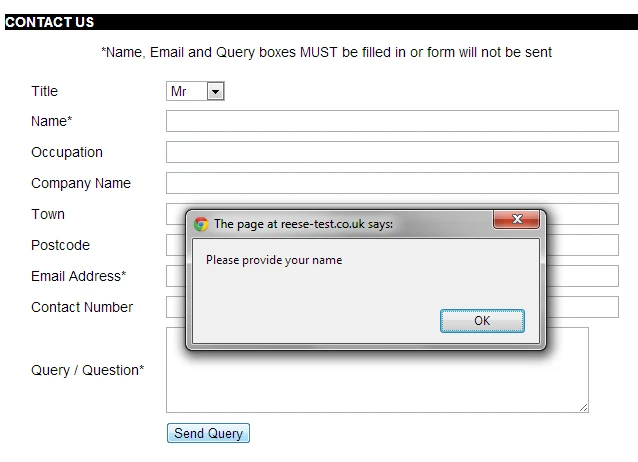
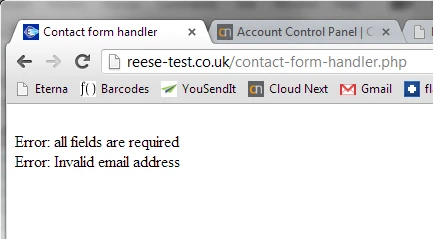
What I would ideally like is a pop-up for the "emailaddress" field and the "queryquestion" field and for it to not go to the contact_form_handler.php to show the other errors. Does anyone know why it is doing this?

I am using: gen_validatorv31.js for the validation which I got from a sample forms site

below is the code for the contact_form_handler.php:

<?php

$errors = '';

$myemail = 'sales@reese-test.co.uk';

if(empty($_POST['name'])  ||

   empty($_POST['emailaddress']) ||

   empty($_POST['queryquestion']))

{

    $errors .= "\n Error: all fields are required";

}

$titlename = $_POST['titlename'];

$name = $_POST['name'];

$occupation = $_POST['occupation'];

$companyname = $_POST['companyname'];

$town = $_POST['town'];

$postocode = $_POST['postcode'];

$emailaddress = $_POST['emailaddress'];

$contactnumber = $_POST['contactnumber'];

$queryquestion = $_POST['queryquestion'];

if (!preg_match(

"/^[_a-z0-9-]+(\.[_a-z0-9-]+)*@[a-z0-9-]+(\.[a-z0-9-]+)*(\.[a-z]{2,3})$/i",

$emailaddress))

{

    $errors .= "\n Error: Invalid email address";

}

if( empty($errors))

{

          $to = $myemail;

          $email_subject = "Website Query: $name";

          $email_body = "You have received a new query. ".

          " Here are the details:\n Title: $titlename \n Name: $name \n Occupation: $occupation \n Company Name: $companyname \n Postcode: $postocode \n Email: $emailaddress \n Contact Number: $contactnumber \n Message: \n $queryquestion";


          $headers = "From: $myemail\n";

          $headers .= "Reply-To: $emailaddress";


          mail($to,$email_subject,$email_body,$headers);

          //redirect to the 'thank you' page

          header('Location: thankyou.php');

}

?>

<!DOCTYPE HTML PUBLIC "-//W3C//DTD HTML 4.01 Transitional//EN" "http://www.w3.org/TR/html4/loose.dtd">

<html>

<head>

          <title>Contact form handler</title>

</head>

<body>

<!-- This page is displayed only if there is some error -->

<?php

echo nl2br($errors);

?>

</body>

</html>


This topic is closed to new replies. Start a new post to keep the conversation going.
Sara_Reese
Sara_ReeseCorrect answer
Inspiring
Jan 4, 2013 3:13 PM UTC

Ok thanks Jon i have worked out how to get the pop-ups instead - your answer gave me an idea!.

The code I had before on my contact.php was:

    <script language="JavaScript">

// Code for validating the form

// Visit http://www.javascript-coder.com/html-form/javascript-form-validation.phtml

// for details

var frmvalidator  = new Validator("contactform");

frmvalidator.addValidation("name","req","Please provide your name");

frmvalidator.addValidation("email","req","Please provide your email");

frmvalidator.addValidation("email","email","Please enter a valid email address");

</script>

I changed it to the below

    <script language="JavaScript">

// Code for validating the form

// Visit http://www.javascript-coder.com/html-form/javascript-form-validation.phtml

// for details

var frmvalidator  = new Validator("contactform");

frmvalidator.addValidation("name","req","Please provide your name");

frmvalidator.addValidation("emailaddress","req","Please provide your email");

frmvalidator.addValidation("emailaddress","email","Please enter a valid email address");

frmvalidator.addValidation("queryquestion","req","Please type in your question");

</script>

My contact form now works as it should. Thanks.

Although I am a little worried that you cant see my website. What browser are you on? I have tested it on various PCs on IE, Firefox, Safari and Chrome and all is fine that I can see? Stupid question, but have you cleared your Cache?

6 replies

Jon Fritz
Community Expert
Community Expert
Jan 4, 2013 2:35 PM UTC

The reason it is doing that is because your .php script tells it to.

Right now you are requiring all fields to be filled in. Originally it was just name, message and email that were required, but when you added occupation, companyname, postcode, contactnumber and the rest to that list, everything now needs to be filled in. If it's not, it will print "Error: all fields are required"

The email address error comes a little later in your .php. If it is left blank the error displays as invalid due to the code toward the middle of your .php. If the email is wrong or missing, it will print "Error: Invalid email address".

You can make your error page graphically interesting if you like by adding the html design elements around the line...

<?php

echo nl2br($errors);

?>

That .php snippet is what's responsible for printing out the actual error messages, the html stuff around it is responsible for the design of the page. You can treat those <html>, <head> and <body> tags just like any other page on your site and add in whatever you like.

I suspect the pop-up alert is being caused by a javascript on the page with the form. Unfortunately, I can't view your site for some reason to tell you where it is, I still get a "Server not found" error.

Translate
Sara_Reese
Sara_ReeseAuthorCorrect answer
Inspiring
Jan 4, 2013 3:13 PM UTC

Ok thanks Jon i have worked out how to get the pop-ups instead - your answer gave me an idea!.

The code I had before on my contact.php was:

    <script language="JavaScript">

// Code for validating the form

// Visit http://www.javascript-coder.com/html-form/javascript-form-validation.phtml

// for details

var frmvalidator  = new Validator("contactform");

frmvalidator.addValidation("name","req","Please provide your name");

frmvalidator.addValidation("email","req","Please provide your email");

frmvalidator.addValidation("email","email","Please enter a valid email address");

</script>

I changed it to the below

    <script language="JavaScript">

// Code for validating the form

// Visit http://www.javascript-coder.com/html-form/javascript-form-validation.phtml

// for details

var frmvalidator  = new Validator("contactform");

frmvalidator.addValidation("name","req","Please provide your name");

frmvalidator.addValidation("emailaddress","req","Please provide your email");

frmvalidator.addValidation("emailaddress","email","Please enter a valid email address");

frmvalidator.addValidation("queryquestion","req","Please type in your question");

</script>

My contact form now works as it should. Thanks.

Although I am a little worried that you cant see my website. What browser are you on? I have tested it on various PCs on IE, Firefox, Safari and Chrome and all is fine that I can see? Stupid question, but have you cleared your Cache?

Translate
Jon Fritz
Community Expert
Community Expert
Jan 4, 2013 3:31 PM UTC

It does't come up in any browsers on any device on my network.

If I visit your site via my iphone, using AT&T's network, it comes up without issue (unfortunately I have terrible signal in my office and it takes forever if I can get it to load at all). I can also see it on all devices on my home network. I've gone through our firewall settings and there is absolutely nothing  that would cause it to disallow access (if it did, I would be seeing an entirely different error message as well).

If I had to venture a guess, I would say my company network IP is being blocked by your hosting company for some reason. I've had this happen before with other .uk sites recently (perhaps the same hosting company?).

My ISP  claims there is nothing on their end that would be causing it either, though I do admit, I don't have the greatest confidence in their "tech support" personnel.

Translate