SnikketyNikkety
Participant
January 8, 2018
Answered

Create a site and then define it?

  • January 8, 2018
  • 2 replies
  • 301 views

Can I define a site after I create it? All the tutorials have me defining sites and now I have 43 sites on my desktop none of which I'll ever use. I just want to creat my site, make it pretty and then define it.

imac high sierra 10.13.2

DWCC 2018 10.13.16

This topic has been closed for replies.
Correct answer Nancy OShea

You normally define your site first.  Then Create it.

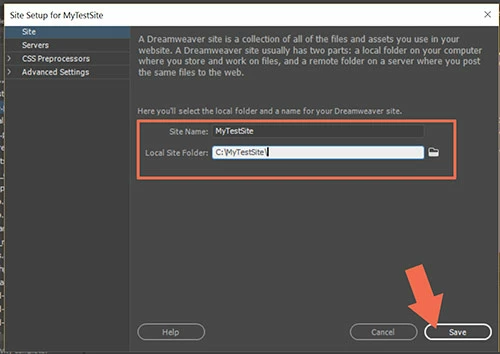
Go to Site > New Site and enter the site folder's name.  For example, C:\MyTestSite.

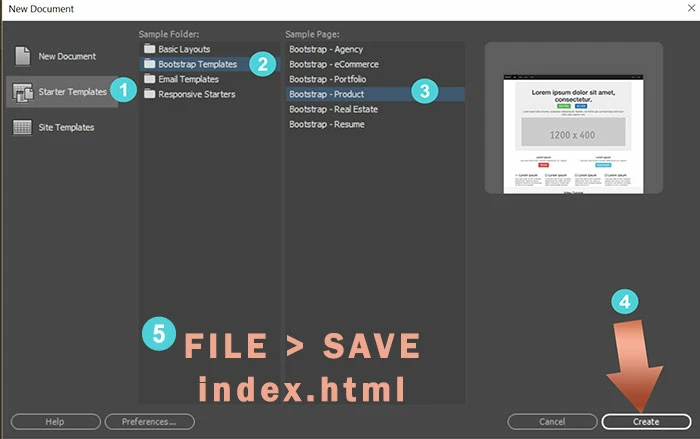
Then go to File > New > Starter Templates.  Select a layout and hit Create button.

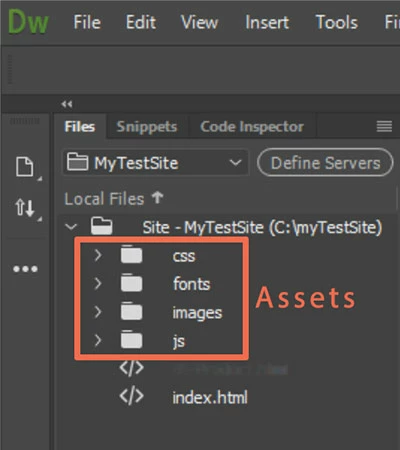
Save and name your document.   DW creates Assets folders for you as shown in your Files panel.

If you have other media or assets from previous projects that you want to use in this one, move or copy them over to your local site folder with your OS's file manager (Win File Explorer or Mac Finder).

Nancy

2 replies

Jon Fritz
Community Expert
Community Expert
January 8, 2018

The only thing you really need to do when initially defining your site is determine the root folder and make sure your site's files are all within it. All of the other items, like FTP credentials, testing servers, advanced settings, etc. can come later. DW only needs to know where you intend to work from, in order to start working.

As for duplicate/junk sites, there's no reason to keep them.

Go to Site > Manage Sites > click the sites you want to get rid of to highlight them > click the delete button (- icon) in the bottom left of the Manage Sites dialogue window.

Nancy OShea
Community Expert
Nancy OSheaCommunity ExpertCorrect answer
Community Expert
January 8, 2018

You normally define your site first.  Then Create it.

Go to Site > New Site and enter the site folder's name.  For example, C:\MyTestSite.

Then go to File > New > Starter Templates.  Select a layout and hit Create button.

Save and name your document.   DW creates Assets folders for you as shown in your Files panel.

If you have other media or assets from previous projects that you want to use in this one, move or copy them over to your local site folder with your OS's file manager (Win File Explorer or Mac Finder).

Nancy

Nancy O'Shea— Product User & Community Expert