
YviGeese
Known Participant
August 2, 2021
Answered

Creating a mouse over in a table

  • August 2, 2021
  • 4 replies
  • 975 views

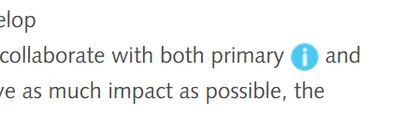
On our website we use a mouse over under an 'i' like in the picture below. 


Now I also want to add an 'i' under which this text will be visible:
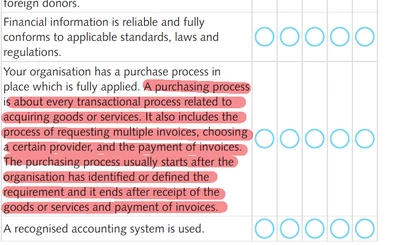


This is what it is like now, I'm using Dreamweaver:
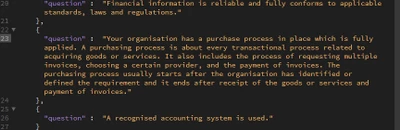


I tried adding it the usual way with <span></span> and also tried <a href=" ">TEXT</a>
When using the <span> option the entire table disappears from my website and when I use the <a> option it just adds the coding to the plain text visible on the site (so on the website you actually see <a>TEXT</a>.
Since that didn't work I tried to mark the text italic with <i></i> so at least it looked different from the rest, that didn't work either and got the same result as with the <a>.

Can anybody help me out? Usually I contact our webbuilder (I am only a beginner, my job is maintaining the website and add/remove stuff and do some basic coding.) but today is his first day of a 3 week holiday. My GUESS is that is has to doo with an overload of """""", but no idea how to solve it!

Thanks in advance!

This topic has been closed for replies.
Correct answer osgood_

Sounds like you need a 'tooltip approach'.


Whats the 'I'? is it an image, real text, icon?


If its an image you need to add a class to it - <img scr="info.jpg" alt="" class="showInfoText">

If its real text give the element a class - <span class="showInfoText">I</span>

It might even be an icon?


Then wrap the text you want to appear when the 'I' is moused over in a span tag.


<span class="infoText">Text that you want to show on mouse over 'I' goes here</span>


Add the css:


/* This hides the block of information text

.infoText {
display: none;
}


/* This shows the blcok of information text on  mouse over the 'I'

.showInfoText:hover+.infoText {
display: block;
}


To get anymore information then give us a link to a page which already has the 'I' on it so we can see how your developer has done this. The developer seems quite adept as they have looped through a json array of questions to insert on the page.


Also be aware mouse over does NOT work on mobile devices if thats a concern.


Edited.

Im not even sure you will be able do this as all would need to be executed at the time of looping through the json array of 'question' objects.


You may just have to build a static table of questions and then apply the spans/classes to the specific text.


Try adding it to the json object text:


{

"question": "Your organisation has as purchase............fully applied.<span class='showInfoText'>I</span>
<span class='infoText'>A purchasing process is about................invoices.</span>"

},


4 replies

YviGeese
YviGeeseAuthor
Known Participant
August 5, 2021

I think I'd better not waste too much time of all the kind people up here and just waste till our web builder has returned. Very much appreciate all the help. Thanks everybody!

Legend
August 5, 2021
quote

I think I'd better not waste too much time of all the kind people up here and just waste till our web builder has returned. Very much appreciate all the help. Thanks everybody!


By @YviGeese


I don't think its any shame waiting for your web-builder to get back. Looking at the code it's a pretty horrible mess to be honest. They are using some kind of Jquery tool tip plugin in combination with <iframes>.


Problem these days is when is a web-developer a web-developer, there are infinite ways to create a website and its becoming more and more that the person who developed the website is going to be the ONLY person who knows what method, workflow, plugins etc are being used. The code generally being used to create these abortions is horendous and almost imposible for someone else to sort out unless they start from scratch. Yes, they look ok on the surface, in a browser, but scratch the surface to reveal the crap.


It aint what it used to be when a web-developer could look at almost any website and undertsand the code. 


Good luck. Let's hope your builder can remember what they did because mostly it would be just using 3rd party plugins.

YviGeese
YviGeeseAuthor
Known Participant
August 5, 2021

Oh, I'm pretty sure our builder knows exactly what he did. Our website is a learning platform with all kinds of crazy cross references that in the end are combined in a full action plan. 

Nancy OShea
Community Expert
Community Expert
August 2, 2021

Sadly, a Mouse Over approach does NOTHING on touch screen devices.  So if this is important information, you should re-consider how this must function for ALL users, not just devices connected to a mouse. 


An onClick event trigger or plain informational text that's visible at all times works better for the majority of users.  Remember the KISS principle of "Keep it simple, stupid."

https://en.wikipedia.org/wiki/KISS_principle


Nancy O'Shea— Product User & Community Expert
YviGeese
YviGeeseAuthor
Known Participant
August 4, 2021

I have to work with the website like it is, the 'i'-s appear on several pages, the way this is set up, the content under the 'i' IS visible when users hold their finger on it. 

Participant
August 4, 2021

Have you tried the solution posted by this bloke - osgood_


That should work for you without altering the set up!

osgood_Correct answer
Legend
August 2, 2021

Sounds like you need a 'tooltip approach'.


Whats the 'I'? is it an image, real text, icon?


If its an image you need to add a class to it - <img scr="info.jpg" alt="" class="showInfoText">

If its real text give the element a class - <span class="showInfoText">I</span>

It might even be an icon?


Then wrap the text you want to appear when the 'I' is moused over in a span tag.


<span class="infoText">Text that you want to show on mouse over 'I' goes here</span>


Add the css:


/* This hides the block of information text

.infoText {
display: none;
}


/* This shows the blcok of information text on  mouse over the 'I'

.showInfoText:hover+.infoText {
display: block;
}


To get anymore information then give us a link to a page which already has the 'I' on it so we can see how your developer has done this. The developer seems quite adept as they have looped through a json array of questions to insert on the page.


Also be aware mouse over does NOT work on mobile devices if thats a concern.


Edited.

Im not even sure you will be able do this as all would need to be executed at the time of looping through the json array of 'question' objects.


You may just have to build a static table of questions and then apply the spans/classes to the specific text.


Try adding it to the json object text:


{

"question": "Your organisation has as purchase............fully applied.<span class='showInfoText'>I</span>
<span class='infoText'>A purchasing process is about................invoices.</span>"

},


YviGeese
YviGeeseAuthor
Known Participant
August 4, 2021

Thank you for your extensive reply! 

You are correct that we should use the tooltip approach.

The way I would normally use the 'i' is by using this code: <span data-tooltip="" aria-haspopup="true" class="has-tip tip-top" title="A purchasing process is about every transactional process related to acquiring goods or services. It also includes the process of requesting multiple invoices, choosing a certain provider, and the payment of invoices. The purchasing process usually starts after the organisation has identified or defined the requirement and it ends after receipt of the goods or services and payment of invoices."><img src="/wp-content/themes/changethegameacademy/img/elearning/ico_tooltip.png" /></span>


As you can see the 'i' is indeed an image.

However when I copy this into the json array like this:

{
"question" : "Your organisation has a purchase process in place which is fully applied. <span data-tooltip="" aria-haspopup="true" class="has-tip tip-top" title="A purchasing process is about every transactional process related to acquiring goods or services. It also includes the process of requesting multiple invoices, choosing a certain provider, and the payment of invoices. The purchasing process usually starts after the organisation has identified or defined the requirement and it ends after receipt of the goods or services and payment of invoices."><img src="/wp-content/themes/changethegameacademy/img/elearning/ico_tooltip.png" /></span>"
},
the result is that the entire table with questions disappears on the website.


On this page you can see how a 'i' is usually used: Involving stakeholders (changethegameacademy.org), on this spot I used the same coding as I put above, just different content of course.

By the way ... the 'i' stil works on a mobile device when the 'i' is touched. 

If it can't be solved I just have to wait till our webbuilder is back, but it would be such a kick for me if I could solve it without him. Wouldn't be a shame if I don't succeed though, as you already pointed out he's very adept, he can build anything we come up with. 

Nancy OShea
Community Expert
Community Expert
August 6, 2021
quote

However when I copy this into the json array like this: ...the result is that the entire table with questions disappears on the website.

=========

In way of an explanation as to why this cannot work,  HTML is not JSON and vice versa.  When adding HTML code to JSON files, the markup must be escaped first.


Also this is not an endorsement to tamper with code that you don't fully understand. 


Nancy O'Shea— Product User & Community Expert
BenPleysier
Community Expert
Community Expert
August 2, 2021
Wappler is the DMXzone-made Dreamweaver replacement and includes the best of their powerful extensions, as well as much more!
YviGeese
YviGeeseAuthor
Known Participant
August 4, 2021

This seems a bit too complex since I have to create an entire new button. Will try though if no other solutions seem possible.


BenPleysier
Community Expert
Community Expert
August 4, 2021

Copy and paste this code in a new document


<!DOCTYPE html>
<html>

<head>
    <meta name="viewport" content="width=device-width, initial-scale=1">
    <style>
        .collapsible {
            background-color: transparent;
            color: #46BDE4;
            cursor: pointer;
            border: none;
            text-align: left;
            outline: none;
            font-size: 45px;
        }

        .active,
        .collapsible:hover {
            background-color: transparent;
        }

        .content {
            padding: 0 18px;
            display: none;
            overflow: hidden;
            background-color: #f1f1f1;
            width: 50%;
        }
    </style>
    <link rel="stylesheet" href="https://cdn.jsdelivr.net/npm/bootstrap-icons@1.4.1/font/bootstrap-icons.css" integrity="sha384-NUDU7Qr8dfscXBIhA0px/bRl3cgNrOT9l/WPm15DzH5xnBs4fL4vgRiXURs98/ID" crossorigin="anonymous" />
</head>

<body>

    <h2>Collapsibles</h2>

    <p>A Collapsible:</p>
    <button type="button" class="collapsible"><i class="bi bi-info-circle-fill"></i></button>
    <div class="content">
        <p>Lorem ipsum dolor sit amet, consectetur adipisicing elit, sed do eiusmod tempor incididunt ut labore et dolore magna aliqua. Ut enim ad minim veniam, quis nostrud exercitation ullamco laboris nisi ut aliquip ex ea commodo consequat.</p>
    </div>


    <script>
        var coll = document.getElementsByClassName("collapsible");
var i;

for (i = 0; i < coll.length; i++) {
  coll[i].addEventListener("click", function() {
    this.classList.toggle("active");
    var content = this.nextElementSibling;
    if (content.style.display === "block") {
      content.style.display = "none";
    } else {
      content.style.display = "block";
    }
  });
}
    </script>

</body>

</html>
 

You may need to make a few styling adjustments. If you are having a problem with that, please come back here.


Wappler is the DMXzone-made Dreamweaver replacement and includes the best of their powerful extensions, as well as much more!