HelenLouise
Inspiring
February 11, 2022
Answered

CS6 Importing site to new computer - CSS and settings

  • February 11, 2022
  • 3 replies
  • 1727 views

Hi there, I forgot I had to IMPORT my dreamweaver sites, not just transfer files.


SETTINGS - I went back to my old computer and Exported to create the .ste file, but where should this be saved in order for the settings to be brought in? I put it in the root folder, but it made no difference.

(Also, when exporting, I no longer get the Exporting Dialog box, just straight to selecting where to save the .ste file. So I hope my original selection was the correct one.)


CSS - Critically, my site pages now appear with no formatting, even though the style sheets have been copied over with the rest of it. 


Can anyone help please? Thank you so much.

This topic has been closed for replies.
Correct answer HelenLouise

What @B i r n o u is saying, this is what is in your code view:

and this is what is in your folder structure:

What you should do is change the folder name to show an upper case first letter 'S'.


And while you are at it, do the same for Templates


Edit: What is @B i r n o u doing up at 5 am


Thanks Ben, that is what I did (that pic is from before I did that). I did Styles and Templates and nothing has improved.

HOWEVER! I just re-copied my files over from my original computer and it's all come in well.

I really should have done this first, I am sorry for taking everyne's time, I really do appreciate it.

Thank you for your kind help.


3 replies

Nancy OShea
Community Expert
Community Expert
February 11, 2022

I usually export STE files to a USB Flash Stick and move it to my other device.


Then I open Site > Manage Sites panel and hit the Import Site button to bring the STE file in from Flash Stick.


Hope that helps.


Nancy O'Shea— Product User & Community Expert
HelenLouise
Inspiring
February 13, 2022

Thank you Nancy,

That part of the process I have done. It is just that all the formatting for both my websites has dropped off.

I'm wondering if there is some import process I have overlooked so that, I'm guessing, the formatting would be included. I set these sites up years ago and modify them rarely.

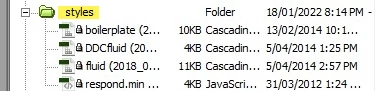
One thing I notice is that just about all the files viewed in DW have a padlock in front of them, pleases see attachment.

One solution might be to download both the sites in full from the server, but I'd love to hear your opinion first.


Nancy OShea
Community Expert
Community Expert
February 13, 2022

@HelenLouise,

A padlock beside file = locked, read-only.  That sometimes happens when you move files from one device to another.


Simply change file attributes from your computer's file manager i.e. Windows Explorer or Mac Finder.


On Windows, right click on file and select Properties.  Remove check mark from Read-only box.  See screenshot.


Nancy O'Shea— Product User & Community Expert
B i r n o u
Legend
February 11, 2022

once exported (you export the STE where ever you want, or can... 🙂 )... then you copy that file to the network or to an external storage ,

Now you connect the new computer to the network, or you plug the external storage, and from DW you import the STE, from the same dialog that you export it just previously.


concerning your CSS...

  • does the site is declared in DW,
  • are the files all loaded and arbored the same way as it use to be
  • what is the path declared for the CSS link ?


HelenLouise
Inspiring
February 11, 2022

Thank you very much, Birnou.

OK so I was expecting the .ste to bring in my server info but in that I believe I am mistaken.

Re the CSS, Yes, the Styles file (if this is it?) is positioned exactly the same as it used to be. I attach a pic of the files, I don't see anything named CSS. But this was all that was on my prior PC (laptop). What do you think?

B i r n o u
Legend
February 11, 2022

could you copy paste here on this forum the HTML code where the CSS is linked

1 - open the HTML file (the one that doesn't display as you expect

2 - it must look as

<head>
   ...
    <link rel="stylesheet" href="the_name_of_the_file.css">
  ...
HelenLouise
Inspiring
February 11, 2022

Hi there, admittedly I didn't realise I had to do this until I saw my page in Dreamweaver with no colours/formatting.

So I went back to my old computer and Exported to create the .ste file, but where should this be saved? I brought it over via USB and I saved it within the site's root folder, but it made no difference when I imported it.

Also, when exporting, I no longer get the Exporting Dialog box, just straight to selecting where to save the .ste file. So I hope my original selection was the correct one.

Can anyone help please?

Thank you


[Moderator branched & moved post from 2018 topic to this new one.]


Jon Fritz
Community Expert
Community Expert
February 11, 2022

Exporting the .ste does not bring actual files (html, css, js, etc) over with it. It's only the settings used in Site > Manage Sites.

To bring your site's files over, you need to copy the actual local root folder at the OS level, bring it to the new computer, then import the .STE and verify the site uses the new copy of your site folder as its root directory.

The .ste also should not be part of the site itself. It's only the settings used by DW and isn't supposed to be inside the site as its own file.

HelenLouise
Inspiring
February 13, 2022

Thank you Jon,

I have put further details in reply to Nancy above.

When you said to copy the files at OS level, I just copied them from my File Explorer and pasted them in my new File Explorer.